Shopify Internal Linking Tool: How to Build Product to Collection Interlinks at Scale
An ideal Shopify internal linking tool should automate the creation of contextual links between product pages and collection pages at a scale that manual linking cannot match.
Stores with 500+ SKUs typically leave 40–60% of their catalog unlinked from the main navigation, creating orphan products that Googlebot never crawls or ranks.
LinkBoss for Shopify connects to your store via the Shopify App Bridge and applies NLP-based anchor text classification to suggest product-to-collection and collection-to-product links based on semantic relevance, not just keyword matching.
LinkBoss processes your full product graph in under 60 seconds and inserts links via Shopify’s native liquid templates without requiring theme code changes.
LinkBoss is the only tool that offers true automated interlinking for Shopify sites.
Why Shopify’s Architecture Makes Internal Linking Hard
Shopify’s platform architecture creates three structural challenges for internal linking that most store owners don’t discover until their product pages fail to rank:
- Liquid template constraints — Shopify’s theme system uses
.liquidfiles for rendering; inserting contextual links manually requires editing theme code, which breaks on theme updates - Collection page bloat — stores with 200+ products in one collection produce pages with 200+ outbound links, diluting PageRank concentration per link target (a damping problem described in Google patent US 6,285,999)
- Product↔collection disconnect — Shopify links products INTO collections automatically but provides no native mechanism to link products back OUT to related collections using contextual anchor text
The result is a unidirectional link architecture where products receive crawl access only from their assigned collections, and collections distribute authority outward without receiving it back.
For a store with 1,000 products across 30 collections, this asymmetry can leave hundreds of product-to-collection connections unmade — each one a missed opportunity to signal topical relevance to Google’s indexer.
Out-of-the-Box Internal Linking in Shopify
Shopify’s native internal linking capabilities are limited to four mechanisms:
| Method | What it does | Limitation |
|---|---|---|
| Manual link in rich text editor | Hand-typed <a> tags in product descriptions | Not scalable; breaks on theme change |
| Navigation menu links | Menu items link to collections | No per-product contextual anchors |
| Related products (optional) | Shopify’s “Related products” section | Algorithm-based, not semantic; no anchor text control |
| Search and filter apps | Link from filtered results | No editorial anchor text; no crawl path improvement |
None of these mechanisms produces bidirectional, contextually rich links between products and the collections they belong to — the missing link type that drives the most SEO value in an ecommerce architecture.
Common Shopify Internal Linking Problems
Specific patterns that hurt Shopify SEO performance:
- Orphan products — products added directly to the store without being assigned to any collection receive zero internal link equity flow and are rarely crawled
- Keyword-stuffed collection links — using collection names like “blue-widgets” as exact-match anchors triggers over-optimization risk when repeated across 50+ product pages
- Deep collection nesting — sub-collections nested 4+ clicks from the homepage create click depth problems that no Shopify-native tool addresses
- Blog-to-product disconnects — editorial blog posts about products rarely link to the products they mention because manual linking is time-prohibitive at scale
(8 products)
(8 products)
(8 products)
Product
How to Install LinkBoss on Shopify (Step-by-Step)
- Navigate to the Shopify App Store and search for “LinkBoss” or visit the LinkBoss Shopify app page at /cms/shopify-automatic-internal-linking-app/
- Click Install and approve the required OAuth permissions (read product data, read collections, manage blog posts)
- In the LinkBoss dashboard, select your Shopify store from the Connected Platforms list
- LinkBoss automatically pulls your product catalog, collection structure, and blog posts via the Shopify Storefront API
- Configure your anchor text distribution rules — set target ratios for branded, LSI, and exact-match anchors across product and collection pages
- Click Run Link Suggestions to generate the initial batch of internal link recommendations
- Review suggested links in the dashboard; approve, dismiss, or adjust anchors before publishing
- Enable Auto-Linking Mode to have LinkBoss insert approved links automatically on new product and blog post publishes
Automating Product↔Collection Links at Scale
The manual alternative is linking each product to every semantically related collection. It requires approximately 15 minutes per product for a human operator. For a store with 1,000 products, that is 250+ hours of work. LinkBoss for Shopify automates this process using:
- NLP anchor classification — the platform classifies each product’s semantic context using the same entity-recognition signals Google reads (reference: Google patent US 7,716,225, Reasonable Surfer Model)
- Bidirectional collection mapping — unlike Shopify’s native one-way product→collection links, LinkBoss creates reciprocal collection→product links with descriptive anchors that signal topical relevance to Google’s indexer
- Bulk approval workflows — suggested links can be approved in bulk by collection, by product type, or by anchor text pattern
- Real-time sync — when a new product is added, LinkBoss scans existing collections for semantic relevance and suggests inbound links within 60 seconds of publish
The Contextual Semantic Interlinking module uses vector embeddings to evaluate semantic similarity between products and collections, so “leather-wallet” links to “accessories” not because the words match, but because their embedding vectors occupy adjacent positions in semantic space.
This prevents the context failure where a keyword-match tool would incorrectly link “Apple iPhone case” to a collection about apple-related kitchen products.
Step-by-Step: Building a Product↔Collection Link Strategy
- Audit your current link graph — use LinkBoss’s Site Report to identify which products have zero inbound collection links (orphan products) and which collections link only inward (dead-end pages)
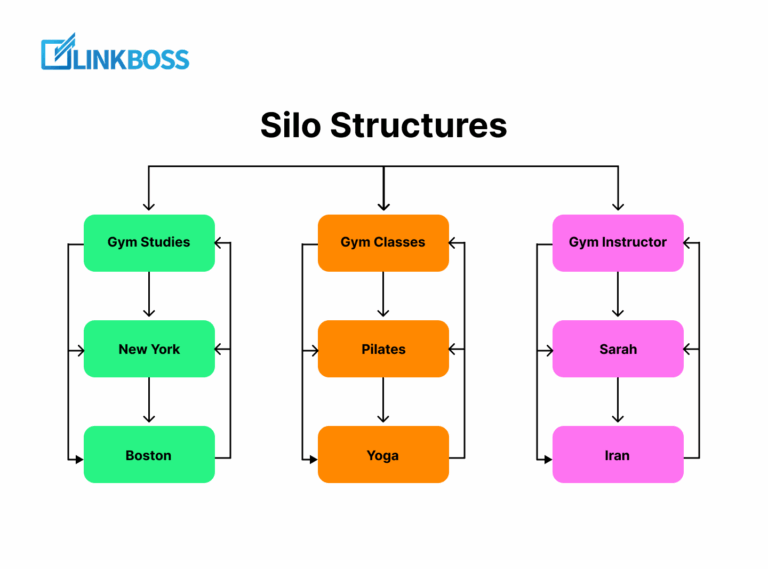
- Define your semantic clusters — group products by shared attributes (material, use case, brand, seasonality) rather than Shopify’s default alphabetical or manual collection structure. How SEO silo structures prevent orphan pages from being created
- Set anchor text targets — for a 60/20/15/5 distribution: 60% branded or LSI anchors, 20% partial-match product attributes, 15% collection name anchors, 5% generic anchors
- Configure auto-linking rules — in LinkBoss, set rules to automatically link new products to their top 3 semantically related collections using the assigned anchor distribution
- Link blog content to products — enable LinkBoss’s blog-to-product linking module to automatically insert links from editorial posts to relevant product pages using anchor text from the product’s semantic context
- Monitor crawl depth — verify that all products are within 3 clicks of the homepage using LinkBoss’s click-depth report; flag any product still buried 4+ clicks deep
- Audit quarterly — re-run the Site Report every 90 days to catch new orphan products created by new product publishes
Shopify Internal Linking Audit Checklist
| Check | Tool | Frequency |
|---|---|---|
| Orphan product scan (zero inbound collection links) | LinkBoss Site Report | Monthly |
| Collection PageRank dilution (>100 outbound links per collection) | LinkBoss Link Health Monitor | Monthly |
| Anchor text distribution audit | LinkBoss Smart Anchor Text | Quarterly |
| Click depth verification (all products ≤3 clicks from home) | LinkBoss Site Report | Monthly |
| Blog-to-product link coverage | LinkBoss dashboard | After every blog post publish |
| Broken internal links (404s in the link graph) | LinkBoss Link Health Monitor | Weekly |
Frequently Asked Questions
Does Shopify’s built-in “Related Products” section count as internal linking?
Yes, but it does not serve SEO the same way. Shopify’s related products algorithm is based on co-purchase data and shared tags — not semantic relevance. The links pass PageRank but they do not signal topical context to Google’s indexer the way anchor text on editorial-style contextual links does. Replacing generic related-product links with semantically classified anchor text on manually curated links is the higher-value approach for SEO.
How many internal links should a Shopify product page have?
Google’s documented guidance is to keep internal link counts reasonable. For product pages, a range of 5–15 outbound internal links is optimal — enough to distribute PageRank to related products and collections without diluting equity across too many targets. Product pages with 50+ outbound links (common in large collections) distribute roughly 1/50th of the page’s authority to each link target, which is below meaningful ranking threshold.
Can LinkBoss link products to blog posts in Shopify?
Yes — LinkBoss for Shopify includes a blog-to-product linking module that scans your blog content for product mentions and suggests contextual anchor text links to the relevant product page. This is one of the highest-value link-building opportunities for Shopify stores because blog posts are typically crawled frequently and pass strong topical authority to product pages via descriptive anchors.
What happens to internal links when I change my Shopify theme?
LinkBoss stores its link data independently of your theme and re-inserts links on theme change via Shopify’s native liquid template hooks. You do not need to reconfigure link rules after a theme update — the platform re-runs its insertion logic against your new theme structure automatically.
How does LinkBoss avoid over-optimization penalties on Shopify?
LinkBoss enforces a configurable anchor text distribution cap per page. By default, no page receives more than 3 links with the same anchor text pattern, and the platform monitors the overall ratio of branded to exact-match to LSI anchors across your entire store. This prevents the anchor text concentration patterns that trigger Google’s over-optimization filters while maintaining semantic relevance.
References
- Google. Large site owner’s guide to managing crawl budget. Google Search Central.
- Page, L. (1999). Method for node ranking in a linked database. US Patent 6,285,999.
- Google. (2004). Using document related objects to determine the intent of a link. US Patent 7,716,225 — Reasonable Surfer Model.
- Morris, C. Internal Linking Best Practices. Search Engine Journal.