Trusted by 7,000+ SEO professionals worldwide
The Link Assistant That Costs $200+
and Still Can’t Bulk Link.
AIOSEO’s Link Assistant is gated behind Pro at $199.60/year and Elite at $299.60/year — and it still requires manual, post-by-post link insertion on your local WordPress server, impacting your Core Web Vitals. LinkBoss delivers cloud-based semantic AI with bulk 1,000 interlinking, and most features are completely free.
3 Reasons SEOs Choose LinkBoss Over AIOSEO
Don’t have time for the full breakdown? Here’s what matters most.
Cloud Processing vs Server Load
AIOSEO’s Link Assistant runs domain-wide scans on your local WordPress server, competing with live traffic for CPU and RAM — degrading your Core Web Vitals. LinkBoss processes everything in the cloud with zero impact on your site performance.
$200+ for Manual Workflow vs Free Audits
AIOSEO charges $199.60–$299.60/year just to access the Link Assistant — and it still requires manual, post-by-post link insertion. LinkBoss gives you free site audits, analytics, silo building, and ranking tracking with credits starting at 50 free.
Complete Architecture Tools AIOSEO Lacks
No bulk linking, no silo builder, no anchor manager, no visual site map, no anchor text tracking. Even at the $300 Elite tier, AIOSEO provides diagnostic visibility but no execution layer for serious link architecture.
The Truth About Pricing
AIOSEO’s Link Assistant is exclusively behind paywalls starting at $199.60/year — and for that price, you get manual post-by-post link insertion that degrades your site’s Core Web Vitals during scans.
Zero Core Web Vitals impact: All processing happens in the cloud. Your WordPress server is never affected.
Launch plan — $99/year: 2,400 credits for automated link insertion. That’s less than half of AIOSEO Pro’s $199.60/year — with actual bulk automation included.
Still manual workflow. Even at $300/year, every link requires manual review and insertion, one post at a time. A 1,000-post site with 5 internal links per post requires 5,000 individual editorial decisions.
Core Web Vitals impact. Domain-wide orphan scans and link analysis run on your local WordPress server, competing with live traffic for CPU and RAM. On shared hosting, this can spike TTFB from 400ms to 1,200ms+, pushing CWV scores from “Good” to “Needs Improvement.”
No execution layer. Even at the Elite tier: no bulk linking, no silo builder, no anchor manager, no visual site map, no anchor text tracking. You pay $300/year to know there are problems — with no automated way to fix them at scale.
Cloud-Based Semantic AI vs Local Plugin Processing
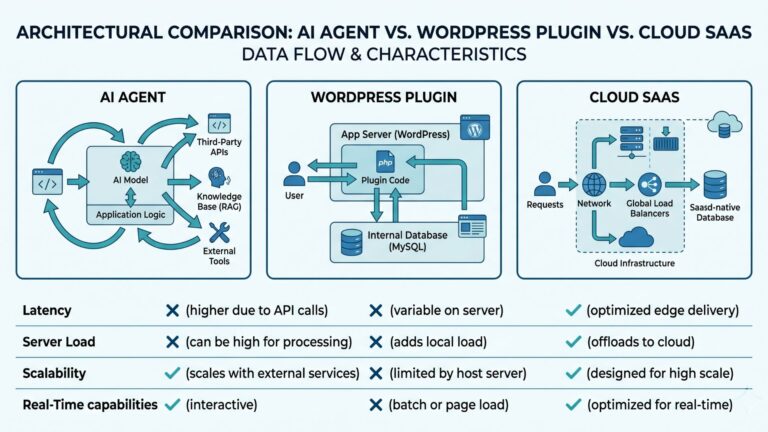
The architectural difference between a WordPress plugin and a cloud-based SaaS platform determines what is computationally possible — and what it costs your site’s performance.
Cloud infrastructure scales horizontally — adding 10,000 more posts doesn’t slow down your WordPress site because computation happens on servers that exist solely for that purpose. A 2,000-post site analysis completes in seconds with zero impact on the live site.
Database queries scanning every post for orphan status, broken links, and suggestion matching consume server resources proportional to your content volume. The result: degraded TTFB, slower LCP and INP scores, and Core Web Vitals that drop from “Good” to “Needs Improvement” during scans. On shared hosting (60%+ of WordPress sites), this impact is measurable and persistent.
Why Local Plugin Processing Creates a Structural Ceiling
A plugin running on shared WordPress hosting has a hard ceiling on analysis sophistication, because every resource it uses competes with your live site traffic.
For agencies: A centralized dashboard manages link architecture across all client sites without per-site WordPress logins or redundant server load.
The gap widens with scale: AIOSEO’s rule-based keyword matching cannot distinguish between a “Credit Card Application” and “Credit Card Debt.” Without semantic understanding, link quality degrades as content volume grows.
Cloud Processing = Unlimited Scale
LinkBoss’s cloud infrastructure scales horizontally. A site with 5,000 posts across multiple languages processes in the same time as a 500-post site — because dedicated SaaS servers handle the computation. Your WordPress site never slows down, your CWV scores never drop, and you can run audits as frequently as needed without any performance tradeoff.
Local Processing = Performance Penalty
A domain-wide link scan on a 1,000-post AIOSEO installation can spike TTFB from 400ms to 1,200ms+ on shared hosting. Google’s CWV documentation states that TTFB exceeding 800ms degrades LCP and INP scores regardless of frontend optimization. You’re paying $200+/year for a feature that actively hurts your site’s search performance during every scan.
6 Features AIOSEO Does Not Have
Even at the $300 Elite tier, AIOSEO’s Link Assistant lacks the fundamental tools required for serious internal link architecture.
Bulk Link Generation
Deploy hundreds of links across an archive simultaneously. AIOSEO requires manual review and insertion for every single link.
Automated SILO Creation
Group content into Topic Clusters with hierarchical linking relationships. AIOSEO has no mechanism for this.
Anchor Text Management
Centralized dashboard for anchor text distribution, cannibalization detection, and optimization. AIOSEO has none.
Visual Site Architecture Map
View your content hierarchy as a connected graph to identify structural weaknesses at a glance. AIOSEO provides no visual mapping.
Zero CWV Impact
All processing in dedicated cloud infrastructure. AIOSEO scans run on your WordPress server, degrading TTFB and CWV scores.
Semantic Entity Analysis
NLP-powered understanding of entity relationships, not just keyword matching. AIOSEO uses rule-based keyword matching.
LinkBoss Features — Up Close
Every feature designed to help you build a stronger, better-connected site.
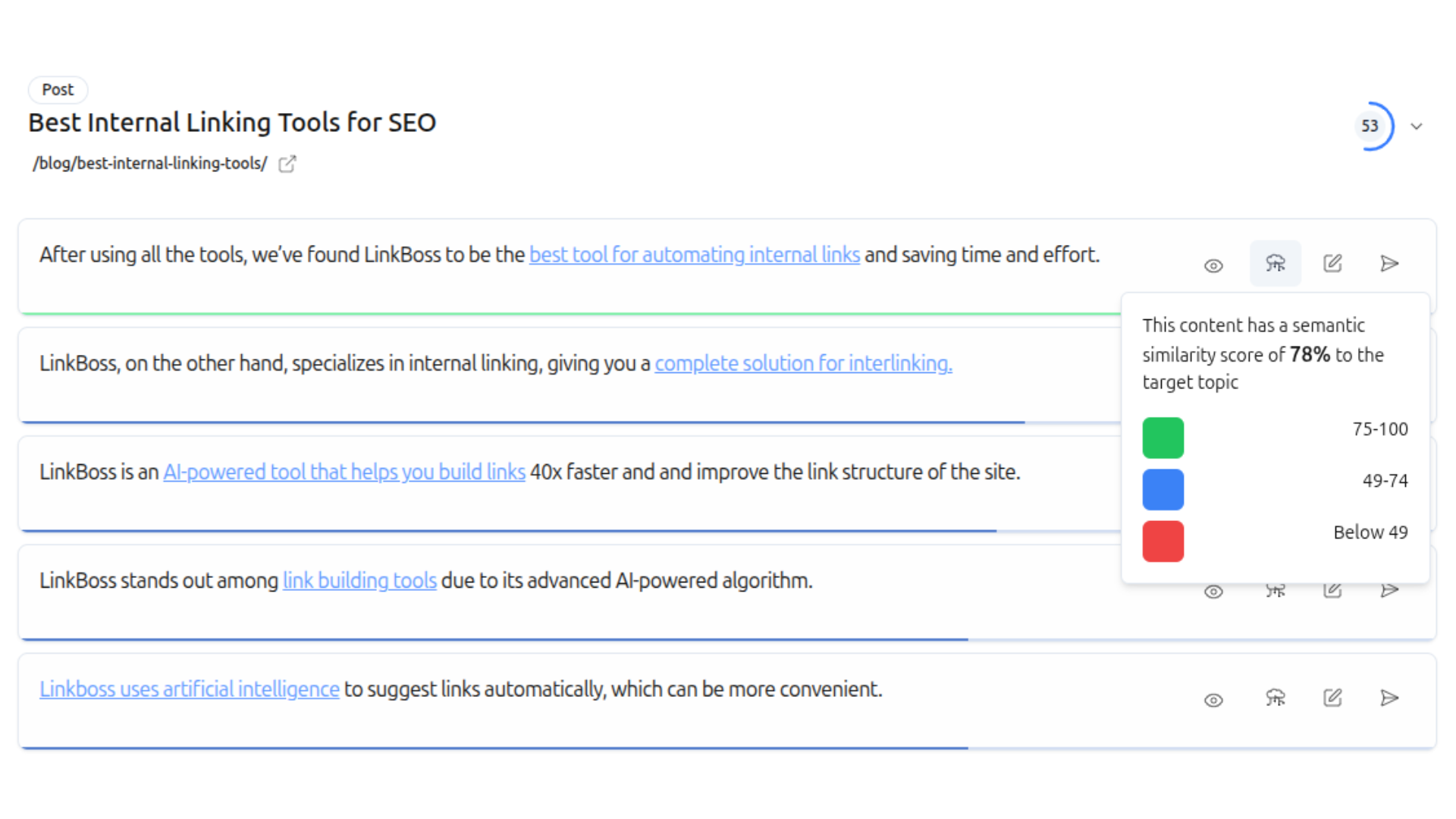
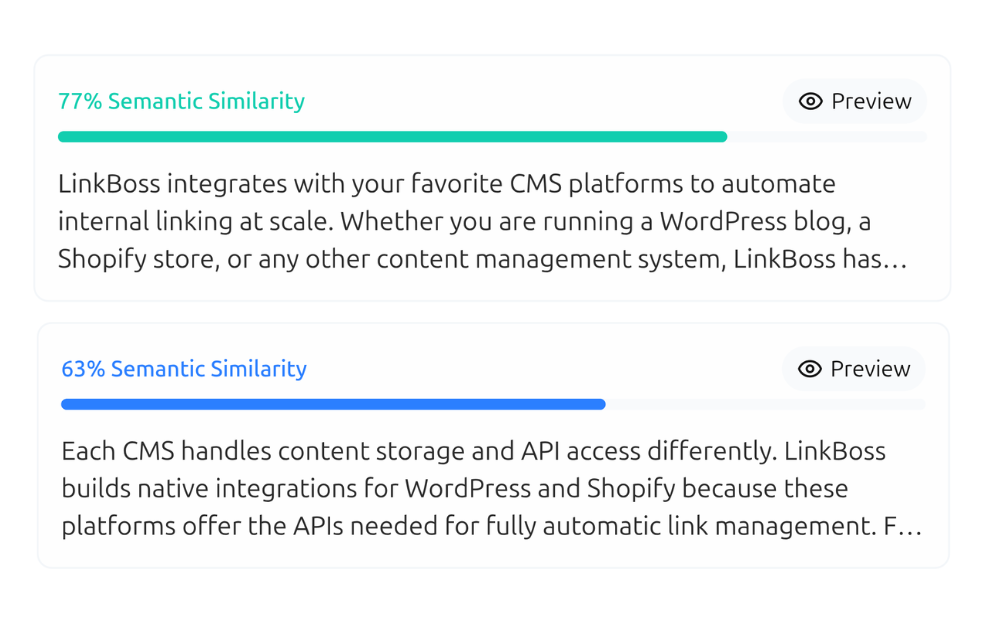
Contextual Semantic Interlinking
LinkBoss uses NLP and semantic AI to understand the meaning of every sentence and find the most relevant pages to link to.
- Understands context — entities, synonyms, polysemy
- Suggests anchor text that reads naturally
- Relevancy scores for every link suggestion
- Smart link generator creates relevant paragraphs when needed
Bulk Auto Interlinking — 1,000 Links in One Click
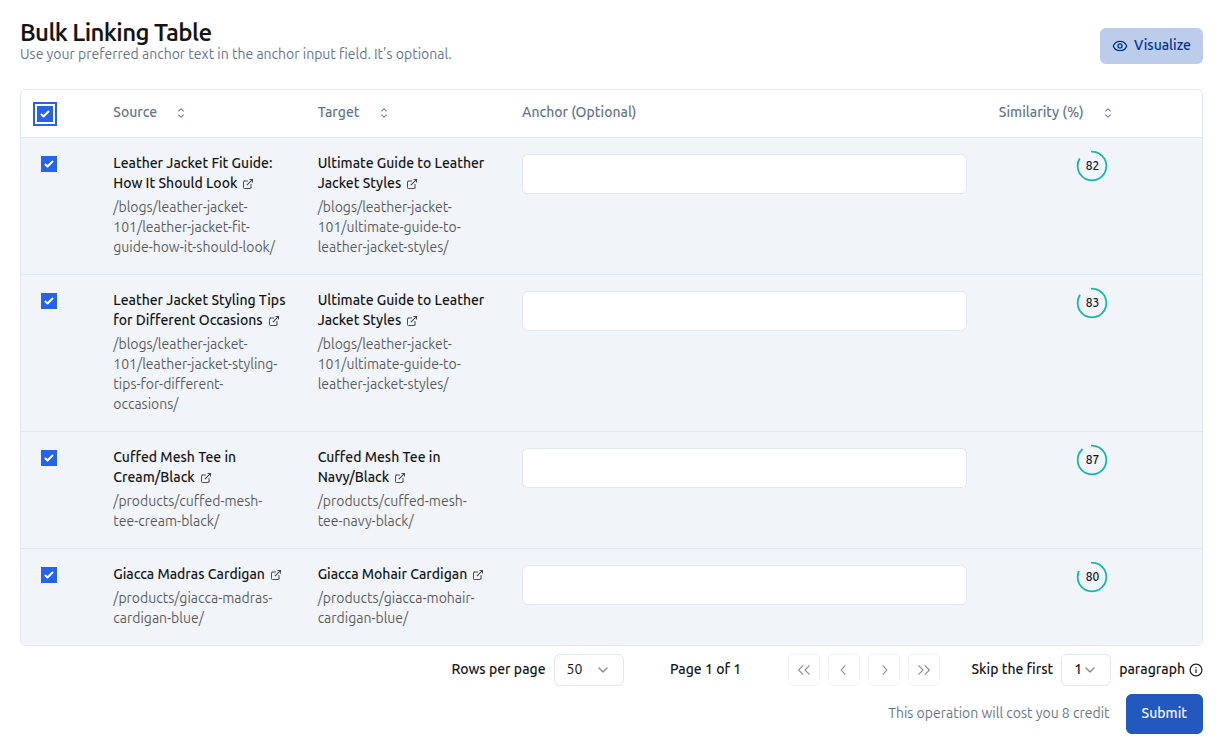
LinkBoss’s Bulk 2.0 creates up to 1,000 contextual interlinks in a single click with customizable anchor text options.
- Create up to 1,000 interlinks with one click
- Customize anchor text preferences and filters
- Filter by category, post type, or custom criteria
- Perfect for large-scale sites and content migrations
Semantic Silo Builder
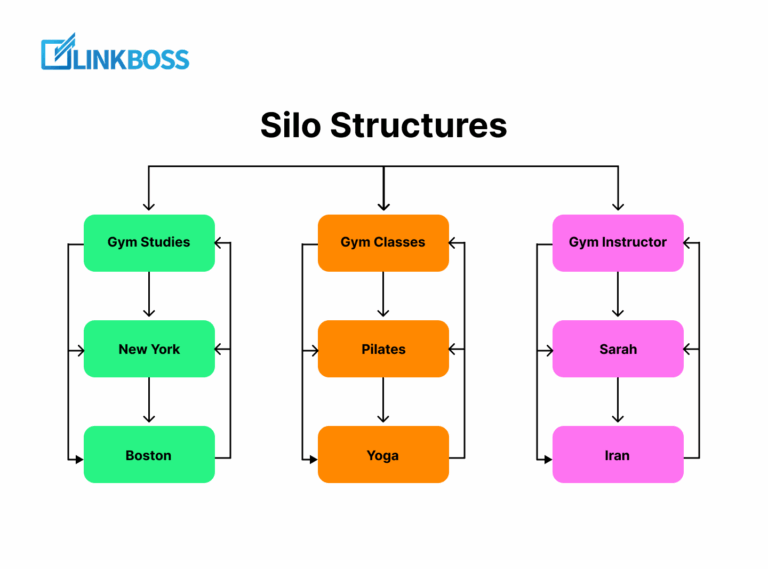
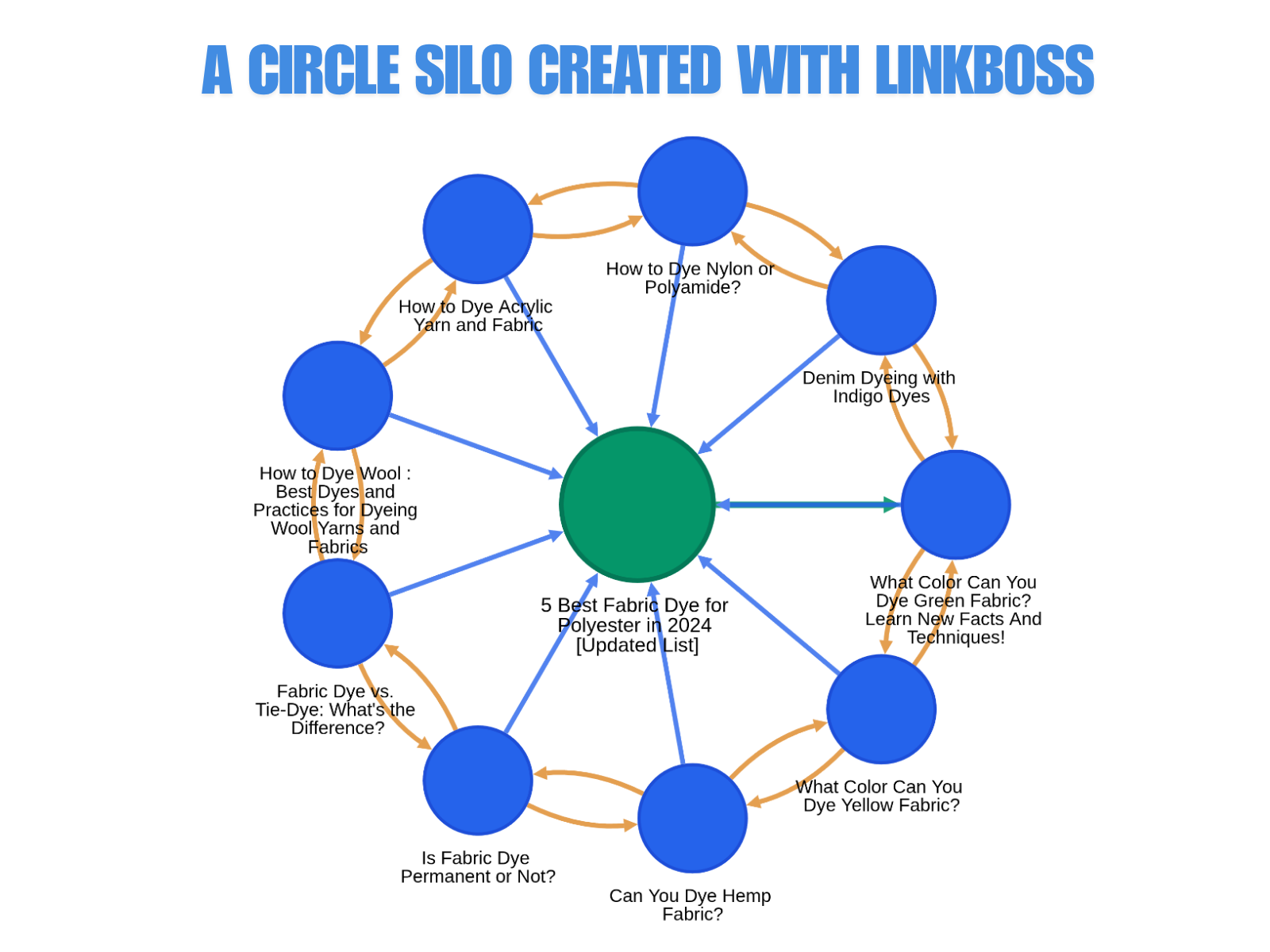
Build authoritative topic clusters with 4 proven silo models deployed with one click using Boss Mode.
- Reverse Silo — push authority up to pillar pages
- Priority Silo — concentrate link juice on high-value pages
- Serial Silo — chain pages in a topical sequence
- Hybrid Circle Silo — combine strategies for maximum coverage
- Visualize your silo structure in real time
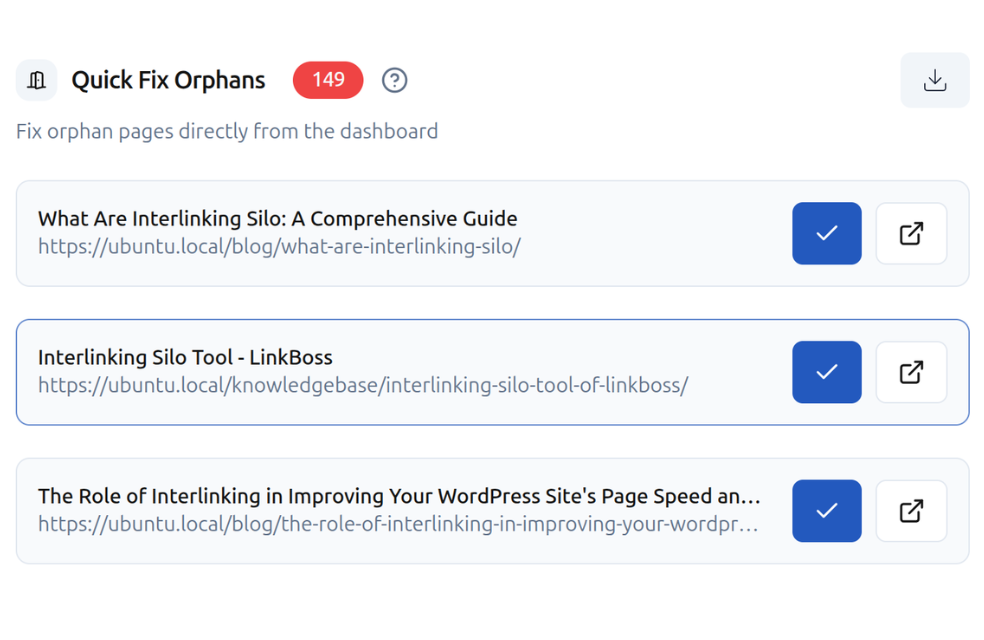
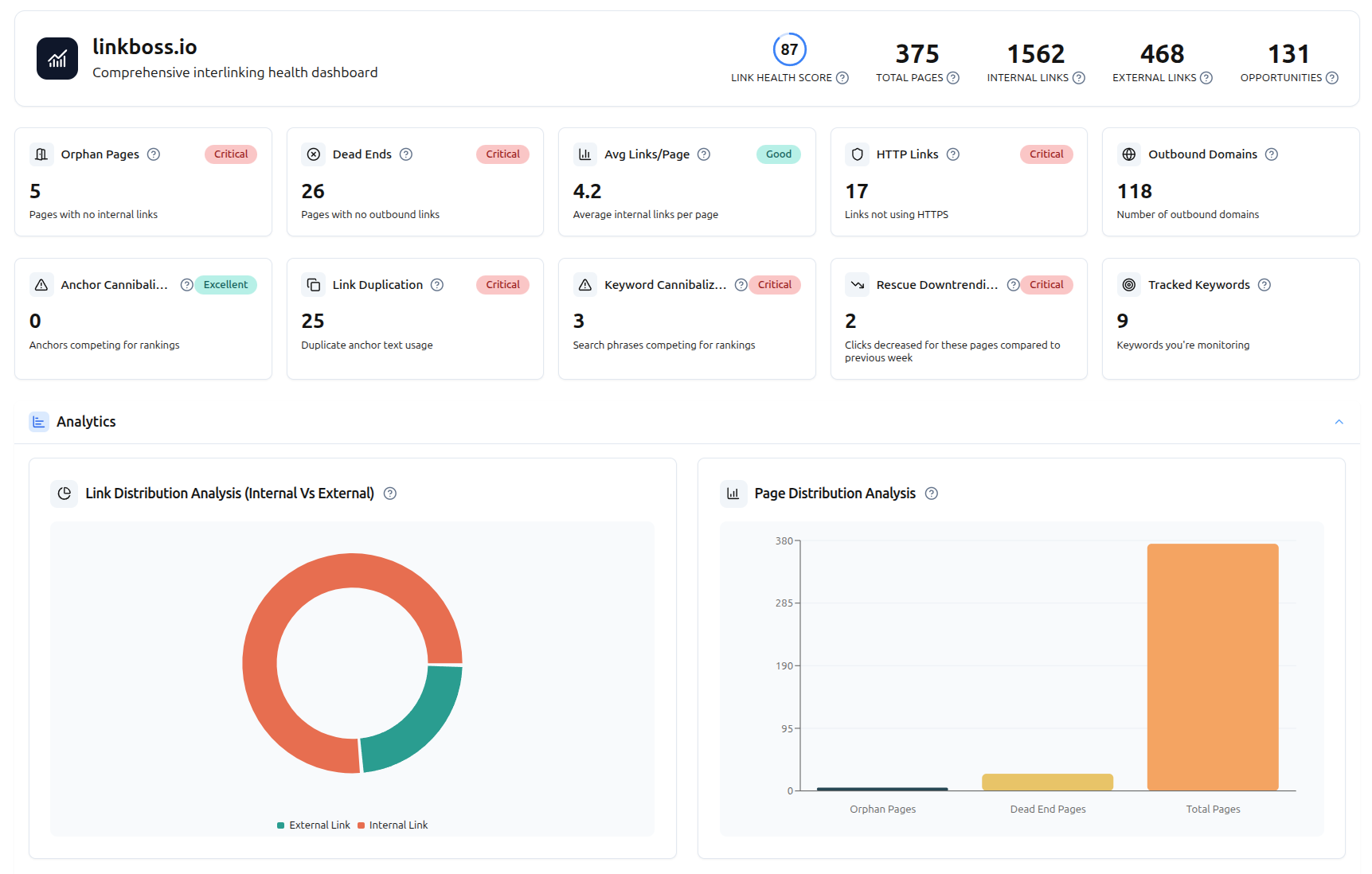
Link Health Monitor & Site Audit
Get a complete health score for your entire site’s internal linking — all processed in the cloud, zero server impact.
- Full site health score & audit dashboard
- Orphan page & dead-end page detection
- Link duplication & anchor cannibalization checker
- Link flow score, HTTP/HTTPS audit, outbound domain tracking
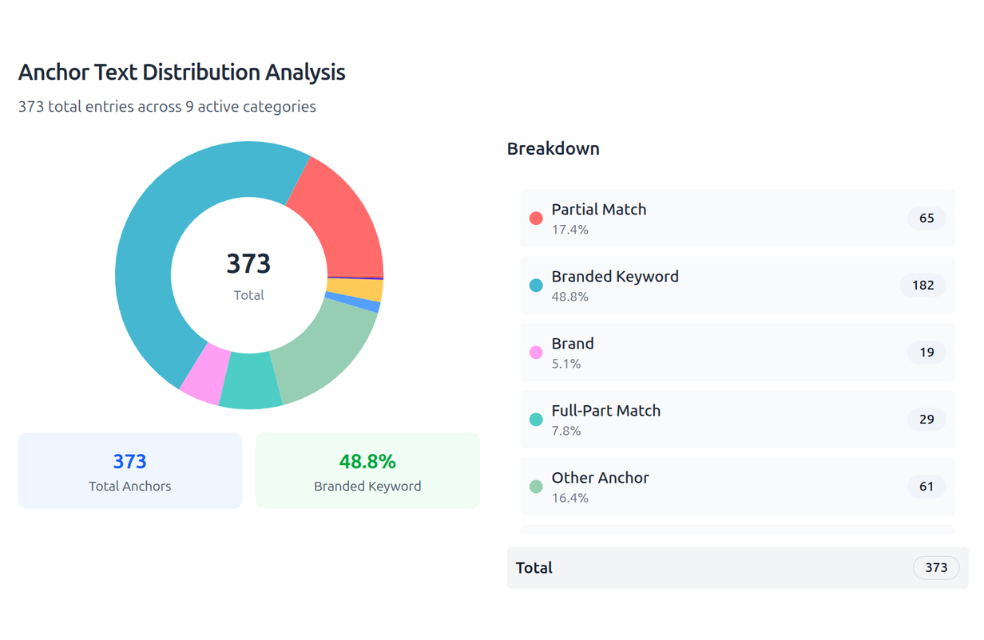
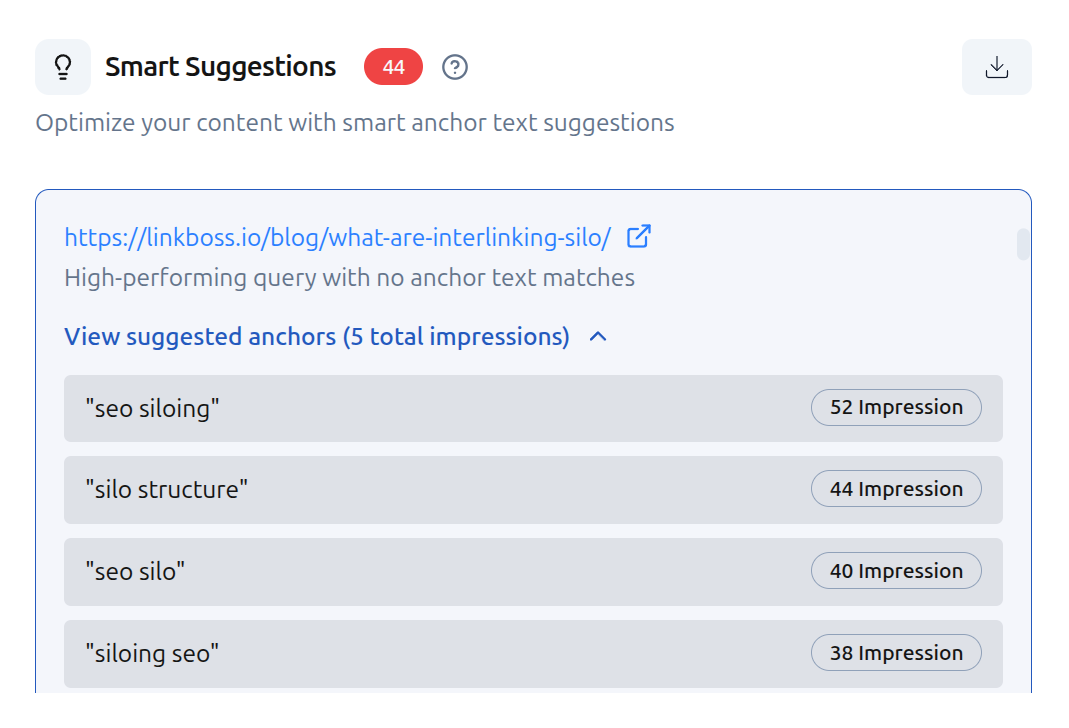
Smart Anchor Text Optimization
Complete anchor text distribution overview with cannibalization detection and GSC-powered suggestions.
- Complete anchor text distribution overview
- Cannibalization detection — same anchor, different targets
- Edit or delete anchors directly from the dashboard
- GSC-powered anchor suggestions from high-impression queries
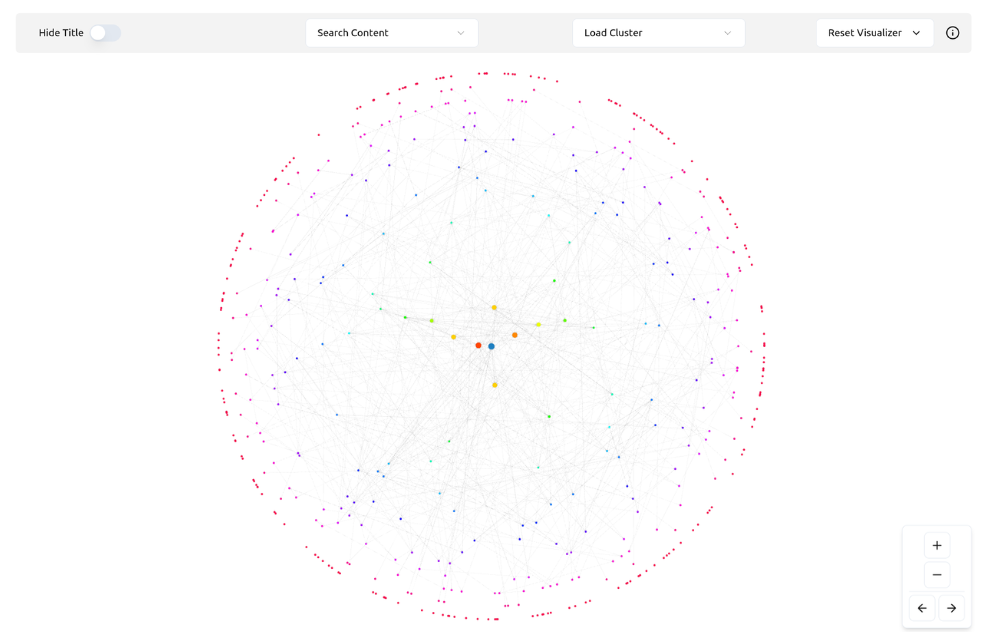
Interactive Site Visualizer
See your entire internal linking structure as an interactive network map. Spot gaps and isolated clusters at a glance.
- Full interactive network map of your site
- Spot isolated content clusters instantly
- Identify linking gaps and opportunities visually
- Understand how every page is interconnected
GSC-Powered Analytics Dashboard
Track keywords, ranking movements, downtrending alerts, and keyword cannibalization — all completely free.
- Top performing keywords with impressions, clicks, position & CTR
- Week-over-week ranking movement tracking
- Downtrending page alerts — rescue pages before they lose traffic
- Keyword cannibalization checker
Side-by-Side Feature Comparison
Everything that matters for internal linking at scale — compared directly.
| Feature | LinkBoss | AIOSEO Link Assistant |
|---|---|---|
| Orphan Page Detection | Free — cloud-based | Yes (Pro+ only, local) |
| Broken Link Reporting | Free | Yes (Pro+ only) |
| Linking Method | Semantic AI entity analysis | Rule-based keyword matching |
| Processing Location | Cloud-based SaaS | Local WordPress server |
| Bulk Link Generation | Up to 1,000 links/click | ❌ No |
| Visual Site Map | Interactive network map | ❌ No |
| Automated SILO Creation | 4 preset types + Boss Mode | ❌ No |
| Anchor Text Manager | Full distribution + tracking | ❌ No |
| CWV Impact | None (cloud processing) | ❌ Server load during scans |
| Multi-Site Management | Cloud dashboard | ❌ No |
| Schema Markup | Not included | Comprehensive suite |
| Social Media Optimization | Not included | Built-in |
| Multilingual Support | Yes (30+ languages) | Limited (plugin-dependent) |
| Price for Linking | Free tier + $99/yr | $199.60–$299.60/yr |
What You Get for $0 on LinkBoss
Most of LinkBoss is completely free. All auditing, analytics, silo building, and reporting features require no credits and no payment.
Site Health & Audit
- Site health score & full audit dashboard
- Orphan & dead-end page detection
- Link duplication & anchor cannibalization
- Anchor text distribution & link flow score
- HTTP/HTTPS audit & outbound domain tracking
- Full site structure visualization
GSC-Powered Analytics
- Top performing keywords (impressions, clicks, position, CTR)
- Week-over-week ranking movement tracking
- New keyword discovery & downtrending alerts
- Keyword cannibalization checker
- Anchor text suggestions from high-impression queries
Silo Building & Structure
- All silo preset types (Reverse, Priority, Serial, Hybrid Circle)
- One-click silo network builder
- Silo structure visualization
- Anchor text distribution management
Credits are only used for automatically inserting internal links into your content. You get 50 free credits on signup. No credit card required. AIOSEO charges $199.60/year before you can access even basic orphan page detection.
Up and Running in Under 5 Minutes
Install a lightweight WordPress plugin, connect it to your LinkBoss dashboard, and let AI analyze everything.
Install the Plugin
Go to Plugins → Add New, search for “LinkBoss”, and activate it.
Connect & Sync
Add your site in the dashboard, copy the API key, paste it in, and hit Sync Now.
Get Your Free Audit
Site health score, orphan pages, anchor cannibalization — all at $0 cost, processed in the cloud.
Build Links & Grow
Silo builder, bulk interlinking, GSC analytics — all free. Your server stays fast.
Simple, Transparent Pricing
Most features are free. Credits only apply when auto-inserting links.
- Full site health audit & dashboard
- Orphan & dead-end page detection
- GSC-powered keyword analytics
- All silo builder tools & presets
- Site visualizer
- 2,400 credits for automated linking
- Delete site & replace monthly
- WordPress + Shopify support
No credit card required
- Everything in Free
- 3 sites from one dashboard
- Bulk interlinking (up to 1,000 links)
- Silo builder with Boss Mode
- Smart anchor optimization
- Smart paragraph generator
- Links stay permanent
No credit card required
- Orphan page detection (local)
- Broken link reporting
- In-editor link suggestions
- Schema markup suite
- ❌ No bulk linking
- ❌ No silo builder
- ❌ No anchor manager
- ❌ No visual site map
- ❌ Server load during scans
- ❌ No multi-site dashboard
$199.60/yr actual • CWV impact
Setting the Record Straight
Common claims about AIOSEO’s linking — and the reality.
“AIOSEO’s orphan page detection is comparable to LinkBoss’s”
“Cloud-based tools are slower than local plugins”
“AIOSEO’s Link Assistant is good enough for growing sites”
“You can’t use LinkBoss and AIOSEO together”
Frequently Asked Questions
Is the AIOSEO Link Assistant available in the free version?
How does AIOSEO affect Core Web Vitals?
Can I use both LinkBoss and AIOSEO together?
Is LinkBoss really free?
How does LinkBoss handle multilingual sites vs AIOSEO?
Stop Paying $200+ for Manual
Link Suggestions That Slow Your Site.
7,000+ SEO professionals trust LinkBoss for cloud-based, semantic internal linking. Audit your site, build silos, track rankings — all for $0 with zero CWV impact. Start free today.