Trusted by 7,000+ SEO professionals worldwide
Why Internal Linking Needs
a Specialist, Not a Generalist.
Yoast is the most installed SEO plugin on WordPress with 13 million+ active installations — but internal linking is a Premium-only sidebar widget that requires manual drag-and-drop, one post at a time. LinkBoss uses semantic AI to automate internal link architecture at scale with bulk 1,000 interlinking, and most features are completely free.
3 Reasons SEOs Choose LinkBoss Over Yoast
Don’t have time for the full breakdown? Here’s what matters most.
Semantic AI vs Prominent Word Scanning
Yoast scans for shared vocabulary between posts — a basic lexical match. LinkBoss uses NLP and semantic AI to understand what your content actually means, generating contextually relevant links based on entity relationships, not word overlap.
Bulk Automation Yoast Doesn’t Have
Yoast requires you to drag-and-drop every link suggestion manually, inside each post editor. LinkBoss creates up to 1,000 contextual interlinks in a single click across your entire site with automated anchor text variation.
Free Audits vs $99/Year Premium
Yoast’s internal linking is gated behind Premium at $99/year and still requires manual work. LinkBoss gives you free site audits, orphan detection, silo building, GSC analytics, and ranking tracking — with bulk linking credits starting at 50 free.
The Truth About Pricing
Yoast Premium costs $99/year — and internal linking is just a sidebar widget that still requires you to manually drag-and-drop every link. LinkBoss lets you audit, analyze, build silos, and track rankings completely free.
Credits only for: Automatically inserting internal links into your content. You get 50 free credits on signup. No credit card required.
Launch plan — $99/year: 2,400 credits allocated at once. Need to switch sites? Delete your current site and add a different one — your credits stay.
No bulk linking. No silo builder. No anchor manager. No semantic matching. No site health scoring for links. No link flow visualization. No domain-wide link architecture view. No multi-site management. The “Cornerstone Content” feature is just a binary toggle — it doesn’t build structural silo relationships.
Local server processing. Yoast runs on your WordPress server. Deep semantic scans require computational power that would spike your CPU and degrade page load times, which is why Yoast’s linking tool must remain lightweight and strictly manual.
Your $99/year buys a sidebar widget that suggests links one post at a time. Every link still requires a human to place it.
Semantic AI vs Prominent Word Scanning
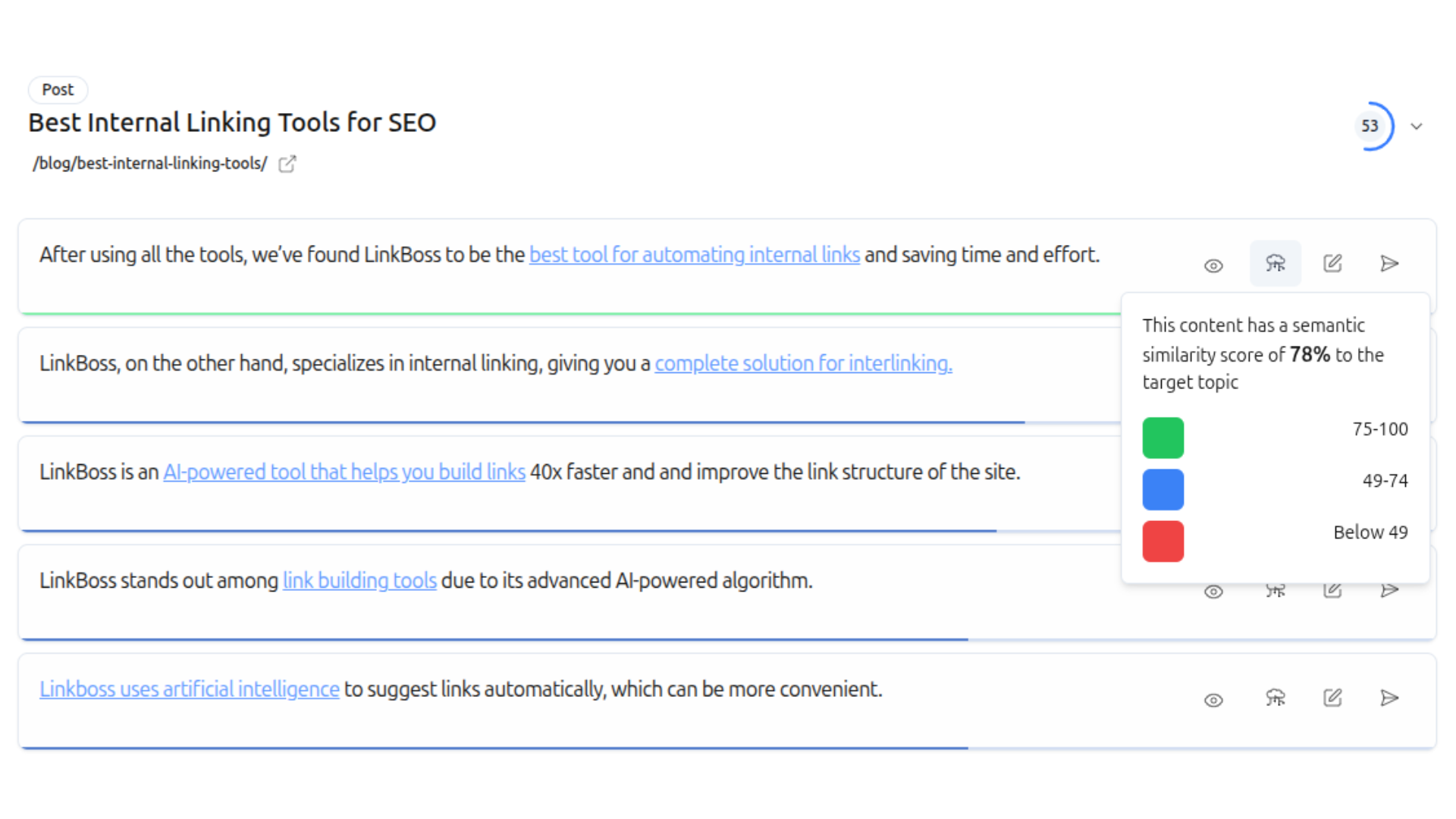
The most critical difference lies in how these tools understand language — and it determines the quality of every link you’ll ever place.
This means every link is contextually flawless, anchor text varies naturally across semantically equivalent phrases, and your domain builds coherent topical clusters that Google’s algorithms can parse.
When you open a post in the Gutenberg editor, Yoast scans the text and surfaces a sidebar panel suggesting related articles based on shared vocabulary. For a single article, this is faster than a manual Google search. But at scale, this workflow falls apart. The more content you have, the more irrelevant the suggestions become.
Why Manual Sidebar Suggestions Can’t Scale
On a site with 500 posts, working through your link architecture manually takes days. On 2,000+ posts, it takes weeks. Every new post you publish instantly adds to the backlog — and Yoast only surfaces connections if an editor actively opens that old post.
What this means for your site:
• Bulk 1,000 interlinks in a single click
• Pillar content identification happens automatically via AI
• Cloud processing — zero impact on your WordPress server
• Anchor text varies naturally across hundreds of placements
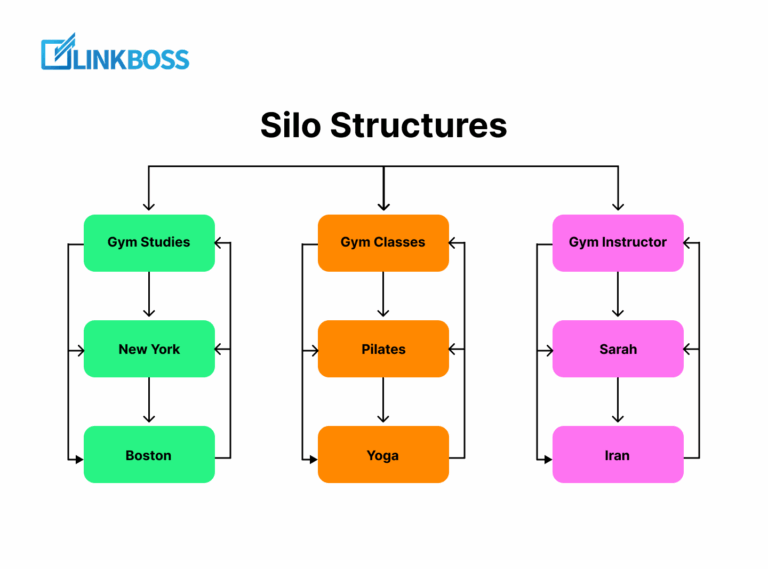
• SILO structures with Reverse, Priority, Serial, and Hybrid models
What this does to your site:
• Domain’s link graph stagnates as content grows
• Older content becomes isolated with no retroactive updates
• Cornerstone toggle doesn’t build structural relationships
• Local server limits prevent deep semantic scanning
• Agencies managing multiple clients face impossible labor costs
Bulk AI Processing > 2,000 Manual Edits
On a 2,000-post site, processing your link architecture manually takes weeks. LinkBoss’s cloud-based engine processes the entire archive in minutes, inserting contextually relevant links across hundreds of URLs simultaneously. Google’s documentation confirms that internal links help crawlers discover and understand relationships between pages — and a complete link graph delivers significantly stronger signals than a manually patched one.
The Compounding Backlog Problem
Every new post you publish instantly adds to the backlog of linking opportunities. An article published six months ago might be highly relevant to today’s post — but no editor will ever open it to check. The domain’s link graph stagnates, and older content becomes isolated. This systematic retroactive auditing never happens in practice, leaving significant portions of your site under-linked.
6 Features Yoast Does Not Have
Beyond the core AI difference, LinkBoss includes a complete internal linking toolkit that Yoast simply does not offer — at any price tier.
Bulk 1,000 Interlinking
Create up to 1,000 contextual internal links across your entire site in a single click. Yoast has zero bulk linking — every link is manual drag-and-drop.
Algorithmic Silo Builder
Build authoritative topic clusters with 4 proven silo models — Reverse, Priority, Serial, and Hybrid Circle — deployed with one click. Yoast’s Cornerstone toggle is just a binary signal.
Anchor Text Manager
Complete anchor text distribution overview with cannibalization detection and optimization. Yoast uses the post title as default anchor text with no distribution tracking.
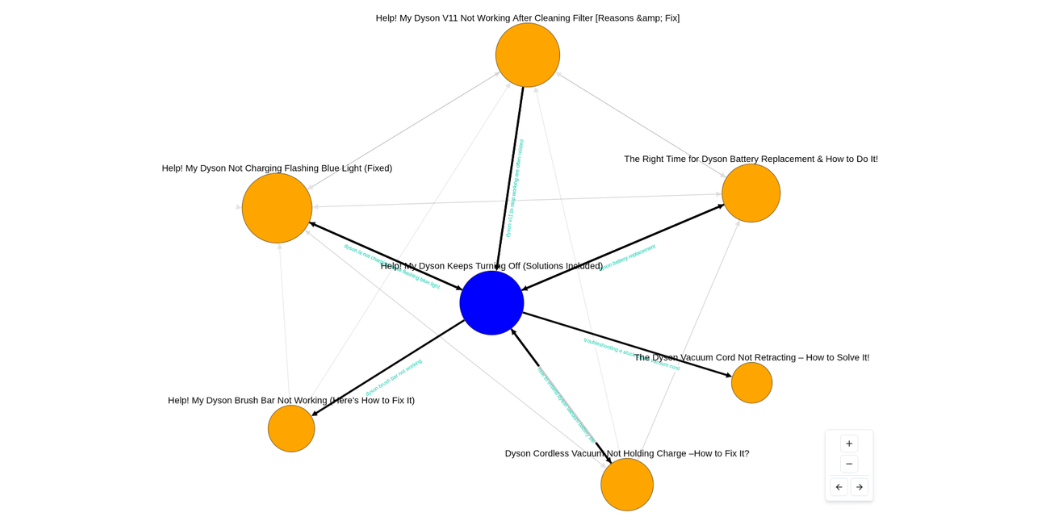
Interactive Site Visualizer
See your entire internal linking structure as an interactive network map. Spot isolated clusters and identify linking gaps at a glance.
GSC-Powered Analytics for Linking
Track keywords, ranking movements, downtrending page alerts, and anchor text suggestions — all specifically designed for internal linking optimization.
Cloud-Based Processing
All analysis runs on dedicated cloud infrastructure. Your WordPress server is never impacted. Yoast runs locally, constrained by your hosting resources.
LinkBoss Features — Up Close
Every feature designed to help you build a stronger, better-connected site.
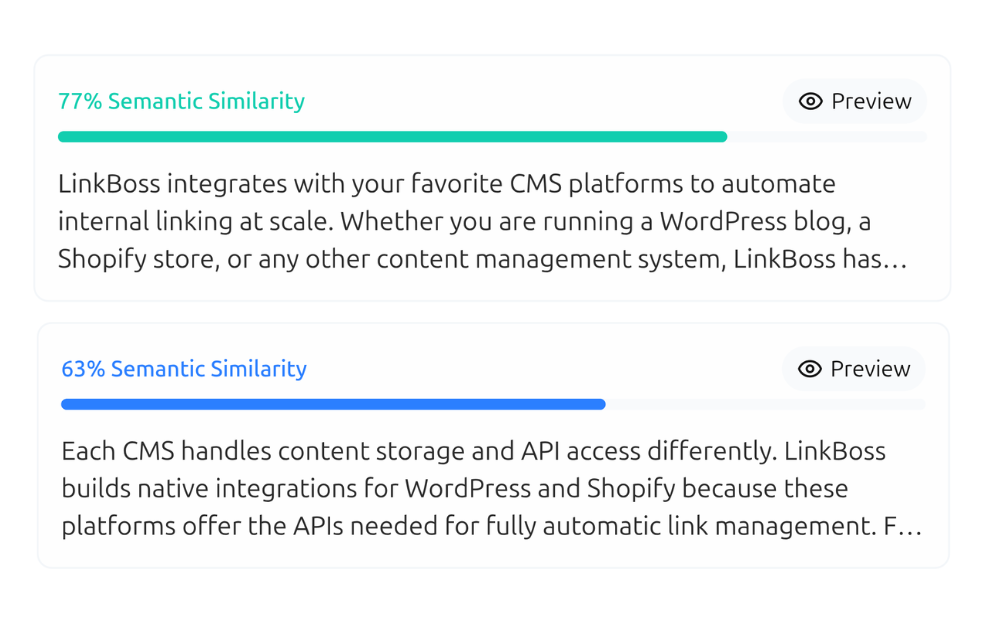
Contextual Semantic Interlinking
LinkBoss doesn’t just match keywords — it reads your content like a human would. Using NLP and semantic analysis, it understands the meaning of every sentence and finds the most relevant pages to link to.
- Understands context — knows “Apple” the fruit vs Apple the company
- Suggests anchor text that reads naturally in your sentence
- Relevancy scores for every link suggestion
- Smart link generator creates relevant paragraphs when needed
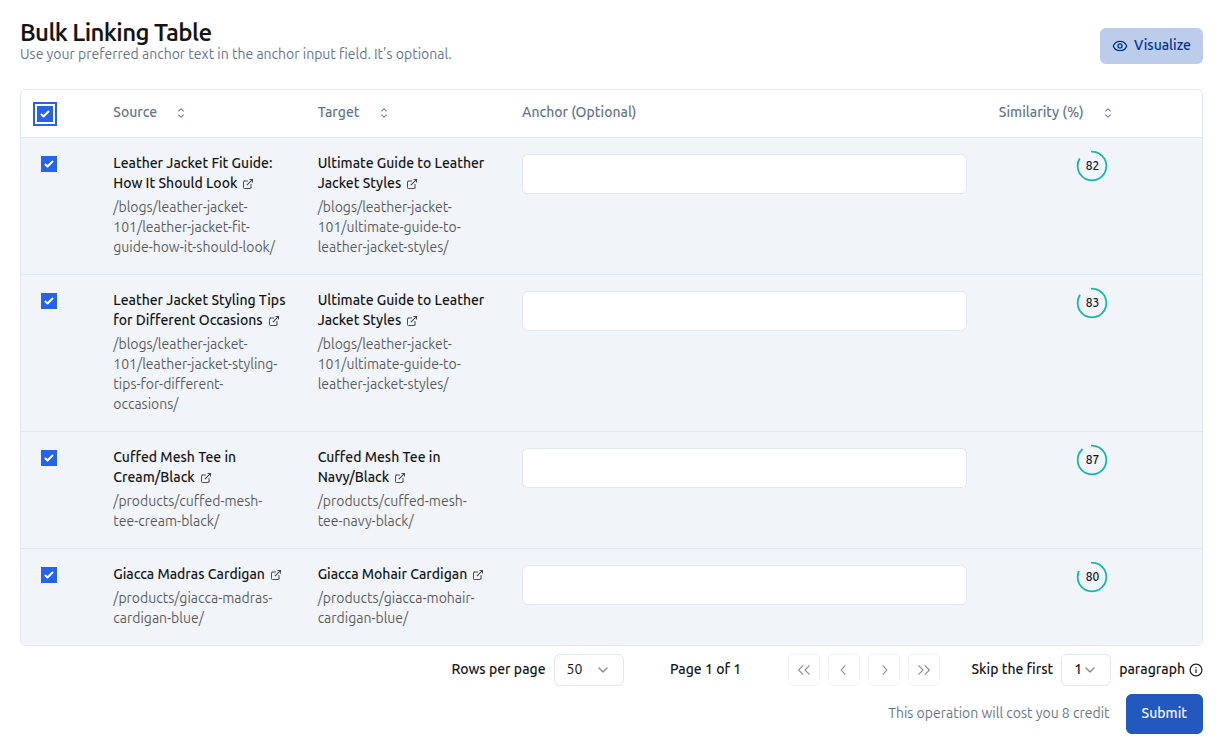
Bulk Auto Interlinking — 1,000 Links in One Click
Got a site with thousands of pages? Manually building internal links is not an option. LinkBoss’s Bulk 2.0 tool creates up to 1,000 contextual interlinks in a single click.
- Create up to 1,000 interlinks with one click
- Customize anchor text preferences and filters
- Filter by category, post type, or custom criteria
- Perfect for large-scale sites and content migrations
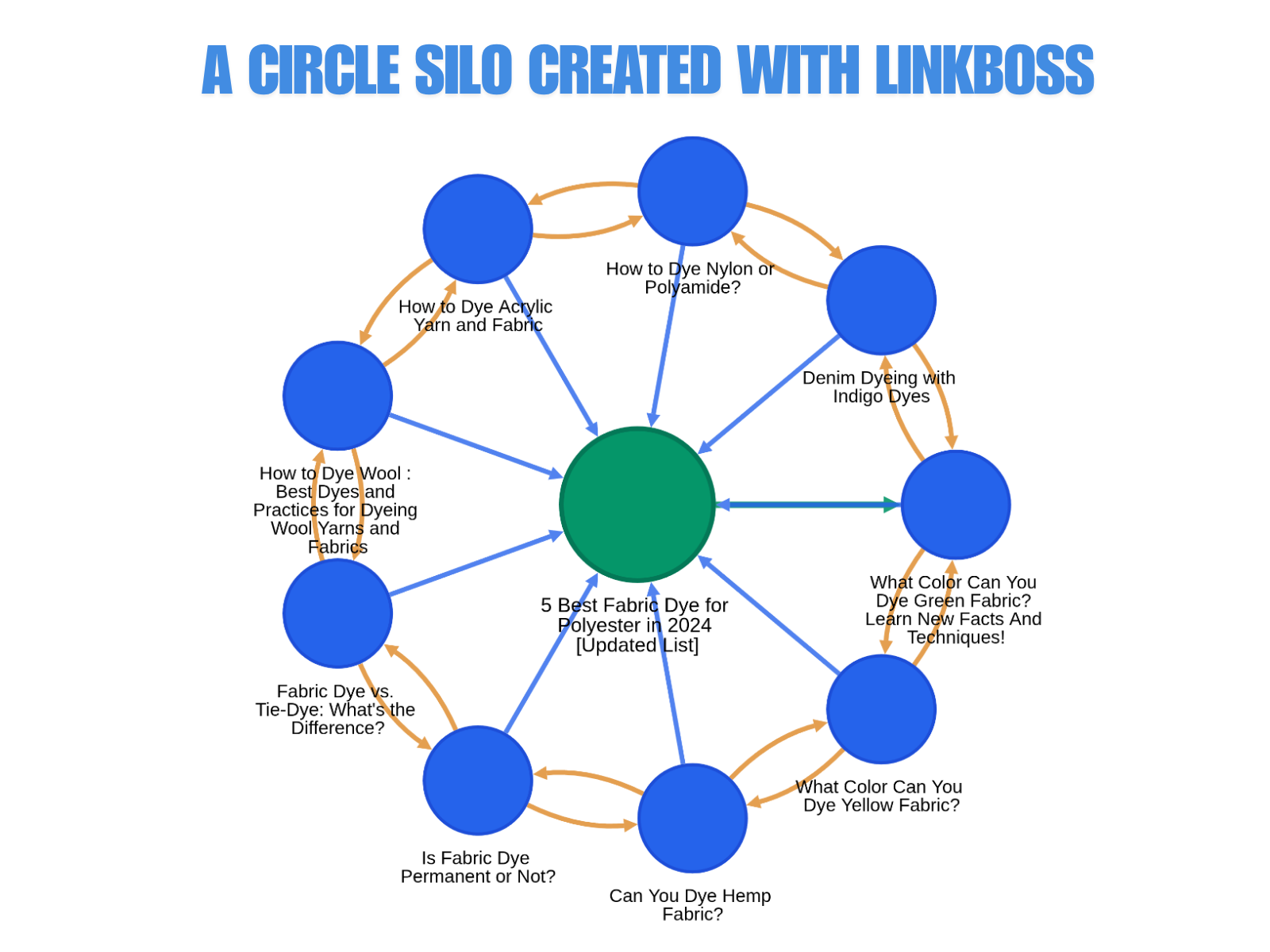
Semantic Silo Builder
Build authoritative topic clusters with structured internal linking. Choose from 4 proven silo models and deploy with one click using Boss Mode.
- Reverse Silo — push authority up to pillar pages
- Priority Silo — concentrate link juice on high-value pages
- Serial Silo — chain pages in a topical sequence
- Hybrid Circle Silo — combine strategies for maximum coverage
- Visualize your silo structure in real time
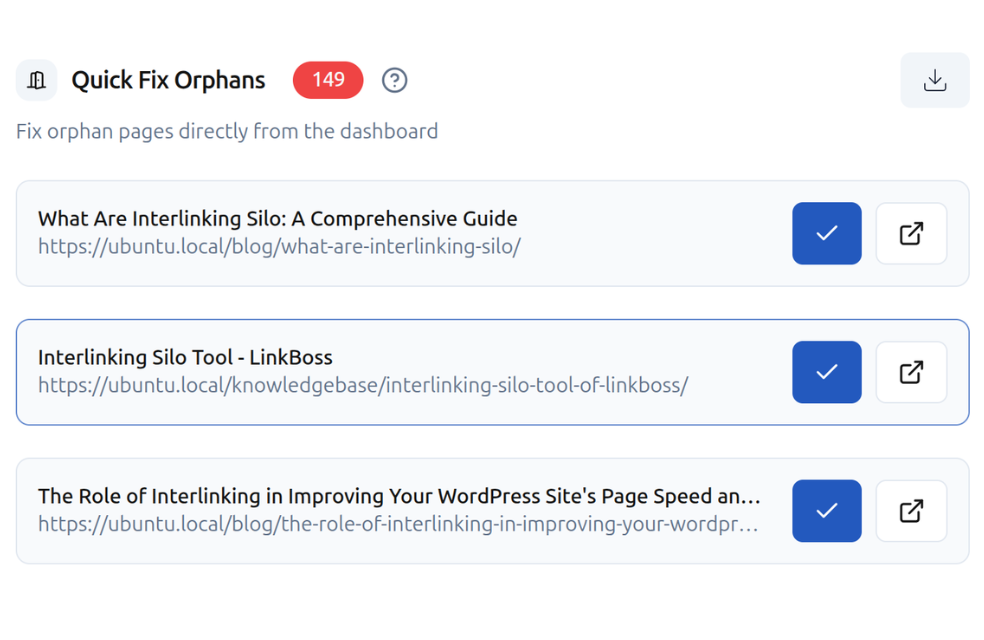
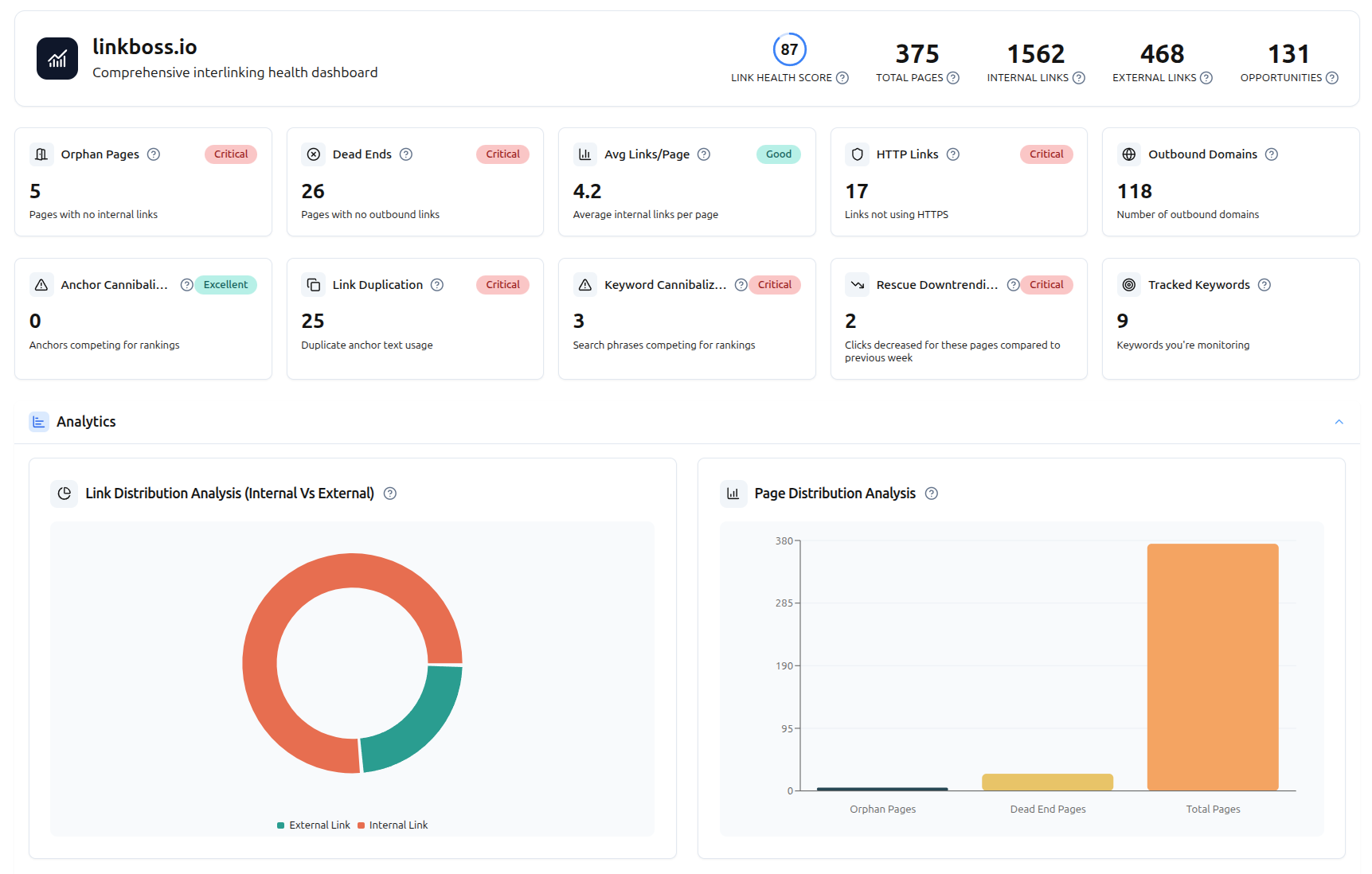
Link Health Monitor & Site Audit
Get a complete health score for your entire site’s internal linking. Detect every orphan page, dead-end page, and anchor cannibalization problem — all for free.
- Full site health score & audit dashboard
- Orphan page detection (pages with zero incoming links)
- Dead-end page detection (pages with no outbound links)
- Link duplication & anchor cannibalization checker
- HTTP/HTTPS link audit & outbound domain tracking
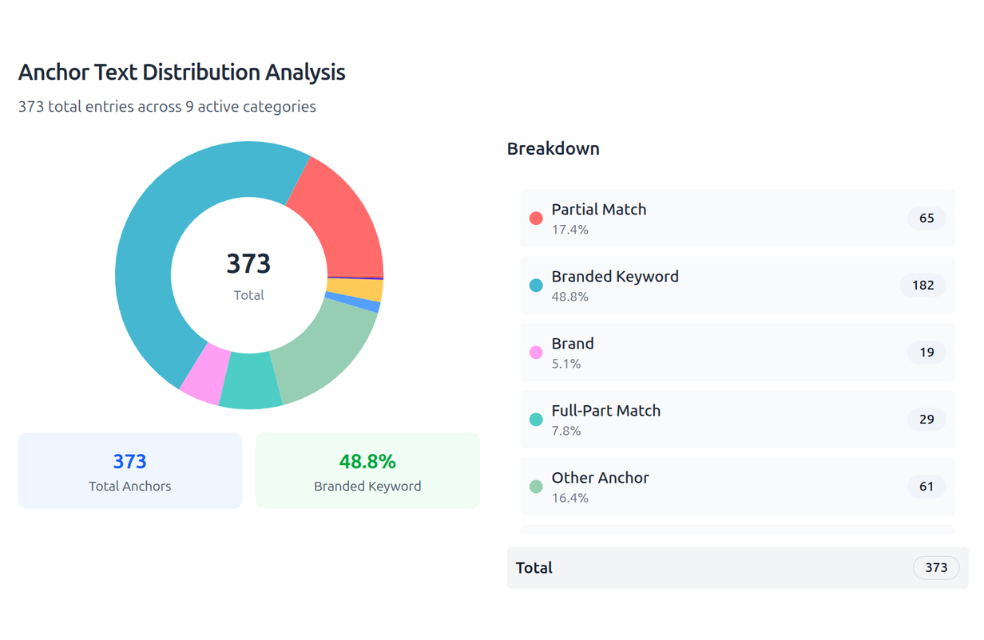
Smart Anchor Text Optimization
See exactly how your anchor texts are distributed across the entire site. Find cannibalization issues and optimize for maximum SEO impact.
- Complete anchor text distribution overview
- Cannibalization detection — same anchor, different targets
- Edit or delete anchors directly from the dashboard
- GSC-powered anchor suggestions based on high-impression queries
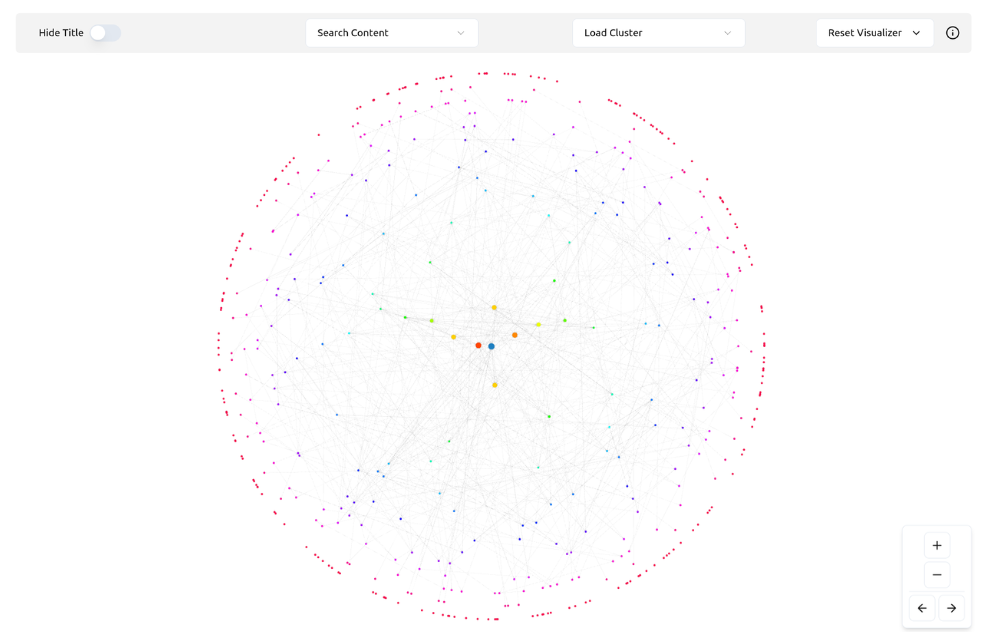
Interactive Site Visualizer
See your entire internal linking structure as an interactive network map. Understand how pages connect, spot gaps, and identify isolated content clusters.
- Full interactive network map of your site
- Visualize how every page is interconnected
- Spot isolated content clusters instantly
- Identify linking gaps and opportunities visually
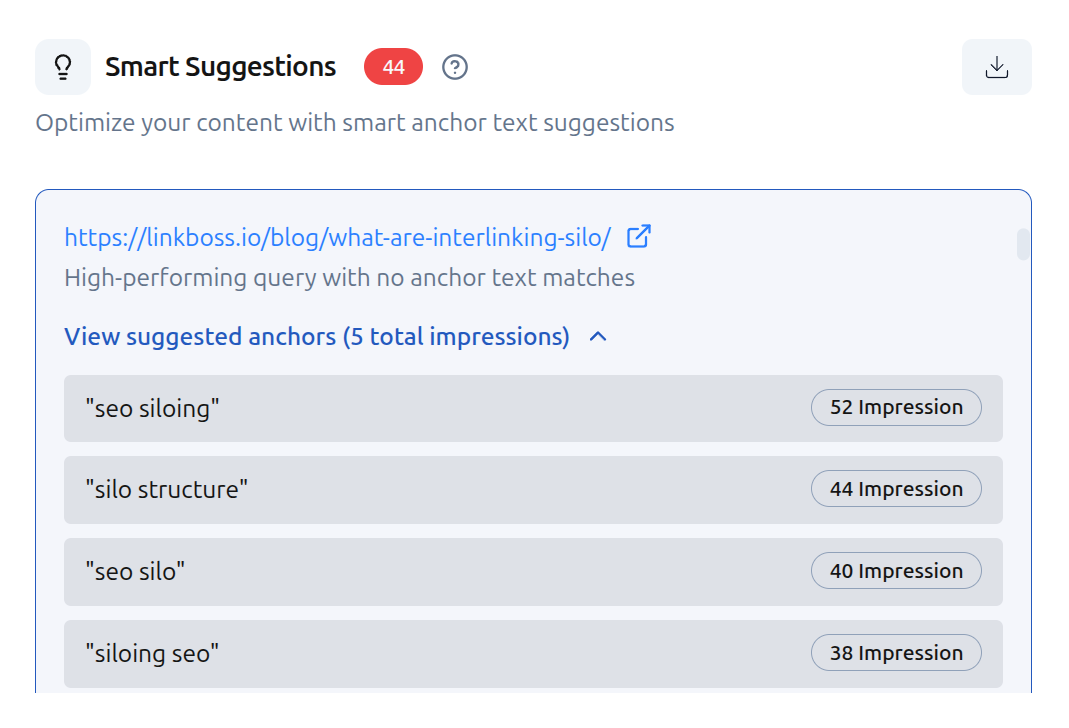
GSC-Powered Analytics Dashboard
Connect Google Search Console and unlock powerful analytics — track top keywords, monitor ranking movements, discover new opportunities, and get downtrending alerts.
- Top performing keywords with impressions, clicks, position & CTR
- Week-over-week ranking movement tracking
- New keyword discovery from the past week
- Downtrending page alerts — rescue pages before they lose traffic
- Keyword cannibalization checker
Side-by-Side Feature Comparison
Everything that matters for internal linking at scale — compared directly.
| Feature | LinkBoss | Yoast Premium |
|---|---|---|
| Primary Function | Internal linking automation | All-in-one WordPress SEO |
| Linking Method | Semantic AI (NLP) | Prominent word scanning |
| Bulk Linking | Up to 1,000 links/click | ❌ No (manual only) |
| Cornerstone / Pillar | AI-identified automatically | Manual toggle only |
| Silo Builder | 4 preset types + Boss Mode | ❌ No |
| Anchor Text Manager | Full distribution + cannibalization | ❌ No |
| Anchor Text Variation | Automated semantic variation | ❌ Post title only |
| Site Health Audit | Free — full dashboard | ❌ No |
| Orphan Page Detection | Free | ❌ No |
| Site Visualizer | Interactive network map | ❌ No |
| Processing Location | Cloud-based SaaS | Local WordPress server |
| Multi-Site Management | Cloud dashboard | ❌ Per-site login |
| Schema Markup | Not included | Comprehensive suite |
| Meta Tag Management | Not included | Full suite |
| Readability Analysis | Not included | Built-in |
| Pricing | Free tier + $99/yr | Premium $99/yr |
What You Get for $0 on LinkBoss
Most of LinkBoss is completely free. All auditing, analytics, silo building, and reporting features require no credits and no payment.
Site Health & Audit
- Site health score & full audit dashboard
- Orphan page detection
- Dead-end page detection
- Link duplication detection
- Anchor cannibalization checker
- Anchor text distribution
- Link flow score per page
- HTTP/HTTPS link audit
- Outbound domain tracking
- Full site structure visualization
GSC-Powered Analytics
- Top performing keywords (impressions, clicks, position, CTR)
- Top performing pages by position
- Week-over-week ranking movement tracking
- New keyword discovery (last week)
- Downtrending page alerts
- Keyword cannibalization checker
- Tracked keyword monitoring
- Anchor text suggestions from high-impression queries
Silo Building & Structure
- All silo preset types (Reverse, Priority, Serial, Hybrid Circle)
- One-click silo network builder
- Silo structure visualization
- Anchor text distribution management
Credits are only used for automatically inserting internal links into your content. You get 50 free credits on signup. No credit card required.
Up and Running in Under 5 Minutes
Install a lightweight WordPress plugin, connect it to your LinkBoss dashboard, and let AI analyze everything.
Install the Plugin
Go to Plugins → Add New in your WordPress dashboard, search for “LinkBoss”, and activate it.
Connect & Sync
Add your site in the LinkBoss dashboard, copy the API key, paste it into the plugin settings, and hit Sync Now.
Get Your Free Audit
See your site health score, orphan pages, dead-end pages, link duplication, anchor cannibalization — all at $0 cost.
Build Links & Grow
Use the silo builder, bulk interlinking, or individual suggestions. Track rankings with GSC analytics — all free.
Simple, Transparent Pricing
Most features are free. Credits only apply when auto-inserting links.
- Full site health audit & dashboard
- Orphan & dead-end page detection
- Link duplication & anchor audit
- GSC-powered keyword analytics
- Week-over-week ranking tracking
- Downtrending page alerts
- All silo builder tools & presets
- Site visualizer
- 2,400 credits allocated at once
- Delete site & replace monthly
- WordPress + Shopify support
No credit card required
- Everything in Free
- 3 sites from one dashboard
- 1,000 credits per month
- Bulk interlinking (up to 1,000 links)
- Silo builder with Boss Mode
- Custom network builder
- Smart anchor optimization
- Smart paragraph generator
- Inbound tool with relevancy scores
- Links stay permanent
No credit card required
- Meta tag optimization
- Schema markup management
- XML sitemaps
- Readability analysis
- Cornerstone content toggle
- ❌ No bulk interlinking
- ❌ No silo builder
- ❌ No anchor manager
- ❌ No site health audit
- ❌ No site visualizer
- ❌ No multi-site dashboard
Great SEO plugin • Not a linking tool
Setting the Record Straight
Common claims about Yoast’s internal linking — and the reality.
“Yoast’s Cornerstone Content feature is a silo builder”
“Yoast’s internal linking is sufficient for large sites”
“Server-side processing is a limitation of LinkBoss”
“Yoast handles everything SEO-related — you don’t need another tool”
Frequently Asked Questions
Does the Yoast free version include internal linking?
Can I use LinkBoss and Yoast together?
Why is bulk internal linking critical for large sites?
Is LinkBoss really free?
When is Yoast’s internal linking sufficient?
Your Internal Linking Deserves
a Specialist, Not a Sidebar Widget.
7,000+ SEO professionals trust LinkBoss for smarter, contextual internal linking at scale. Audit your entire site, build silo networks, track rankings — all for $0. Start free today.