AI Internal Linking: Agents vs Plugins vs SaaS — Which Architecture Wins? (WordPress Focus)
AI internal linking tools use three distinct architectures — autonomous agents, WordPress plugins, and cloud SaaS — each with measurably different implications for linking latency, plugin bloat, data privacy, and throughput across WordPress sites with 500+ posts. Vector embedding computation is the primary cost differentiator: agents and SaaS platforms pre-compute embeddings asynchronously, while plugin architectures compute them synchronously on each post save, creating a direct tradeoff between freshness and server resource consumption.
The Three Architectures Behind AI Internal Linking
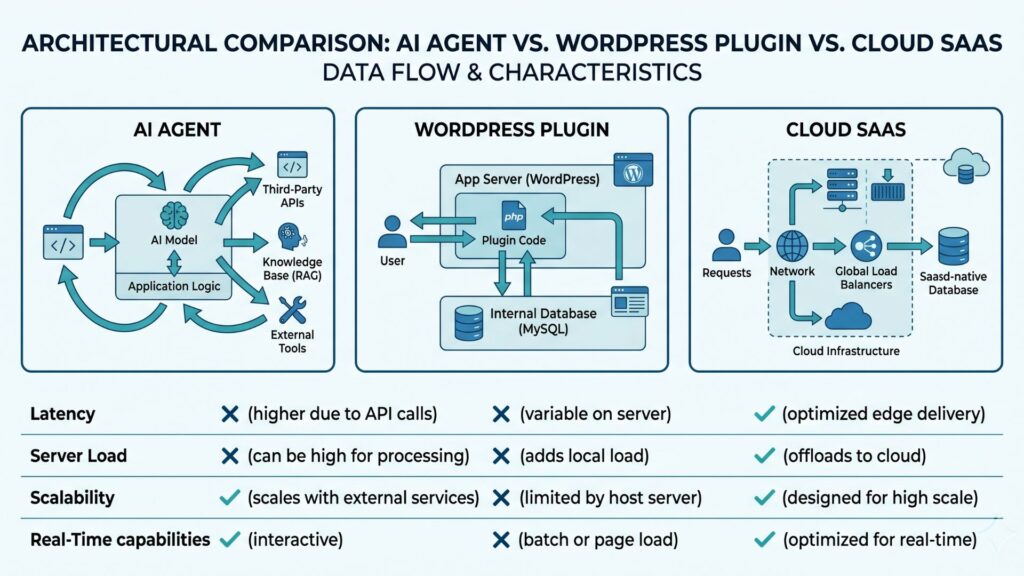
AI-powered internal linking tools are not all the same. The technology stack underneath determines performance characteristics, maintenance burden, and suitability for different site scales. Before choosing a tool, SEOs and developers need to understand what “AI internal linking” actually means at the infrastructure level:
- AI Agents — Autonomous linking systems that receive site crawl data via API, compute linking opportunities in a cloud environment, and push suggested or automatically inserted links back to WordPress through the REST API or webhook. These operate independently of the WordPress page lifecycle.
- WordPress Plugins (Server-Side AI) — Native WordPress code that processes post content at save-time or on-demand, running NLP/embedding models either through PHP bindings to ML libraries or by calling external APIs (OpenAI, Anthropic) synchronously within the WordPress request cycle.
- Cloud SaaS Platforms — Third-party infrastructure where content is sent to an external NLP service, embeddings are computed and stored server-side, linking suggestions are generated in the cloud, and results are delivered via dashboard, API, or direct plugin integration.
OpenAI’s GPTBot documentation confirms agent architectures rely on API access patterns distinct from plugin lifecycle hooks. Anthropic ClaudeBot crawl guidelines distinguish server-rendered versus client-delivered content processing — a distinction that matters for WordPress sites using JavaScript-heavy page builders.
Why Architecture Choice Determines Your Internal Linking Outcome
The architecture underlying your AI internal linking tool is not an implementation detail — it directly determines:
- Link freshness — Plugin architectures run at save-time, producing links based on current content. Agent and SaaS architectures may have a processing lag of minutes to hours.
- Server resource consumption — Plugin architectures consume PHP memory and CPU at request time; shared hosting environments may throttle or degrade. Agent and SaaS architectures offload this to external compute.
- Data privacy — Plugin architectures process content locally. SaaS architectures send content to third-party servers; this has GDPR and data-handling implications for sites with user-generated content.
- Latency tolerance — Asynchronous architectures (agents, SaaS) do not slow down the WordPress editor. Synchronous plugin processing can add 1–5 seconds to post saves when calling external embedding APIs.
Deep Dive: AI Agents for Internal Linking
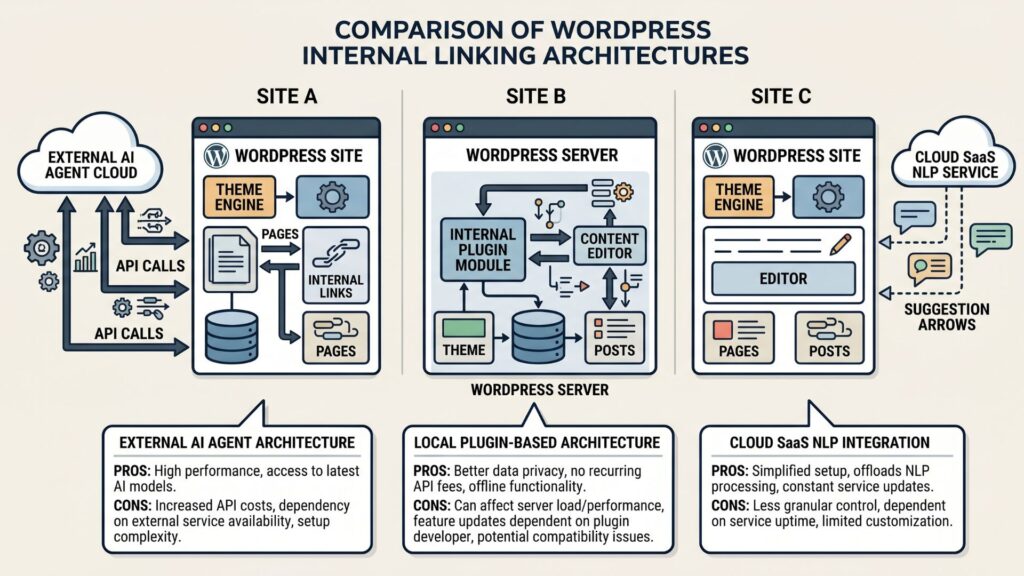
Autonomous agents represent the most architecturally distinct approach to AI internal linking. Rather than processing links within WordPress or through a simple API call, an agent receives objectives (“interlink all posts about X with related posts about Y”), executes multi-step workflows, and can adapt linking behavior based on site crawl results.
How AI agents work for internal linking
- The agent receives a site map or crawl export via API (from LinkBoss, Sitebulb, or Screaming Frog in export-only mode)
- Content is chunked and embedded using a transformer model (OpenAI
text-embedding-3-smallor equivalent) - Cosine similarity scores are computed between all content pairs to surface latent semantic relationships
- The agent applies linking rules — topic coherence thresholds, anchor text diversity constraints, silo structure enforcement
- Suggested links are pushed to WordPress via REST API or presented in a review queue for human approval
Strengths
- No plugin footprint on WordPress — eliminates PHP memory overhead and save-time latency
- Supports multi-site management from a single agent interface (agent can iterate across 50+ WordPress installations)
- Agent reasoning chains can apply complex rules (silo membership + anchor diversity + topic distance) that plugin UIs cannot encode
- Embeddings are pre-computed and cached; linking suggestions are near-instant once the initial compute completes
Weaknesses
- Initial embedding computation for large sites (10,000+ posts) may take hours on commodity GPU hardware
- Agent outputs require a linking layer to WordPress (REST API credentials, webhook configuration) — higher initial setup complexity
- Agent behavior is opaque compared to plugin rule UIs; diagnosing incorrect linking decisions requires log access
When agents are the better choice
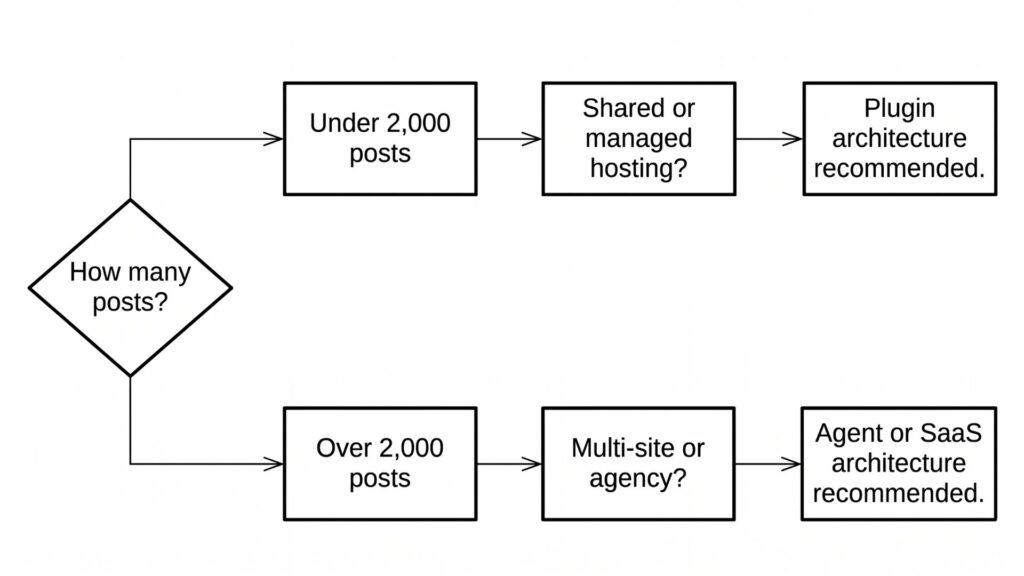
Enterprise WordPress installations with 5,000+ posts, multi-site agencies managing 20+ client WordPress sites, and teams that want to review AI linking decisions in bulk before insertion — agents provide the audit trail and cross-site coordination that plugin architectures cannot match.
Comparison: AI Agents vs WordPress Plugins vs SaaS
| Dimension | AI Agent | WordPress Plugin | Cloud SaaS |
|---|---|---|---|
| Processing location | External cloud compute | WordPress server (PHP) | Third-party NLP infrastructure |
| Link freshness | Near-real-time after initial compute | Real-time at post save | Near-real-time after sync |
| Server resource impact | Zero (off-server) | Moderate to high (embedding APIs or local ML) | Minimal (webhook delivery only) |
| Multi-site support | Native (one agent → many WP installs) | Per-installation licensing | Per-site or multi-site plans |
| Setup complexity | Medium-high (API credentials, agent config) | Low (install and activate) | Low-medium (plugin install + account) |
| Embedding model control | Full (self-hosted or configurable API) | Limited to plugin’s chosen model | Fixed by provider |
| Data privacy | Configurable (can self-host agent) | Content stays on server | Content sent to third-party |
| Audit / review queue | Yes — agent produces suggestion list | Depends on plugin | Yes — SaaS dashboards |
| WordPress version lock-in | None | Plugin updates required | API dependency |
Deep Dive: WordPress Plugin Architectures
WordPress plugins that embed AI linking directly inside the server process are the most familiar architecture for WordPress site owners. They require no external service accounts, no API key management, and no off-server data handling.
How plugin-based AI internal linking works
- On post save (or via on-demand bulk action), WordPress sends content to an embedding API (OpenAI, Cohere, or a self-hosted model) or runs inference locally if the plugin bundles a lightweight model
- The destination post embeddings are fetched from a local cache or computed in real-time
- Cosine similarity between source and destination embeddings produces a ranked list of linking opportunities
- The plugin inserts links automatically (auto-insert mode) or surfaces them in the WordPress admin for approval (suggestion mode)
Strengths
- Simplest setup: install, activate, configure API key, done
- No external dependency for linking suggestions — if the embedding API is reachable, the plugin works
- Content never leaves the WordPress hosting environment (when using server-side embedding only)
- Tight integration with WordPress post editor and block framework
Weaknesses
- Embedding API calls at post save time add latency to the editor experience; plugins that call OpenAI’s API synchronously can add 2–8 seconds per save on slower hosting
- Plugin PHP memory and CPU consumption scales with site size; shared hosting environments often hit memory limits on bulk re-embedding
- Plugin updates and WordPress core updates can break embedding API integrations without notice
- Each WordPress installation runs its own embedding compute — no economy of scale for agencies managing multiple client sites
When plugins are the better choice
Single-site WordPress installations with up to 2,000 posts, shared hosting environments where off-server compute is not feasible, and site owners who prefer all-in-one plugin management over configuring separate agent or SaaS infrastructure.
The WordPress Plugin vs SaaS Tradeoff
The core tension between plugin and SaaS architectures is where the computational load lives. SaaS platforms amortize embedding compute across their entire customer base and maintain GPU-accelerated infrastructure purpose-built for transformer inference. Plugin architectures share the hosting server’s resources, which were not designed for ML workloads.
For sites with 500+ posts, the difference is measurable: a SaaS platform with dedicated GPU inference can produce linking suggestions in under 60 seconds for an entire site. A plugin on a $20/month shared hosting plan may time out or exhaust memory when attempting bulk re-embedding of 1,000+ posts.
Implementation Checklist by Architecture
If You Choose an AI Agent Architecture
- Select an agent platform that supports WordPress REST API integration (LinkBoss API, custom agent via LangChain, or managed service)
- Configure site credential scope — agent needs read access to posts and write access to link insertion endpoints
- Define linking rules: minimum topic coherence score (typically cosine similarity > 0.75), anchor text diversity ratio, silo membership constraints
- Run initial site crawl and embedding compute; allocate 2–6 hours for sites with 5,000+ posts on standard GPU hardware
- Review agent suggestion queue; approve or suppress links based on quality audit
- Schedule recurring agent runs (daily or weekly) to capture linking opportunities from newly published content
If You Choose a WordPress Plugin Architecture
- Install plugin from WordPress.org or provider repository; activate on the target site
- Enter embedding API key (OpenAI, Cohere, or provider’s native model); verify quota allocation
- Run initial bulk embedding pass on existing content; monitor PHP memory usage throughout
- Configure auto-insert vs. suggestion-only mode based on editorial workflow preference
- Set topic coherence threshold (recommended: 0.70–0.80 cosine similarity minimum)
- Monitor post-save latency; if exceeding 3 seconds, switch from synchronous to background queue processing
- Schedule monthly bulk re-embedding to refresh linking suggestions as content corpus grows
If You Choose a SaaS Platform Architecture
- Create account on the SaaS platform; install companion WordPress plugin if required
- Authenticate WordPress site connection via OAuth or API key
- Configure content sync settings — which post types, categories, and status levels to include
- Set linking rules within the SaaS dashboard; preview suggestions before enabling auto-insertion
- Review weekly linking reports; adjust topic distance and anchor text distribution parameters
- For multi-site agencies: add all client WordPress installations to a single SaaS dashboard for unified reporting
ROI Comparison: Which Architecture Delivers the Best Return for WordPress Sites
| Cost Factor | AI Agent | WordPress Plugin | Cloud SaaS |
|---|---|---|---|
| Monthly cost range | $99–$500+ (agent compute + API) | $0–$79 (plugin license + embedding API) | $49–$199 (subscription) |
| Setup time | 4–8 hours | 30–60 minutes | 30–90 minutes |
| Annual fully-loaded cost (1 site) | $1,188–$6,000+ | $0–$948 + API costs | $588–$2,388 |
| Scaling cost model | Per-agent compute (linear) | Per-site API calls (linear) | Per-post or per-site tiers |
| Internal linking capacity | Unlimited (self-hosted) | Limited by server resources | Limited by subscription tier |
| Time-to-link (new post) | 5–30 minutes | Real-time (if plugin is synchronous) | 2–15 minutes |
Frequently Asked Questions
Can I use an AI agent and a WordPress plugin simultaneously for internal linking?
Yes, but it requires careful coordination to prevent link conflicts. Running both simultaneously can produce duplicate links or contradictory linking decisions. If using dual systems, set one to suggestion-only mode and use its output as a secondary review layer rather than auto-inserting from both.
Do AI agents require more technical expertise to manage than WordPress plugins?
Generally yes — agents require API credential management, webhook configuration, and the ability to interpret agent reasoning logs when linking decisions need auditing. Plugins present a familiar WordPress admin UI and are accessible to non-technical users. SaaS platforms fall in the middle, with dashboards designed for SEO practitioners rather than developers.
How does each architecture affect WordPress page speed?
Plugin architectures that run embedding APIs synchronously at post save can add 1–5 seconds of server response time during content edits, though this does not affect front-end page speed. Agent and SaaS architectures have zero impact on front-end performance since all compute is off-server. For front-end access, all three architectures are equivalent — the only frontend effect is the presence of inserted internal links, which marginally increase page HTML weight by 0.5–2KB per link.
Which architecture is most privacy-compliant for GDPR-sensitive content?
Plugin architectures that compute embeddings locally using self-hosted models rather than external APIs are the most privacy-compliant option. Agent architectures are configurable — you can self-host the agent on your own infrastructure. SaaS platforms require sending content to third-party servers; review the provider’s data handling agreements before processing EU user data.
How do AI agents handle linking decisions for sites with 10,000+ posts?
Large corpus handling depends on the agent’s embedding pipeline. Most agents chunk the site into batches of 500–1,000 posts, compute embeddings in parallel, and store results in a vector database. For a 10,000-post site, expect 2–8 hours for initial compute on standard GPU hardware, with incremental updates of 5–30 minutes per newly published post afterward.
References
- Google. Large site owner’s guide to managing crawl budget. Google Search Central.
- OpenAI. GPTBot operator information. OpenAI Platform.
- Anthropic. ClaudeBot crawler documentation. Anthropic Platform.
- Wikipedia. Cosine similarity. Wikipedia.
- Wikipedia. Semantic search. Wikipedia.
- WordPress. REST API Handbook. WordPress Developer Resources.