What Is a Reverse Silo in SEO?
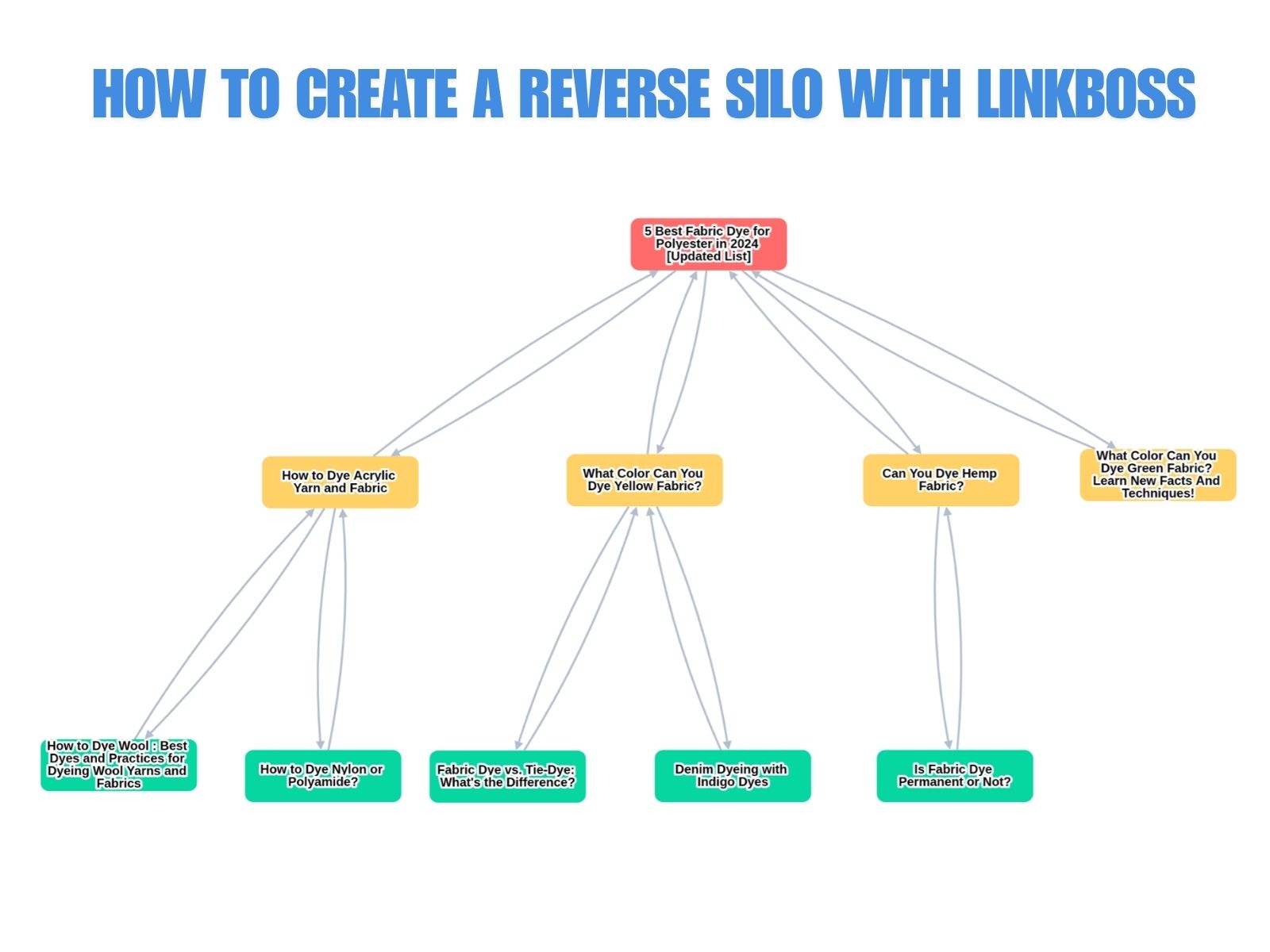
A reverse silo is an internal linking structure where supporting content pages funnel link equity upward toward a single target page. A traditional top-down silo flows authority from parent to child pages, but the reverse silo inverts this direction: long-tail, informational pages pass their PageRank to one high-value conversion page at the bottom of the structure.
Kyle Roof, the creator of PageOptimizer Pro and a recognized on-page SEO authority, developed and formalized the reverse silo model through correlation-based testing. The concept builds on Bruce Clay’s original siloing framework, invented in the early 2000s, but reverses the authority flow direction.
In a reverse silo, 3 structural components define the architecture:
- Target Page: The single page at the bottom of the structure receiving all inbound internal links. This page targets a high-competition, high-value keyword, typically a product page, service page, or landing page.
- Supporting Posts: Informational blog posts that answer specific long-tail queries. Each supporting post contains 1 internal link to the Target Page and 1–2 internal links to other supporting posts in the silo.
- Link Equity Flow: Authority moves upward from granular content toward the Target Page. No other outbound links exist on supporting posts, concentrating the PageRank flow toward one destination.
According to HVSEO, the reverse silo earned its name because “while many would put their Target Page at the top, this model has the Target Page at the bottom… The flow moves downwards towards the Target Page, rather than back and forth.”
How Does a Reverse Silo Distribute Link Equity?
Link equity in a reverse silo flows bottom-up: every supporting page passes a portion of its PageRank directly to the target page, creating concentrated authority accumulation at a single URL. The supporting posts also link to 1–2 adjacent posts, forming a secondary chain that circulates equity among the support layer before directing it downward.
Google’s PageRank algorithm assigns each page an authority score based on the quantity and quality of links pointing to it. In a reverse silo with 10 supporting posts, the Target Page receives 10 direct internal links, each carrying a fraction of the linking page’s authority. The mathematical effect compounds: if Page A links to Page B, and Page B links to both Page C and the Target Page, the Target Page receives equity from both the direct link and the cascading indirect chain.
Google’s Gary Illyes confirmed that PageRank remains an active ranking signal, and internal links participate in PageRank computation. The reverse silo exploits this by creating an asymmetric accumulation pattern: the Target Page receives concentrated inbound equity while distributing minimal equity outward.
The 3 factors that govern equity distribution in a reverse silo:
- Direct link count: Each supporting post that links to the Target Page passes a defined portion of its authority. More supporting posts increase the Target Page’s accumulated PageRank.
- Link dilution control: Supporting posts restrict outbound links to only the Target Page and 1–2 adjacent supporting posts. Fewer outbound links per page mean each individual link carries more equity.
- In-content placement: All links appear within body content, not sidebars or footers. In-content links carry higher contextual weight in Google’s evaluation.
What Are the 5 SEO Benefits of a Reverse Silo?
The 5 SEO benefits of a reverse silo are rapid ranking for low-authority sites, long-tail keyword dominance, authority consolidation on a single page, natural internal linking patterns, and conversion-focused equity distribution. Each benefit operates through a distinct mechanism that compounds with the others.
- Rank low-domain-authority sites against stronger competitors. A practitioner on Builder Society reported ranking a DR 8 domain in the top positions against DR 80–90 sites using a 6-post reverse silo in a YMYL niche. The concentrated internal linking compensates for weak external backlink profiles by channeling all topical authority to one URL.
- Capture long-tail search traffic before targeting head terms. According to Visible SERP, long-tail keywords account for 70% of web searches. Pages optimized for long-tail queries move up 11 positions on average after receiving proper internal link support. The supporting posts in a reverse silo target these specific queries while passing their accumulated authority to the Target Page.
- Consolidate topical authority on one URL. With all supporting posts linking to the Target Page, Google receives a strong signal about which page represents the primary resource on a given topic. HVSEO describes this effect: “With all the links coming to that single page, it lets Google know this is a solid page. Look at how many closely related pages link to it.”
- Create natural internal linking patterns. The reverse silo uses semantically relevant in-content links between topically related pages. This matches Google’s stated preference for links that serve users rather than manipulate rankings.
- Funnel authority to conversion-focused pages. Informational supporting posts attract organic traffic and backlinks more easily than commercial pages. The reverse silo converts this informational authority into ranking power for the Target Page, typically a product or service page that generates revenue.
When Should You Use a Reverse Silo Structure?
Deploy a reverse silo when a specific high-value page requires a ranking boost, when your domain has low authority compared to competitors, or when informational content needs to support commercial pages. The reverse silo is a targeted structure that solves specific ranking challenges rather than serving as a default site architecture.
The 4 scenarios where a reverse silo delivers maximum impact:
- A product or service page ranks on page 2–3 for its target keyword. The reverse silo funnels additional PageRank to that page from supporting informational content, pushing it into the top 10 results.
- A low-DR site competes against established domains. A reverse silo with 6–10 supporting posts concentrates enough topical authority on one page to overcome domain-level authority gaps.
- Informational blog content exists but lacks strategic internal linking to commercial pages. Retrofitting existing posts into a reverse silo structure redirects their accumulated authority toward conversion-focused URLs.
- A new site needs to rank for competitive terms before building extensive external backlinks. The reverse silo’s concentrated internal linking provides an immediate authority boost to the Target Page.
Avoid a reverse silo when all pages in a cluster need equal ranking power (use a circle silo instead), or when the site architecture requires broad topical authority across multiple categories (use a hub-and-spoke structure instead).
How to Create a Reverse Silo in LinkBoss Custom Network?
Building a reverse silo in LinkBoss requires 6 steps: navigate to Custom Network, add URLs via topic-based suggestions, submit the cluster, select the reverse silo preset, review the visual structure, and execute Boss Mode for automatic linking. LinkBoss uses NLP and semantic similarity scoring to determine which pages belong in the cluster and generates contextually relevant anchor text for each link.
Step 1: Access the Custom Network Tool
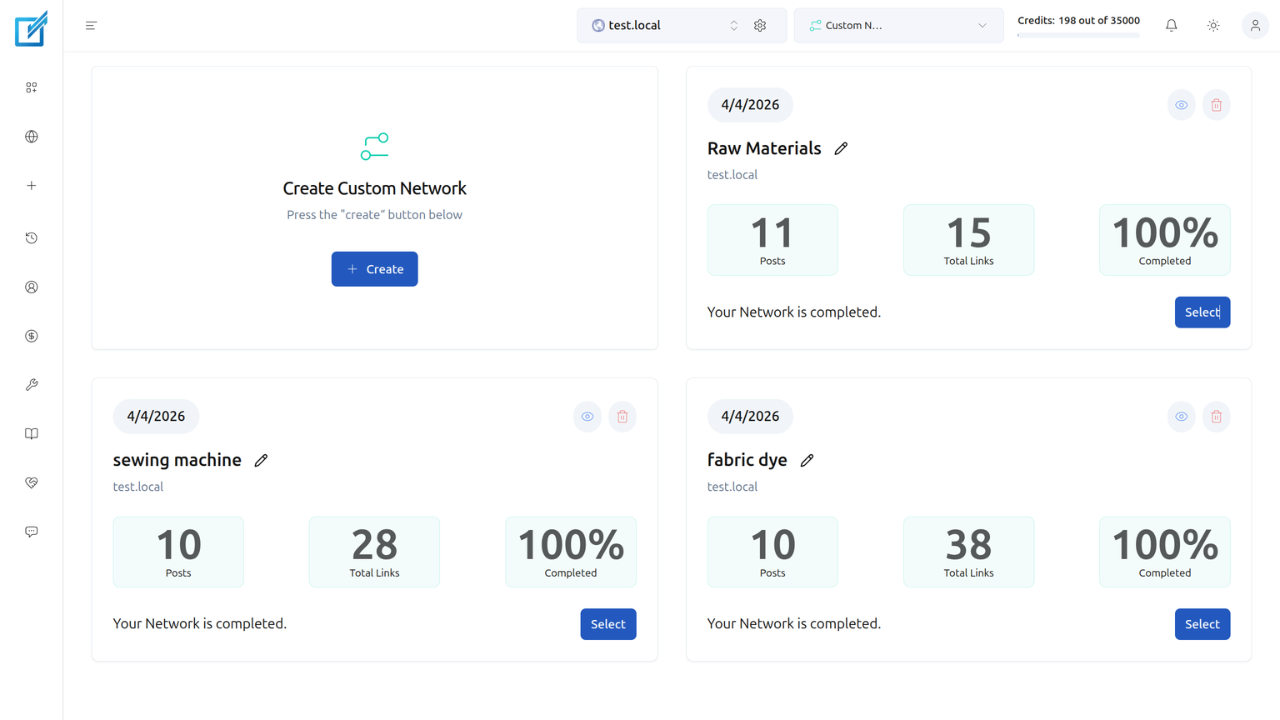
Open the LinkBoss dashboard. Navigate to Tools → Custom Network → Create. The Create Custom Network page loads with a URL input field and a right sidebar containing 3 tabs for adding URLs.
Step 2: Add URLs to Your Topic Cluster
The right sidebar provides 3 methods for selecting URLs:
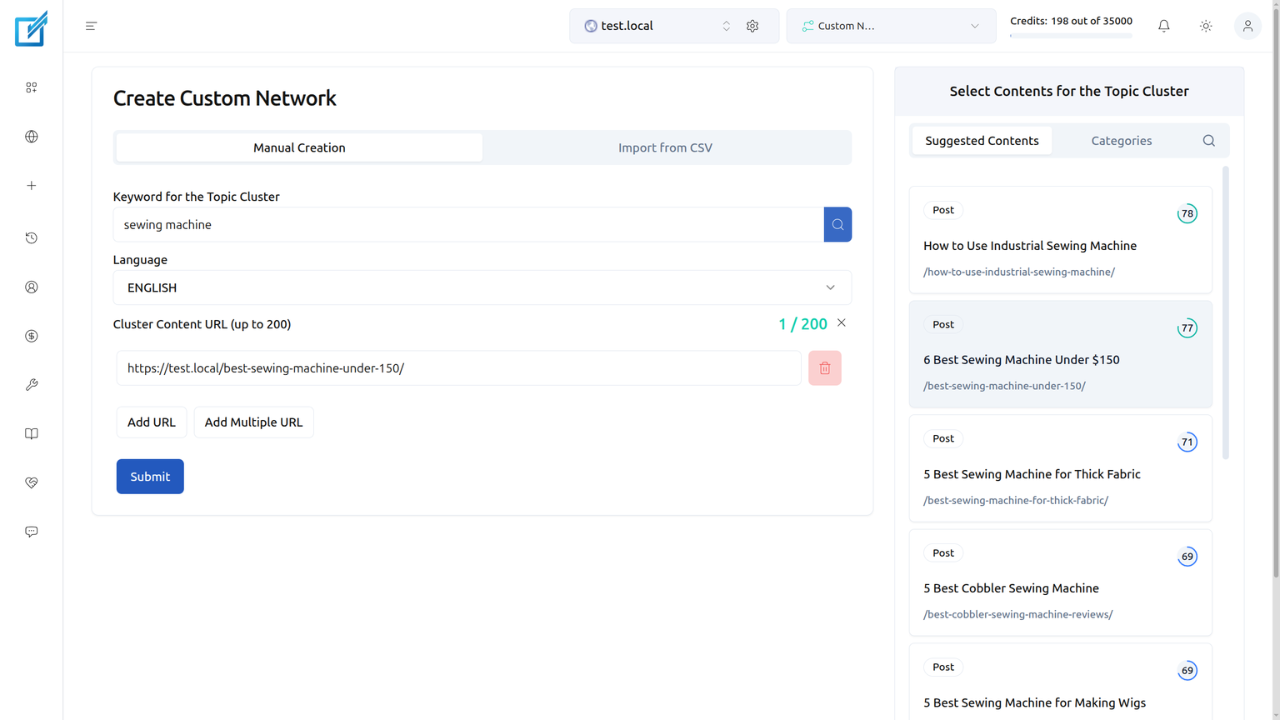
- Suggested Contents: Enter a topic keyword (for example, “fabric dye”) in the Keyword for Topic Cluster field. LinkBoss populates URLs ranked by semantic similarity score. Select the URLs most relevant to your topic.
- Categories: Browse URLs organized by your site’s existing category structure. Click Fetch on a category, then Add to include those URLs.
- Search: Find specific pages by title keyword.
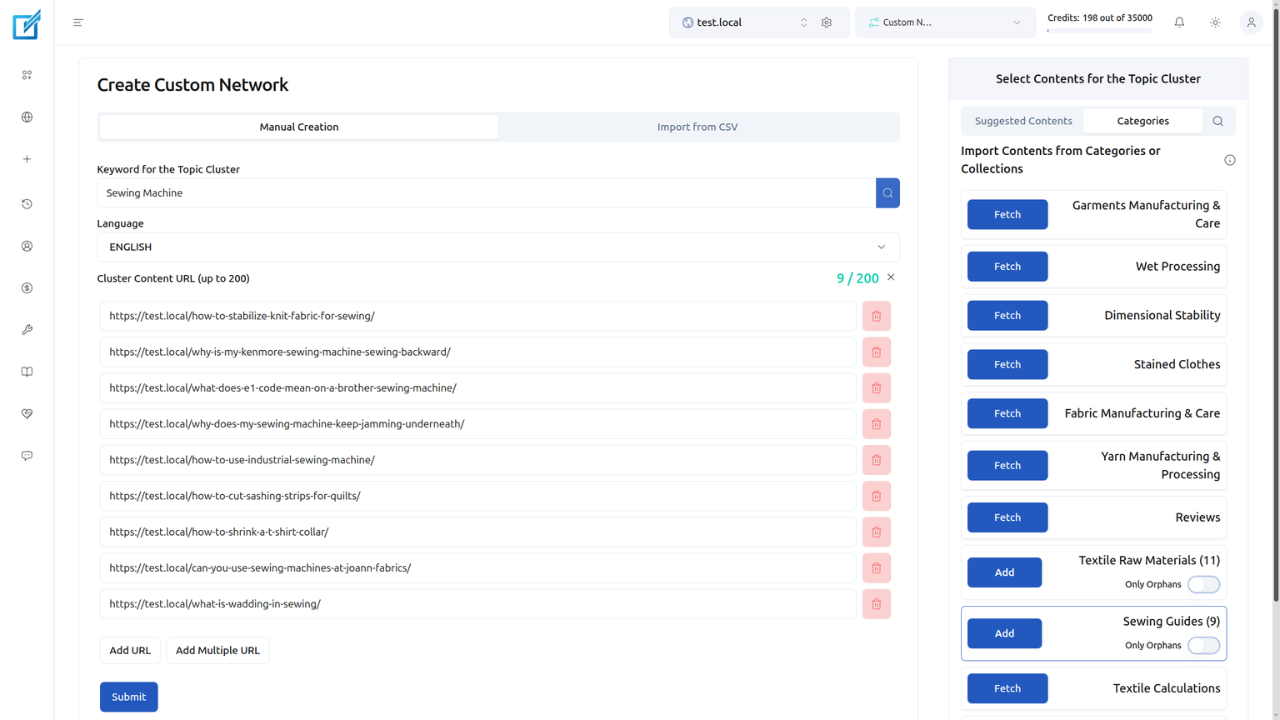
For a reverse silo, select pages that form a coherent topical cluster around your Target Page’s subject. Include the Target Page itself plus 5–10 supporting informational posts.
Step 3: Submit the Cluster
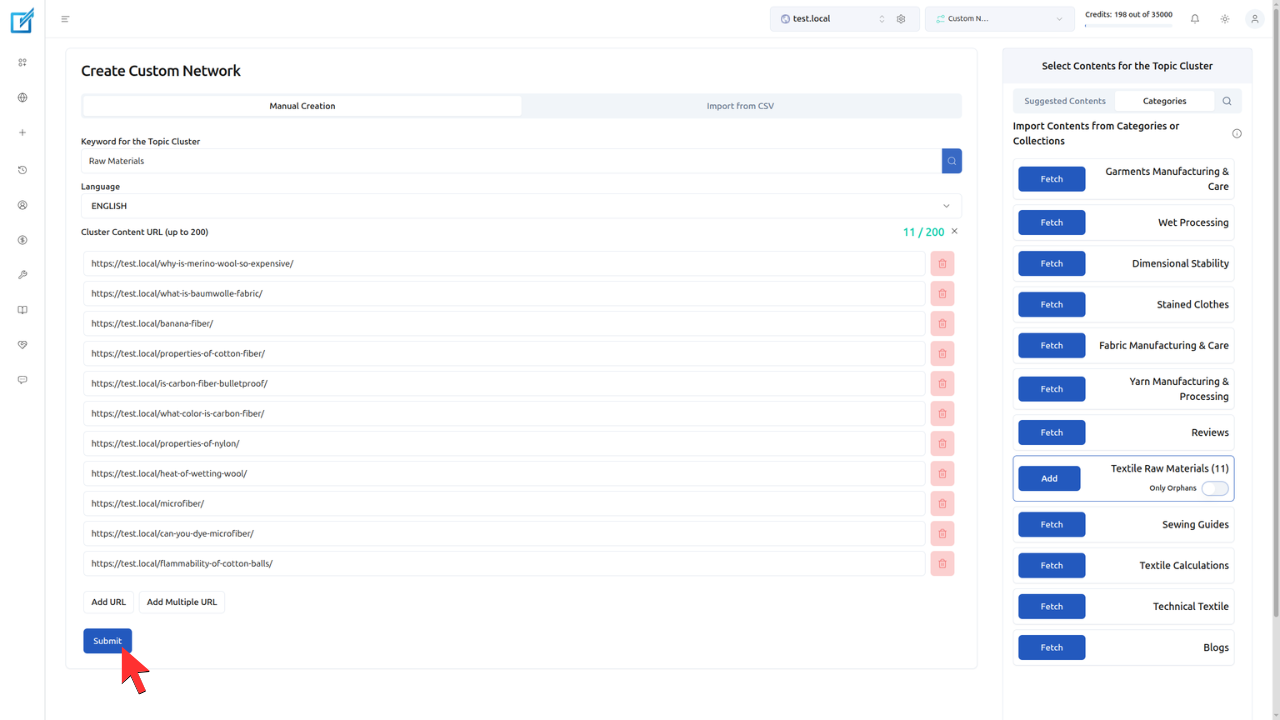
Click Submit. LinkBoss processes the selected URLs and advances to the silo configuration screen.
Step 4: Select the Reverse Silo Preset
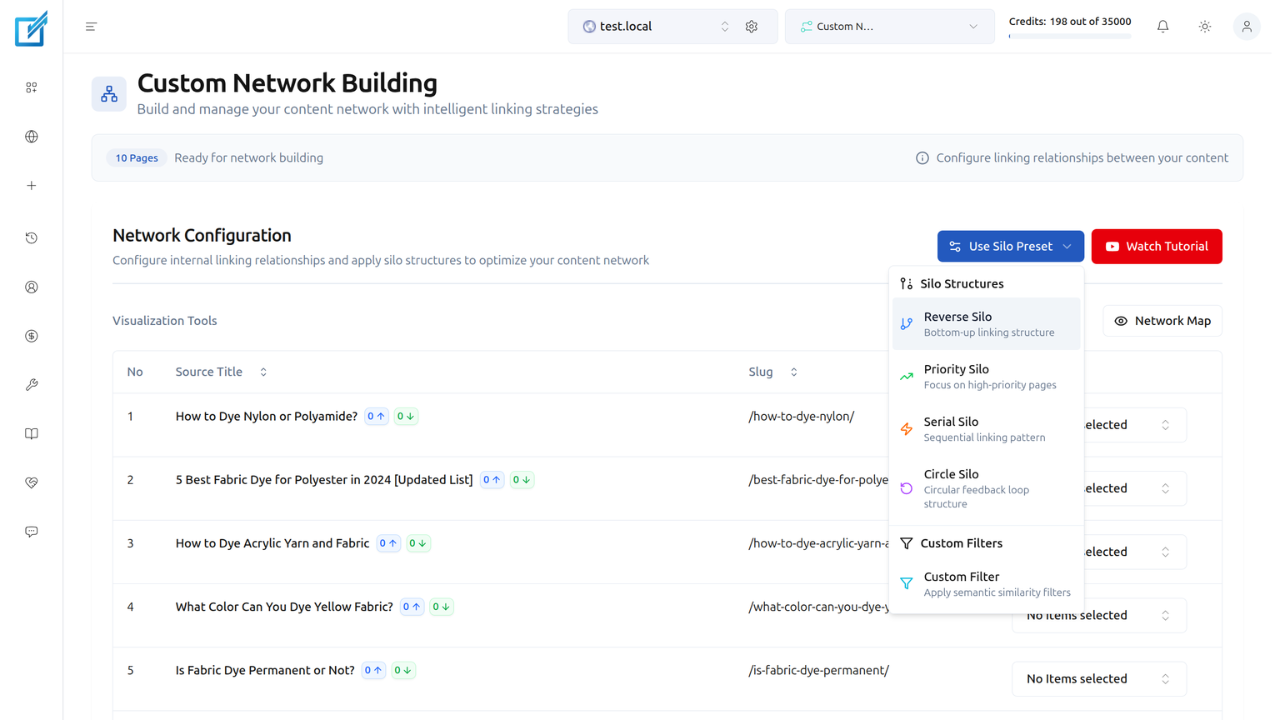
Click Use Silo Preset on the configuration screen. Choose Reverse Silo from the available options. Optionally select a Parent Node (the pillar/Target Page URL) from the dropdown. Click Generate Reverse Silo.
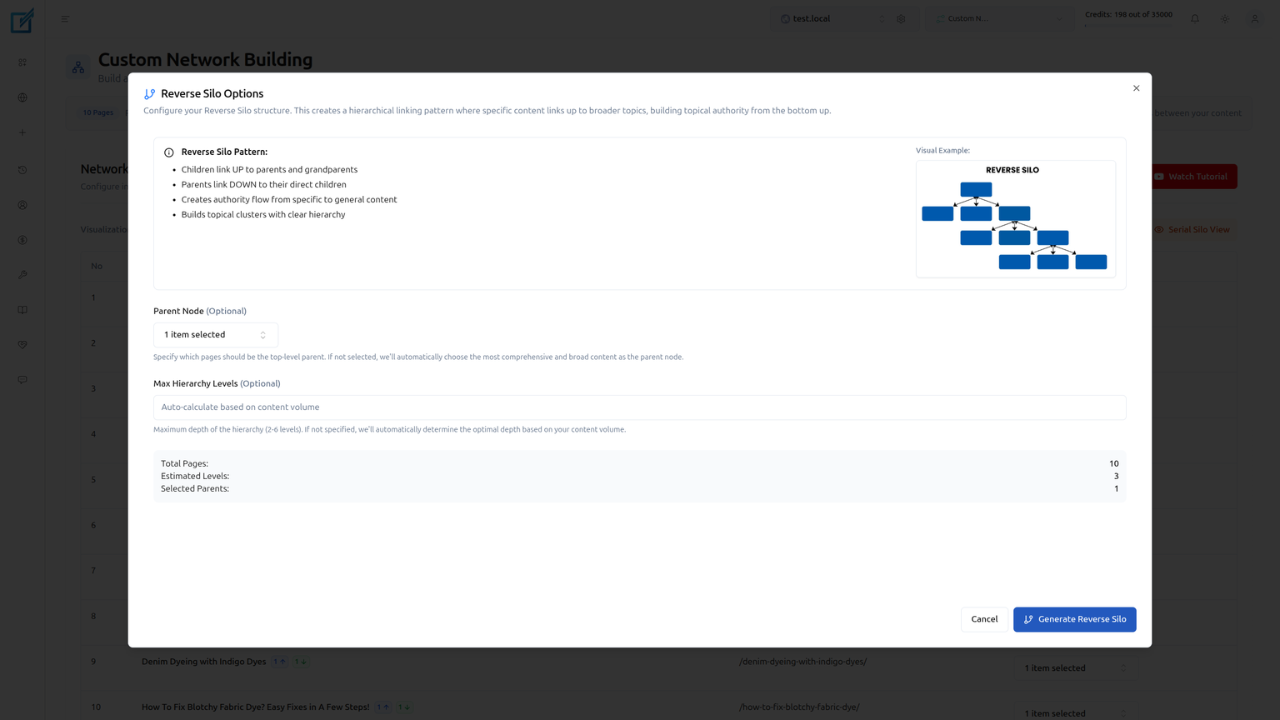
LinkBoss automatically calculates the optimal linking structure based on the reverse silo model, with supporting pages linking upward to the Target Page using semantically relevant anchor text.
Step 5: Review the Visual Structure
Click Reverse Silo View to see the linking structure displayed as a visual diagram. Verify that:
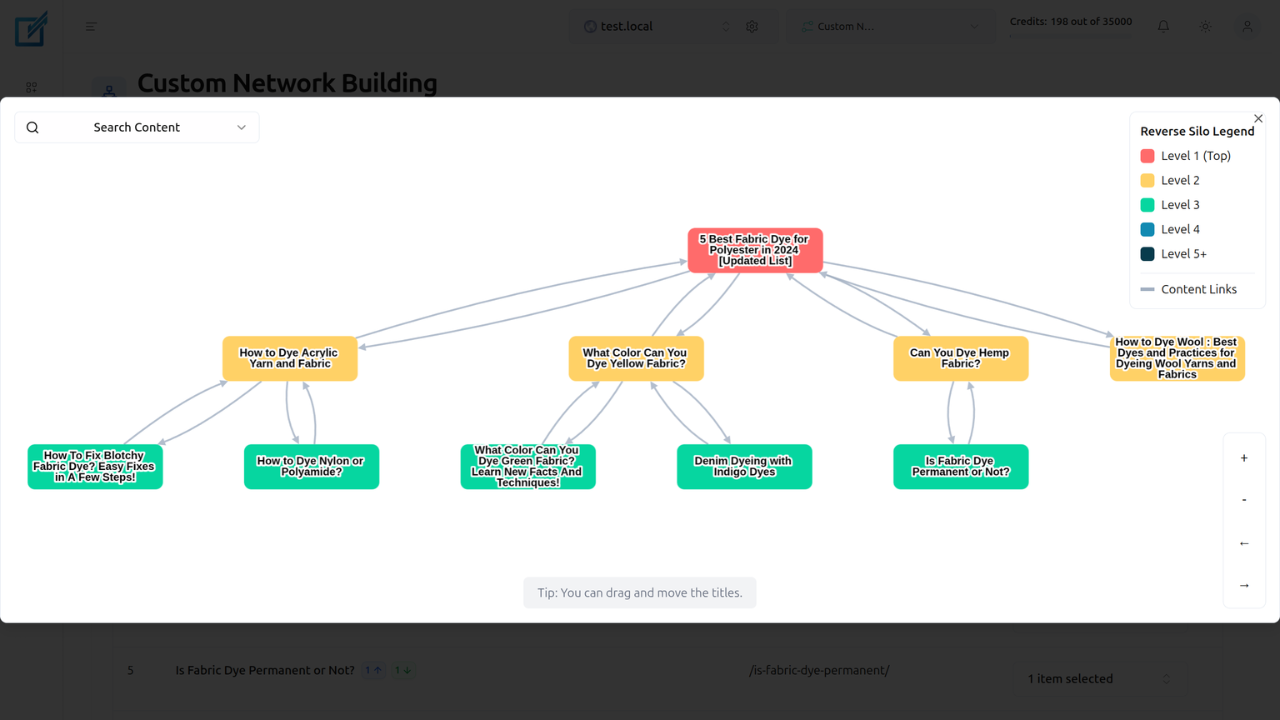
- The Target Page sits at the bottom of the structure
- All supporting posts link to the Target Page
- Supporting posts link to 1–2 adjacent posts in the cluster
- Anchor texts are contextually relevant to each linked page
Step 6: Execute Boss Mode
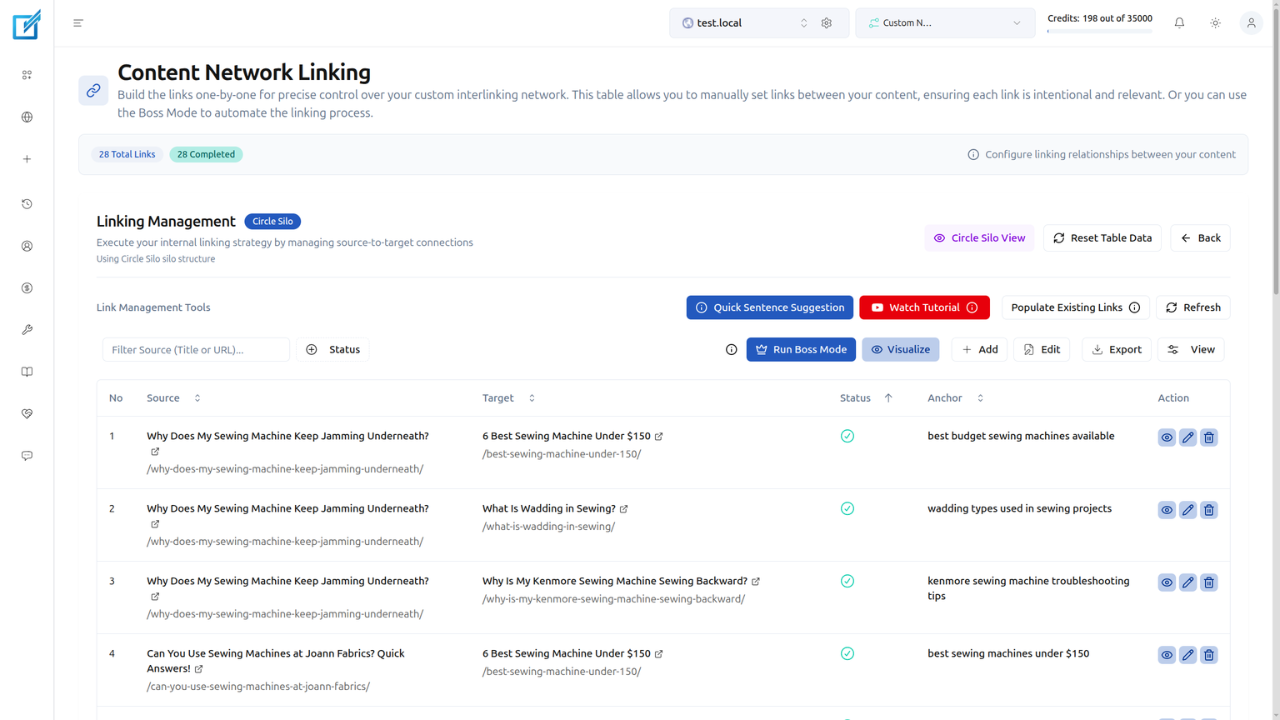
Click Next, then Run Boss Mode → Let’s Go.
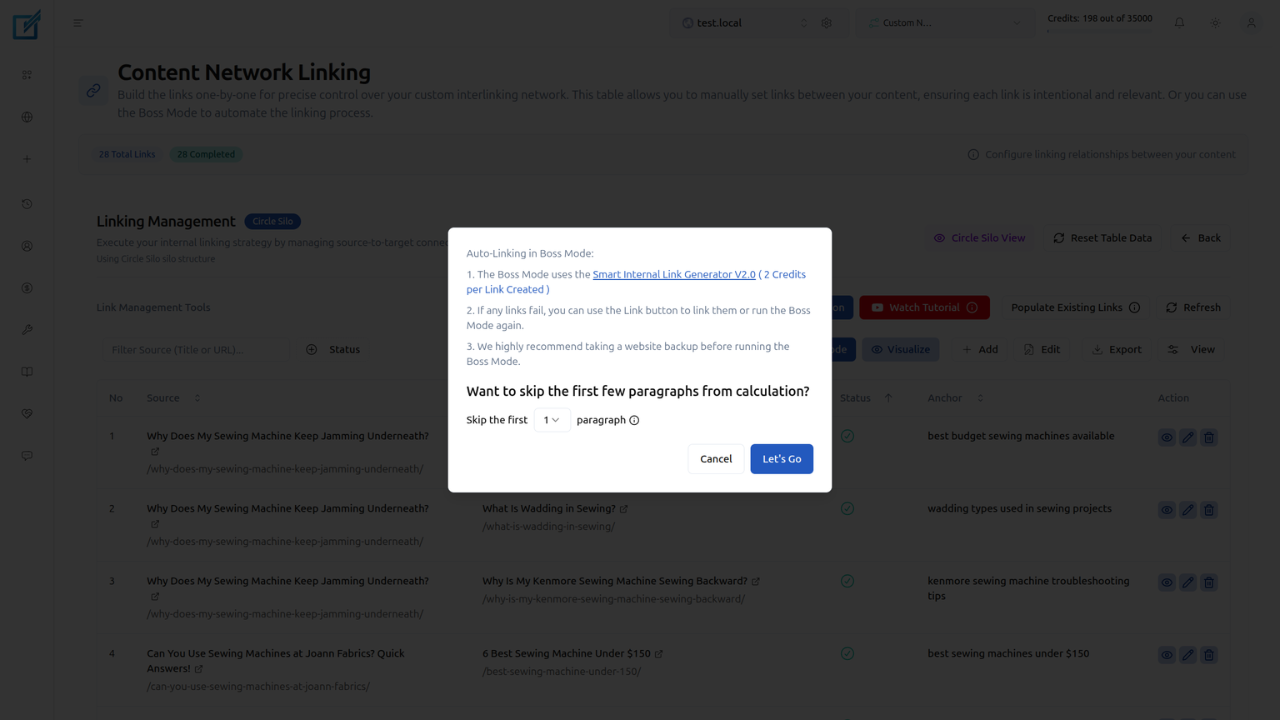
Boss Mode uses the Smart Internal Link Generator V2.0 to insert every link in the silo. For each connection in the structure, the system:
- Finds the most semantically relevant paragraph in the target post based on NLP analysis of content meaning.
- Generates 2–3 new contextual sentences that are appended after that paragraph. These sentences naturally lead into the anchor text rather than forcing a link into existing content.
- Embeds NLP-optimized anchor text within the generated sentences so the link reads as a natural part of the paragraph, not an insertion.
This approach differs from simple link wrapping (the “In-Post Sentences” method), which only inserts a link into an existing sentence. Boss Mode adds fresh context around each link, which produces more natural-sounding content and stronger topical signals for search engines.
The process runs in the background. LinkBoss deploys all links directly to your live site and notifies you on completion. After Boss Mode finishes, you can go back and edit individual links, modify anchor text, or adjust the surrounding context.
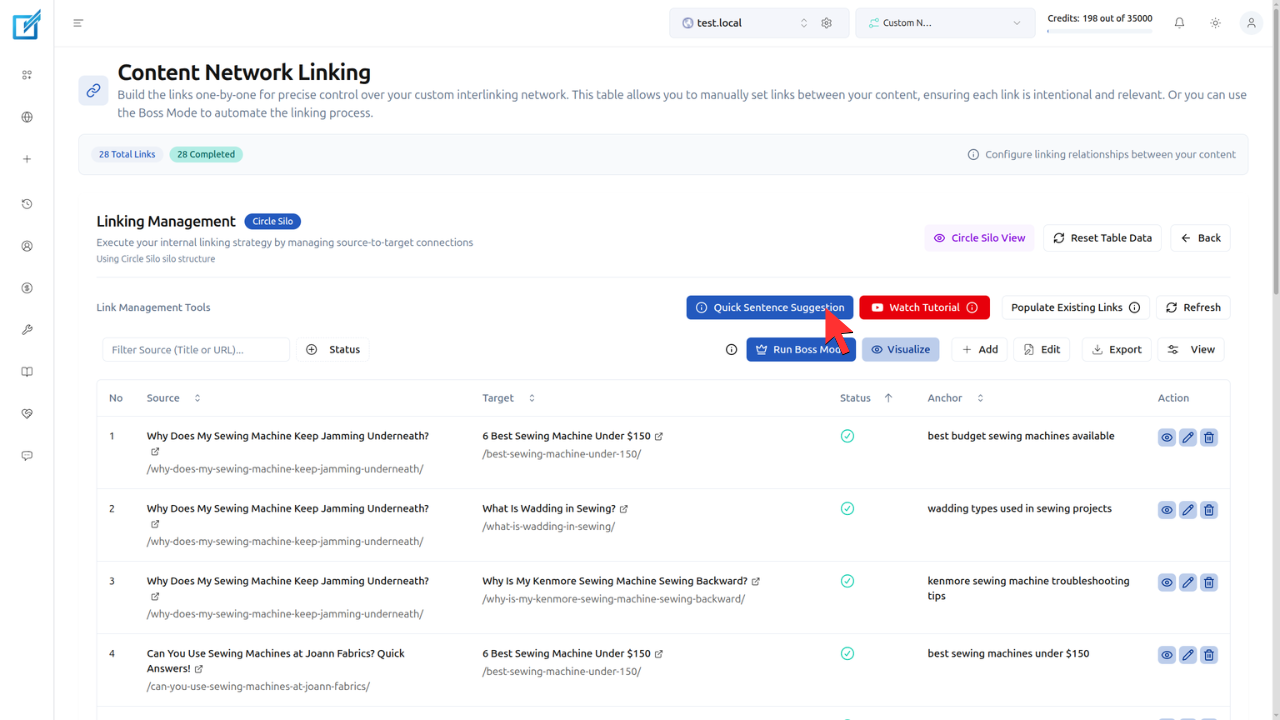
If you prefer not to add new sentences to your posts, use the Quick Sentence Suggestions route instead of Boss Mode. This option inserts links into existing sentences without generating additional content, It costs 1 credit per link instead of 2 credits.
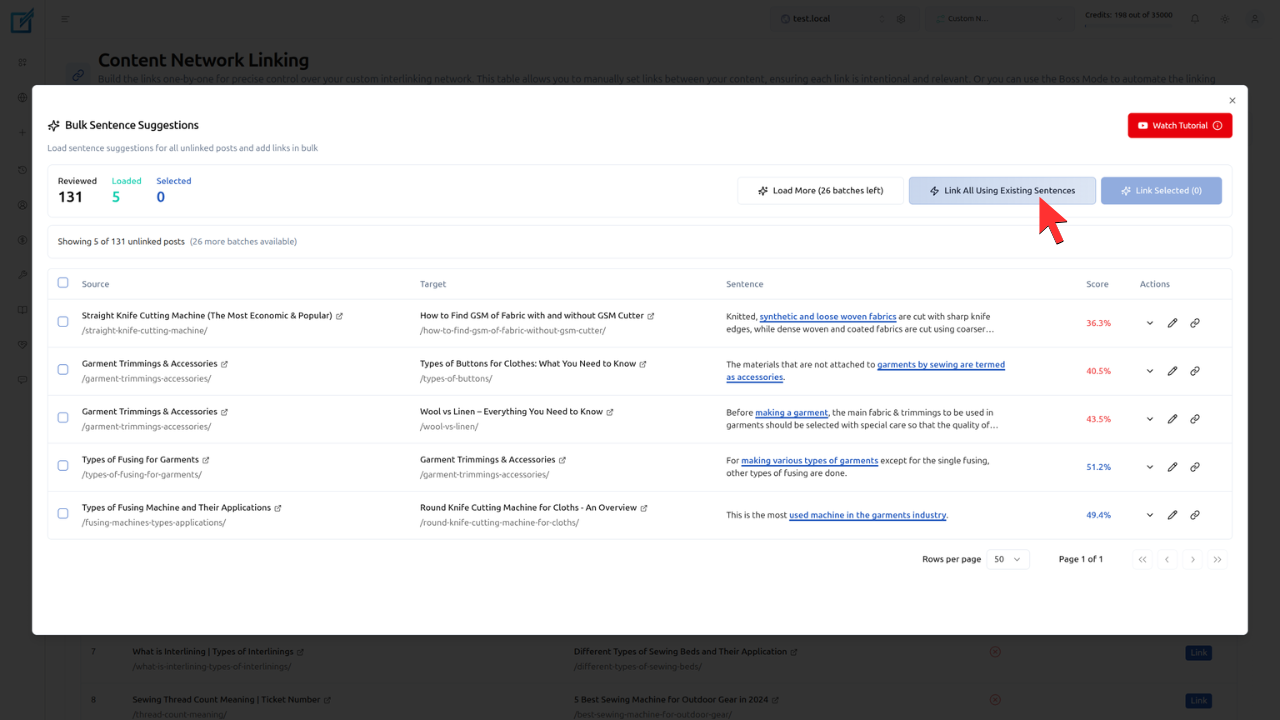
LinkBoss generates the entire reverse silo structure in under 2 minutes, a process that takes 40x longer when performed manually. Links remain permanent even if the LinkBoss plugin is removed from the site. Boss Mode costs 2 credits per link (compared to 1 credit per link for the In-Post Sentences method).
What Types of Websites Benefit Most from a Reverse Silo?
The 4 types of websites that benefit most from a reverse silo are SaaS and product-based sites, low-domain-authority sites, e-commerce stores, and affiliate or niche content sites. Each site type shares a common characteristic: a specific commercial page requires ranking support from surrounding informational content.
- SaaS and product sites: The Target Page is a product or pricing page. Supporting posts are educational articles, tutorials, and comparison guides that attract organic traffic and pass authority to the commercial page.
- Low-domain-authority sites: Sites with DR 8–25 that compete against DR 50+ domains. The concentrated internal linking of a reverse silo compensates for weak backlink profiles by channeling all topical authority to one URL.
- E-commerce stores: Product category pages or individual product pages serve as the Target Page. Buying guides, how-to articles, and product comparison posts function as supporting content.
- Affiliate and niche sites: The “best [product]” roundup page is the Target Page. Individual product reviews, comparison posts, and informational guides form the supporting layer.
How Does a Reverse Silo Compare to Other Silo Structures?
A reverse silo differs from other silo structures in its bottom-up authority flow, single-target concentration, and suitability for low-authority domains. The 4 common silo structures each serve distinct strategic purposes.
| Structure | Authority Direction | Equity Distribution | Best Use Case |
|---|---|---|---|
| Reverse Silo | Bottom-up (support → target) | Concentrated on 1 page | Low-DR sites, commercial page support |
| Serial Silo | Sequential (A → B → C → D) | Linear chain | Tutorials, step-by-step guides |
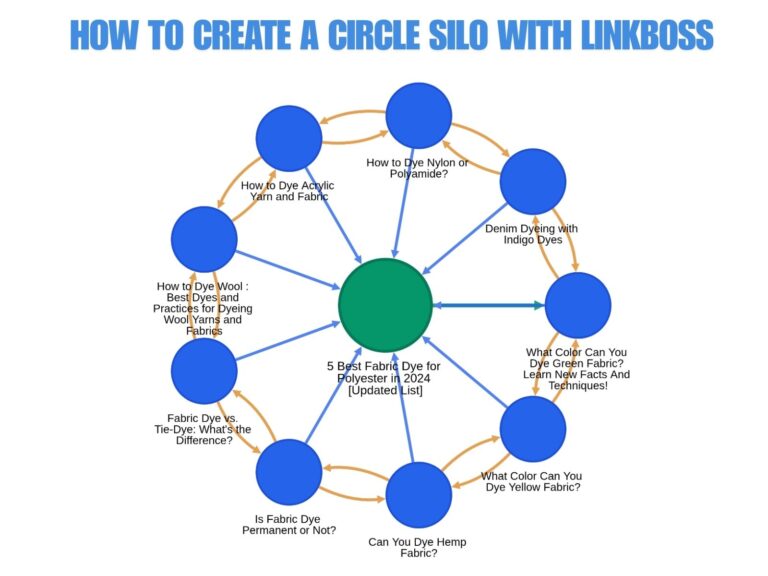
| Circle Silo | Circular (closed loop) | Distributed evenly | Blog clusters, topical authority |
| Priority Silo | Asymmetric (many → 1) | Concentrated on priority page | Revenue-focused pages |
The reverse silo and priority silo share a similarity: both concentrate equity on a single page. The difference lies in the linking pattern. A reverse silo uses bottom-up linking from a layer of supporting posts, while a priority silo uses asymmetric many-to-one linking from any cluster configuration.
What Internal Linking Best Practices Apply to a Reverse Silo?
The 4 internal linking best practices for a reverse silo are restricting outbound links on supporting posts, using in-content links only, varying anchor text semantically, and maintaining topical coherence across all cluster pages. These practices maximize the PageRank flow toward the Target Page while avoiding Google’s spam detection thresholds.
- Restrict outbound links on supporting posts to 2–3 maximum: 1 link to the Target Page and 1–2 links to adjacent supporting posts. Fewer outbound links increase the equity value of each individual link.
- Place all links within body content: Avoid sidebar, footer, or navigational links for silo purposes. Google weights in-content links higher than template-level links because they carry contextual relevance.
- Vary anchor text using semantic synonyms: Each link to the Target Page uses a different but topically relevant anchor text. This prevents over-optimization penalties while reinforcing the Target Page’s topic from multiple linguistic angles.
- Ensure every supporting post covers a subtopic directly related to the Target Page’s subject: Topical coherence between cluster pages strengthens the semantic signal that the Target Page is the authoritative resource on the subject.
John Mueller of Google confirmed the importance of internal linking structure: “Internal linking is super critical for SEO. It’s one of the biggest things you can do on a website to guide Google and visitors to the pages that you think are important.”
Frequently Asked Questions About Reverse Silo Structures
What Is the Difference Between a Reverse Silo and a Traditional Silo?
A traditional silo distributes authority top-down from parent pages to child pages. A reverse silo inverts this direction, with authority flowing bottom-up from supporting content pages to a single target page. The traditional silo builds broad topical authority across a category. The reverse silo concentrates authority on one conversion-focused URL.
How Many Supporting Posts Does a Reverse Silo Require?
A reverse silo requires a minimum of 5 supporting posts to establish a coherent topical cluster. Bruce Clay’s siloing framework recommends “a minimum of 5 content pages to establish the theme” of a silo. Practical implementations range from 6 to 15 supporting posts depending on the competitiveness of the Target Page’s keyword.
Does LinkBoss Generate Contextually Relevant Anchor Text for Reverse Silos?
Yes. LinkBoss uses NLP-based semantic analysis to generate anchor text that matches the contextual meaning of both the source and target pages. The anchors flow naturally within existing sentences rather than appearing forced or artificially inserted.
Can a Reverse Silo Work on Sites with Existing Content?
Yes. The reverse silo is a virtual structure created through internal linking, so it does not require changes to URL structure or site architecture. Existing blog posts and informational pages can be organized into a reverse silo by adding strategic internal links to the Target Page and to adjacent supporting posts.
How Long Does It Take to See Results from a Reverse Silo?
Ranking improvements from reverse silo internal linking typically appear within 2–6 weeks as Google recrawls the updated pages and recalculates PageRank distribution. HVSEO and practitioners on Builder Society report ranking movements within 10–30 days after deploying reverse silo structures.
References
- HVSEO. “The Hidden Hero of On Page SEO: Reverse Content Silos.” hvseo.co
- Surfer SEO. “What Is An SEO Silo and How To Use It.” surferseo.com
- Bruce Clay. “SEO Silos: How to Build a Website SEO Silo.” bruceclay.com
- Visible SERP. “How to Implement a Reverse Silo SEO Strategy.” visibleserp.com
- Builder Society Forum. “Kyle Roof / Koray Discussion.” buildersociety.com
- Kyle Roof. “On-Page SEO Course.” markyourbook.com
- Google SEO Office-Hours. John Mueller on Internal Linking. youtube.com