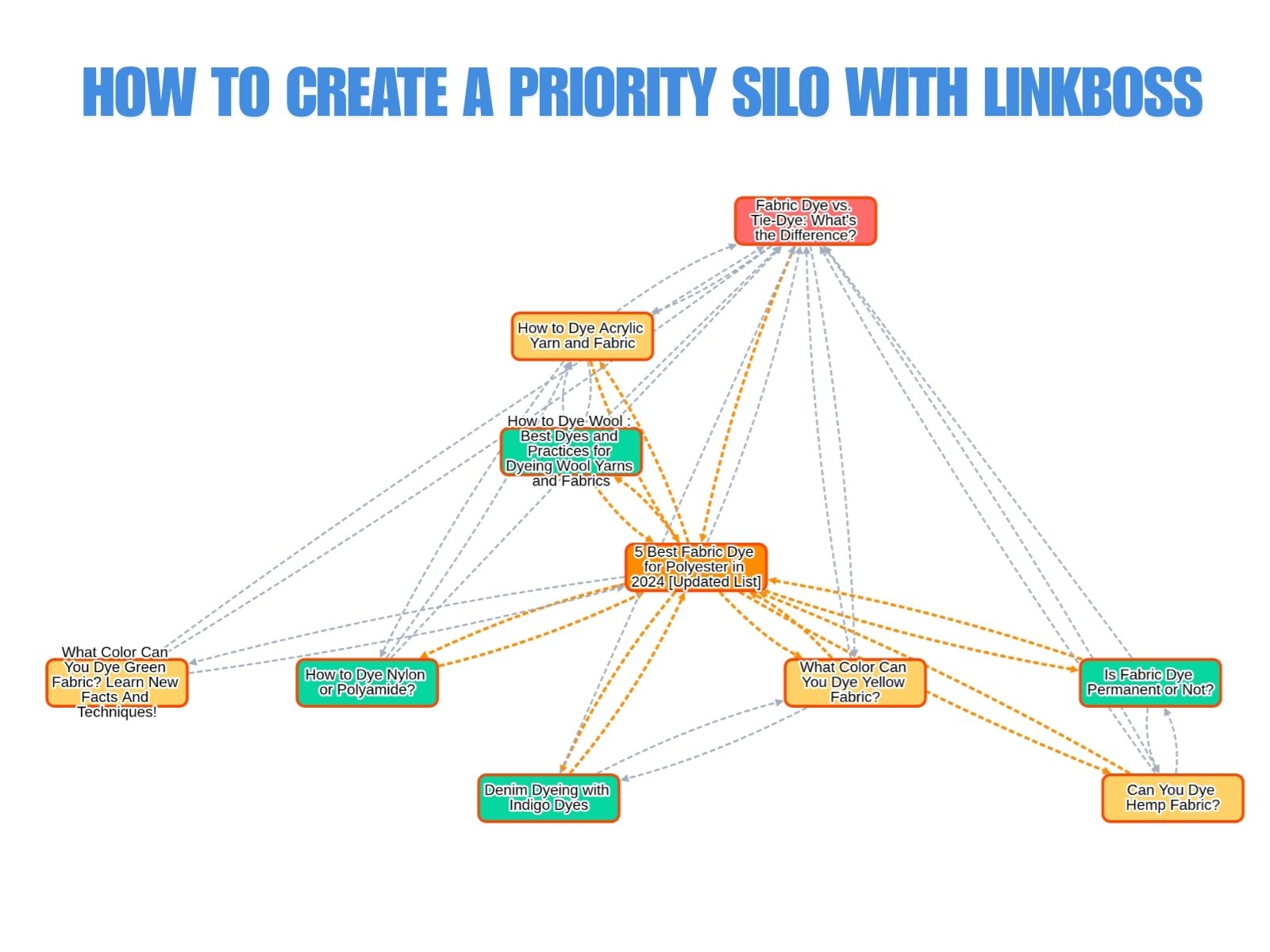
What Is a Priority Silo in SEO?
A priority silo is an internal linking structure where all pages in a cluster link directly to a single designated priority page, creating an asymmetric many-to-one concentration of link equity toward that page. The priority page, typically a revenue-generating page, product page, or high-value conversion page, receives inbound links from every supporting page in the silo but does not reciprocate with equal outbound links. This creates a net-positive equity accumulation on the priority page.
John Mueller of Google confirmed the underlying principle: “Internal linking is super critical for SEO. It’s one of the biggest things you can do on a website to guide Google and visitors to the pages that you think are important… What you think is important is totally up to you.”
The 3 defining components of a priority silo:
- Priority Page: The single page that receives concentrated inbound internal links from all other pages in the cluster. This page targets a high-competition, high-value keyword, typically a product page, service page, pricing page, or conversion-focused landing page.
- Supporting Pages: Content pages that link directly to the priority page. These pages target long-tail keywords, informational queries, or supporting topics that attract organic traffic and backlinks.
- Asymmetric Link Distribution: All supporting pages link to the priority page. The priority page links back to only a subset of supporting pages, or none at all. The net equity flow is strongly one-directional.
How Does a Priority Silo Distribute Link Equity?
Link equity in a priority silo flows in a strongly asymmetric pattern: all supporting pages pass a portion of their PageRank to the priority page, while the priority page distributes minimal equity outward, creating concentrated authority accumulation on a single URL. The supporting pages act as equity donors; the priority page acts as the primary equity recipient.
The 3 factors that govern equity distribution in a priority silo:
- Inbound link concentration: The priority page receives one inbound internal link from each supporting page in the cluster. With 10 supporting pages, the priority page accumulates 10 direct internal links, each carrying a fraction of the linking page’s authority. Ahrefs confirms: “Generally speaking, the more internal links a page has, the higher its PageRank.”
- Outbound link restriction on the priority page: The priority page links back to few or no supporting pages. Each outbound link from the priority page dilutes the equity it has accumulated. Minimizing outbound links preserves the concentrated authority.
- Supporting page equity sources: Supporting pages accumulate their own authority through organic traffic, external backlinks, and topical relevance. Pages that attract natural backlinks (such as informational blog posts and how-to guides) pass more equity to the priority page than pages with no external authority.
Google’s Gary Illyes confirmed that PageRank remains an active ranking signal and that internal links participate in PageRank computation. The priority silo exploits this mechanism by creating a deliberate imbalance in link distribution.
What Are the 5 SEO Benefits of a Priority Silo?
The 5 SEO benefits of a priority silo are concentrated PageRank on a single target page, clear topical authority signals, improved crawl prioritization for the priority page, conversion funnel control, and E-E-A-T reinforcement for the priority page. Each benefit operates through the asymmetric link concentration pattern.
- Concentrate PageRank on a single target page. With every supporting page linking to the priority page, the accumulated internal PageRank significantly exceeds what the page would receive through natural or random linking patterns. Yoast confirms: “Pages with more internal links pointing to them are viewed as more important and often rank higher.”
- Signal clear topical authority through multiple relevant anchor texts. When 10 supporting pages link to the priority page using topically relevant but varied anchor text, Google receives a strong signal that the priority page is the authoritative resource on that topic. John Mueller confirmed: “Anchor text gives additional context” for understanding what a page is about.
- Increase crawl frequency for the priority page. Google discovers pages through internal links and allocates crawl budget based on link density. A page receiving many internal links is crawled and re-indexed more frequently, so new content and updates appear in search results faster.
- Control the conversion funnel through strategic linking. Nathan Gotch of Gotch SEO states: “Since it is your website, you can dictate what pages a user goes to… you can structure your site so that the internal links guide your user to the most important money pages on your site.” The priority silo directs both users and crawlers toward the conversion-focused page.
- Reinforce E-E-A-T signals for the priority page. Bruce Clay’s siloing framework explains: “Search engines award keyword relevancy based on the page and then the interlinked rest of the site with the most supporting relevant content. This contributes to Google’s evaluation of a site’s expertise, part of the E-E-A-T quality factors.” Multiple supporting pages linking to the priority page create a “web of relevancy” that strengthens trust signals.
When Should You Use a Priority Silo Structure?
Deploy a priority silo when a single page must rank for a high-value keyword, when informational content needs to support a commercial page, or when a revenue-generating page requires maximum internal authority concentration. The priority silo is the most aggressive equity concentration structure. It sacrifices balanced distribution for maximum impact on one URL.
The 4 scenarios where a priority silo delivers maximum impact:
- A product or service page must rank for a competitive keyword. The priority page is the product/service page. Supporting content (buying guides, tutorials, comparisons) links directly to this page, funnelling topical authority toward the conversion point.
- A SaaS pricing or feature page needs ranking support. Educational cluster pages (blog posts, case studies, documentation) link to the pricing or feature page. Visitors who read educational content encounter links that guide them toward the commercial page.
- An affiliate site has a roundup or “best of” page that generates revenue. Individual product reviews, comparison posts, and informational guides all link to the roundup page. The roundup accumulates authority from the entire cluster.
- A local business has a service booking page that needs ranking improvement. Blog content about the services offered links to the booking page, concentrating topical authority on the conversion URL.
Avoid a priority silo when all pages in a cluster are equally important (use a circle silo instead), when building broad topical authority across multiple categories (use a hub-and-spoke structure instead), or when multiple commercial pages compete for the same equity (use separate priority silos for each page).
How to Create a Priority Silo in LinkBoss Custom Network?
Building a priority silo in LinkBoss requires 6 steps: navigate to Custom Network, add URLs via topic-based suggestions, submit the cluster, select the priority silo preset, review the equity flow structure visually, and execute Boss Mode for automatic priority-based linking. LinkBoss uses NLP and semantic similarity scoring to determine which pages belong in the cluster and generates contextually relevant anchor text for each link.
Step 1: Access the Custom Network Tool
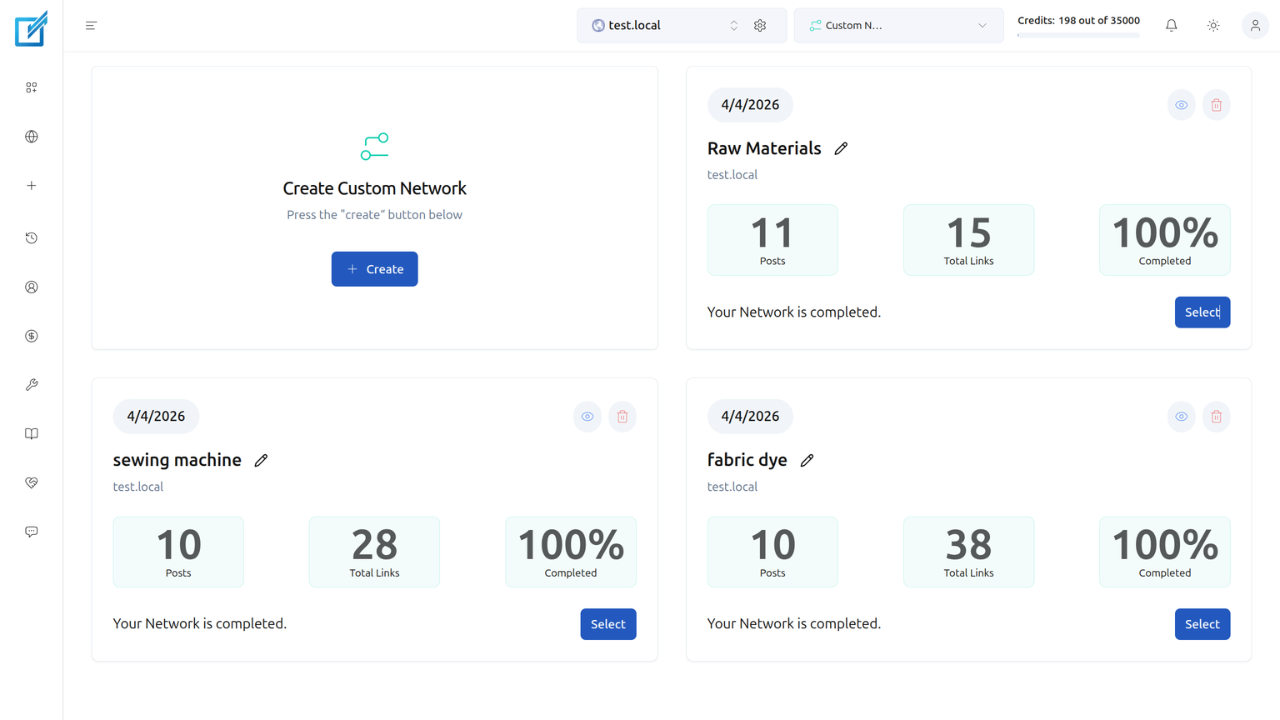
Open the LinkBoss dashboard. Navigate to Tools → Custom Network → Create. The Create Custom Network page loads with a URL input field and a right sidebar containing 3 tabs for adding URLs.
Step 2: Add URLs to Your Topic Cluster
The right sidebar provides 3 methods for selecting URLs:
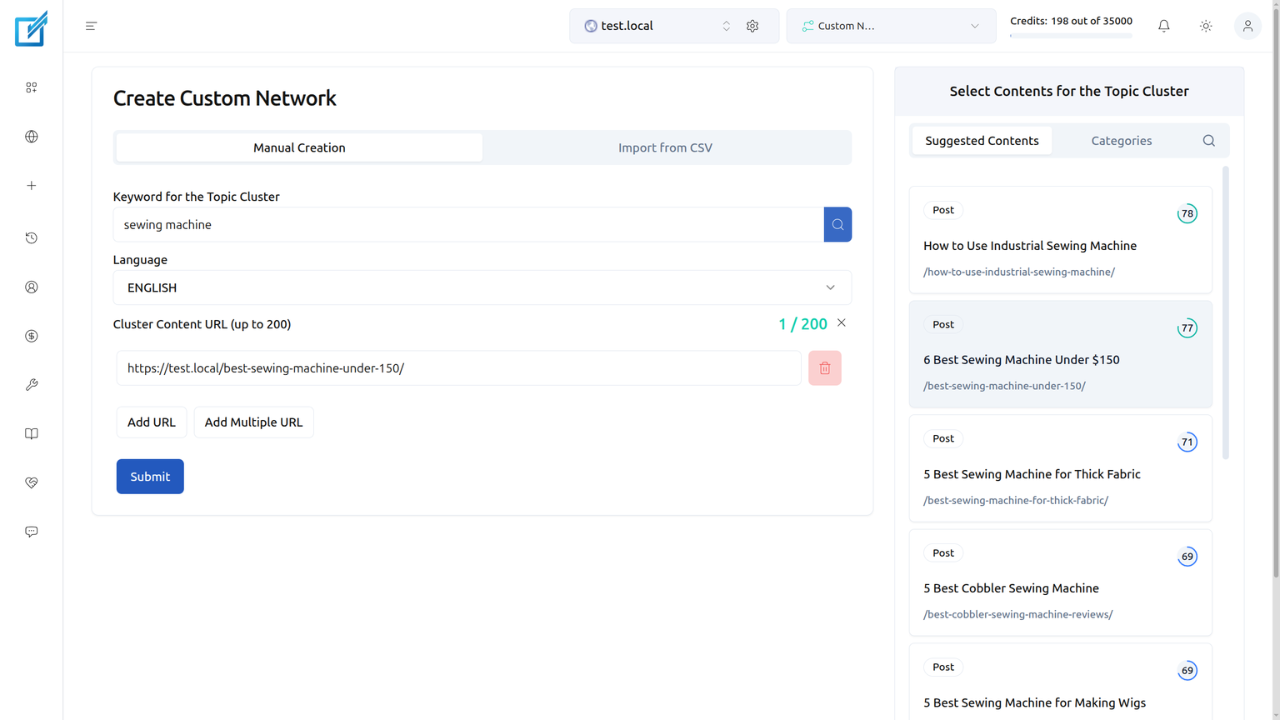
- Suggested Contents: Enter a topic keyword (for example, “fabric dye”) in the Keyword for Topic Cluster field. LinkBoss populates URLs ranked by semantic similarity score. Select pages that topically support your priority page.
- Categories: Browse URLs organized by your site’s existing category structure. Click Fetch on a category, then Add to include those URLs.
- Search: Find specific pages by title keyword.
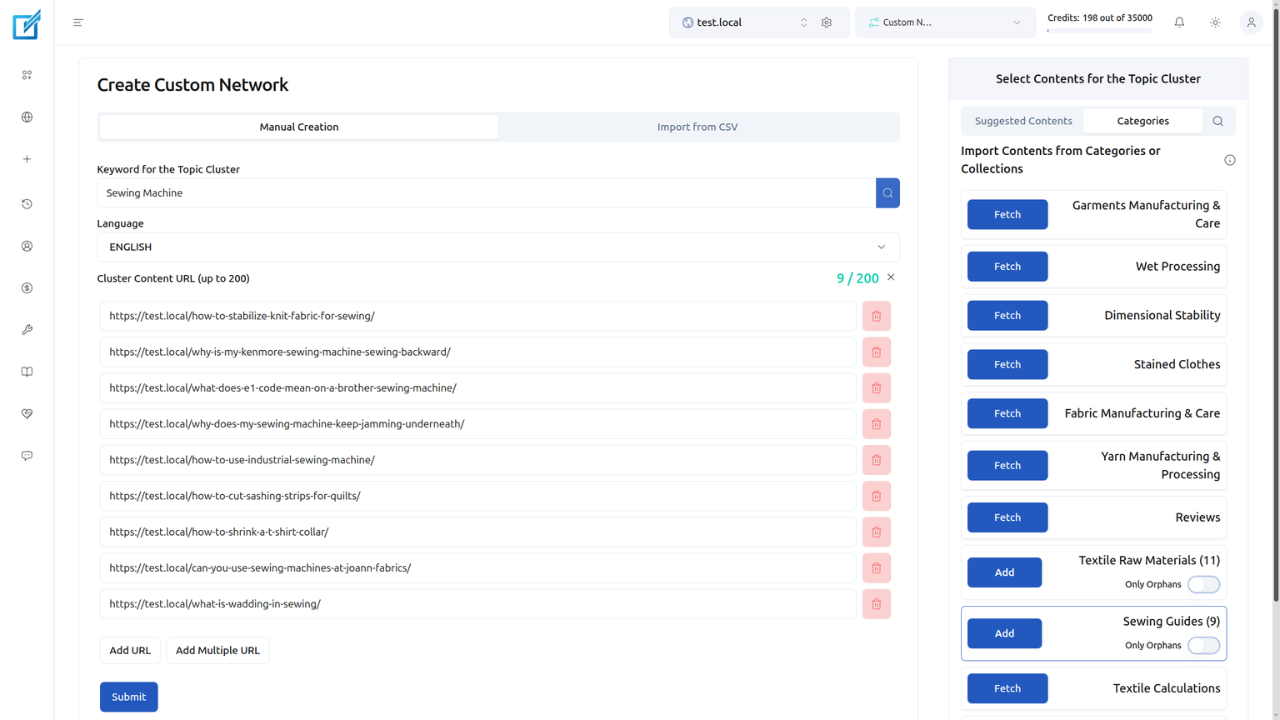
For a priority silo, select the priority page itself plus 5 to 15 supporting pages that cover related subtopics. The supporting pages attract organic traffic and pass their accumulated authority to the priority page.
Step 3: Submit the Cluster
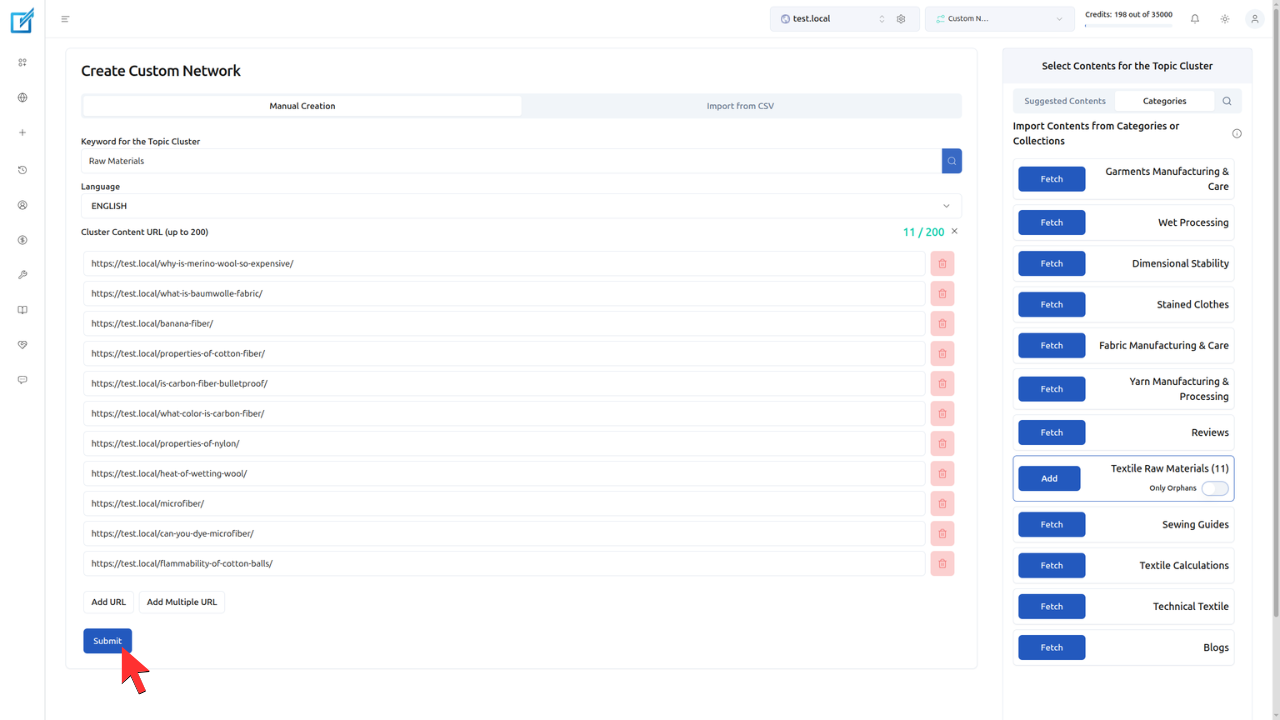
Click Submit. LinkBoss processes the selected URLs and advances to the silo configuration screen.
Step 4: Select the Priority Silo Preset
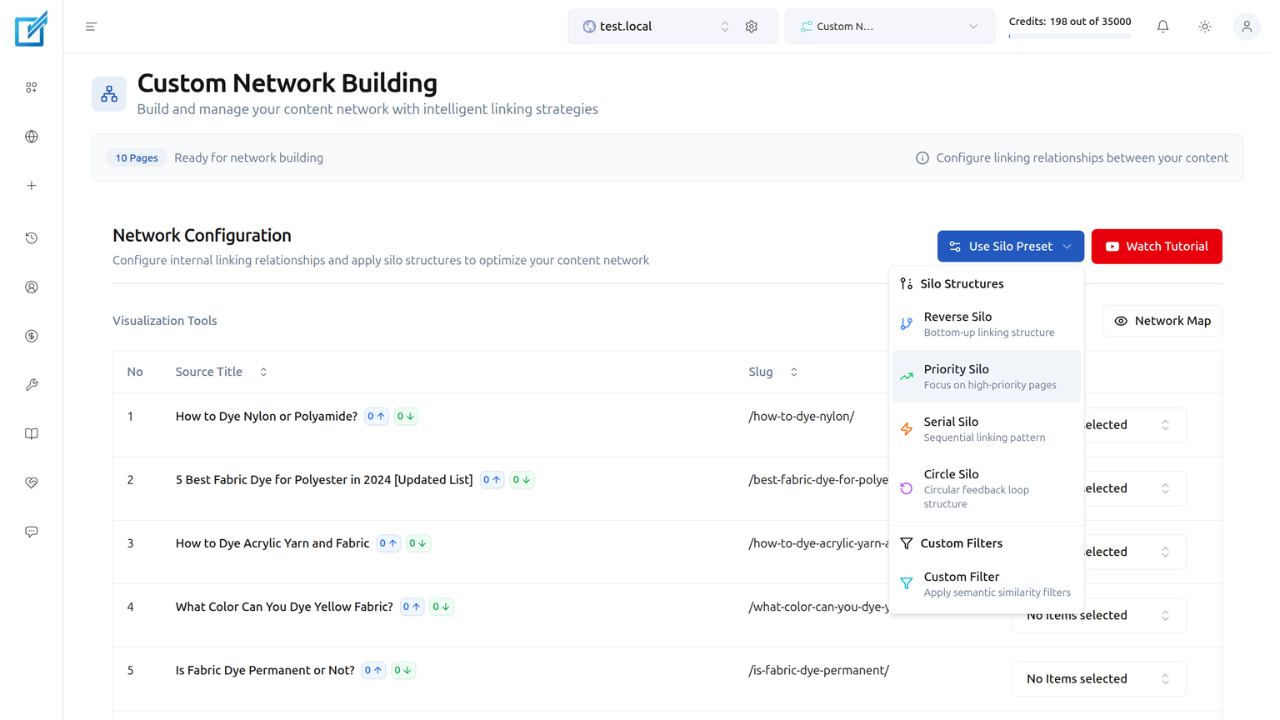
Click Use Silo Preset on the configuration screen. Choose Priority Silo from the available options. Optionally select a Priority Page from the dropdown. This is the page that receives concentrated inbound links from all other pages in the cluster.
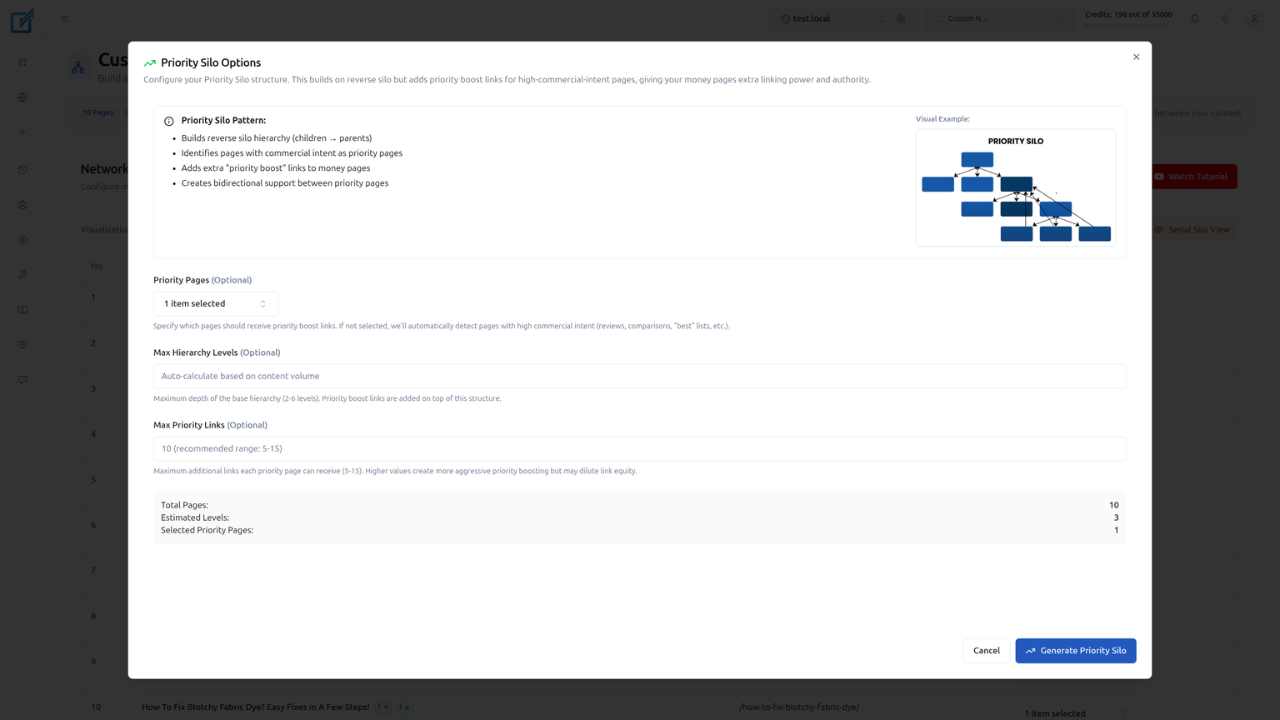
Click Generate Priority Silo. LinkBoss automatically calculates the optimal linking structure based on the priority model: all supporting pages link to the priority page with semantically relevant anchor text.
Step 5: Review the Visual Structure
Click Priority Silo View to see the linking structure displayed as a visual diagram. Verify that:
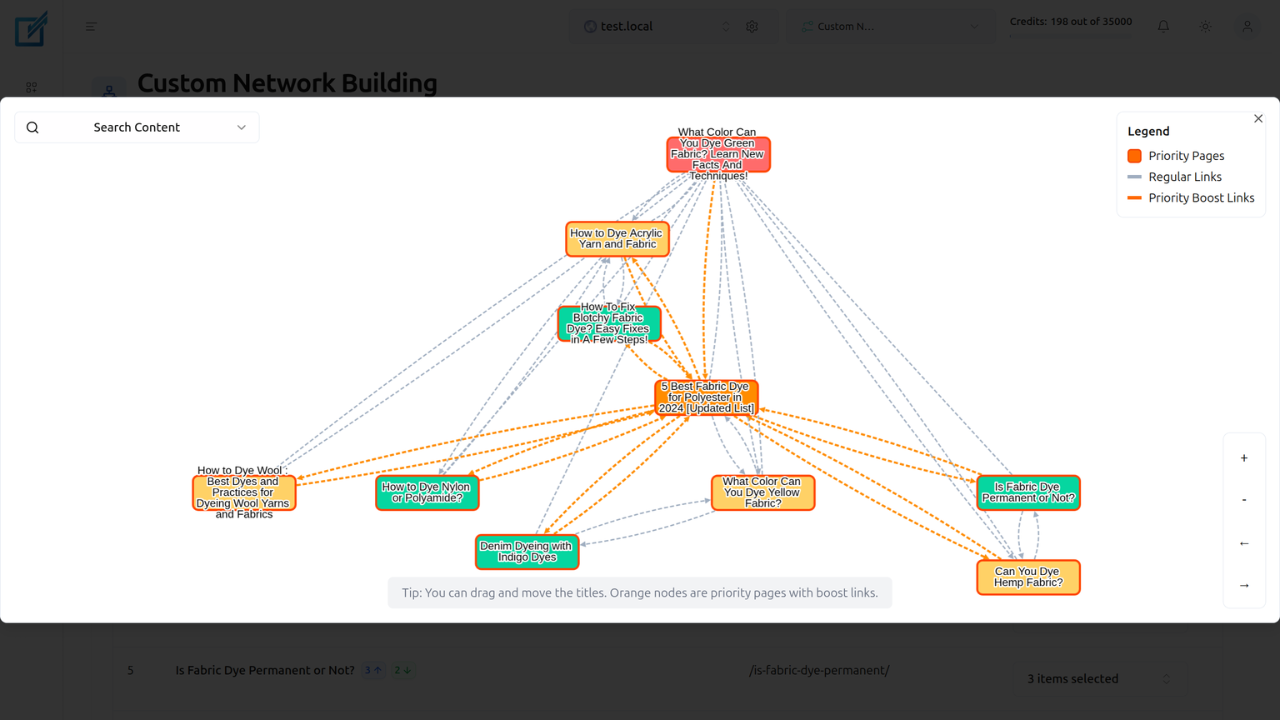
- The priority page sits at the center or top of the structure
- All supporting pages contain a link pointing to the priority page
- Anchor texts are contextually relevant and varied
- The priority page has minimal outbound links to preserve equity
Step 6: Execute Boss Mode
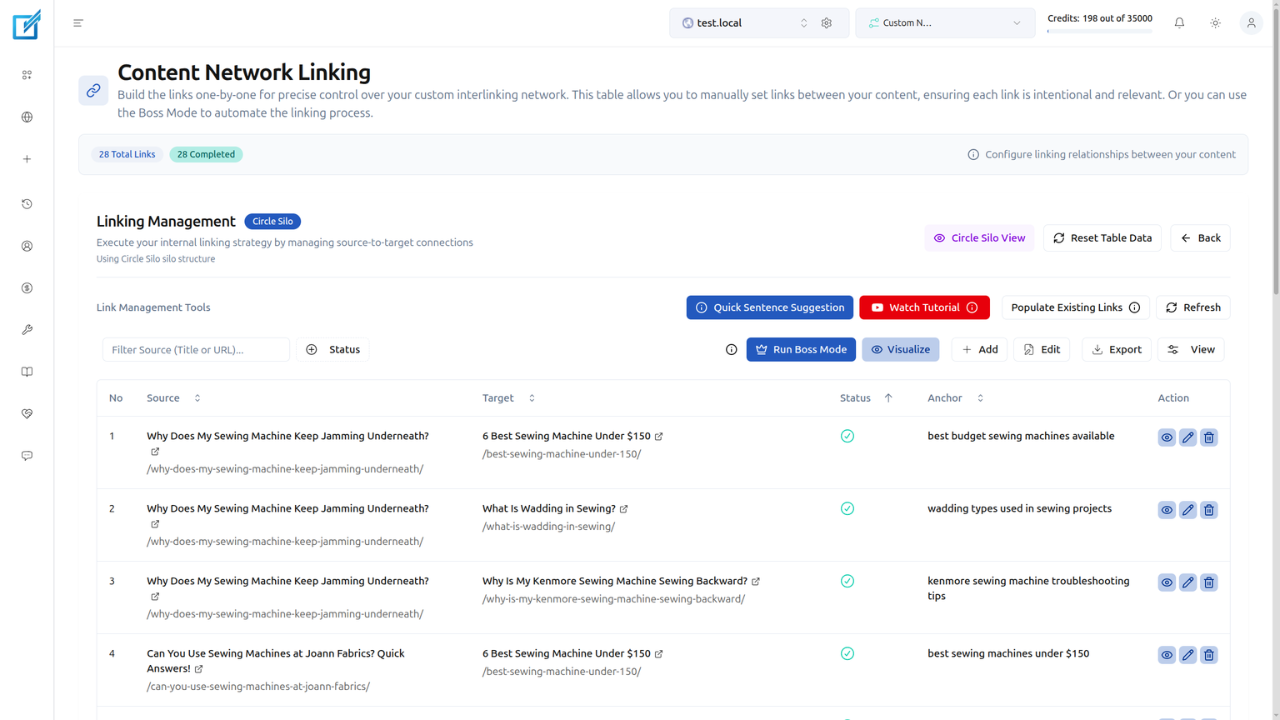
Click Next, then Run Boss Mode → Let’s Go.
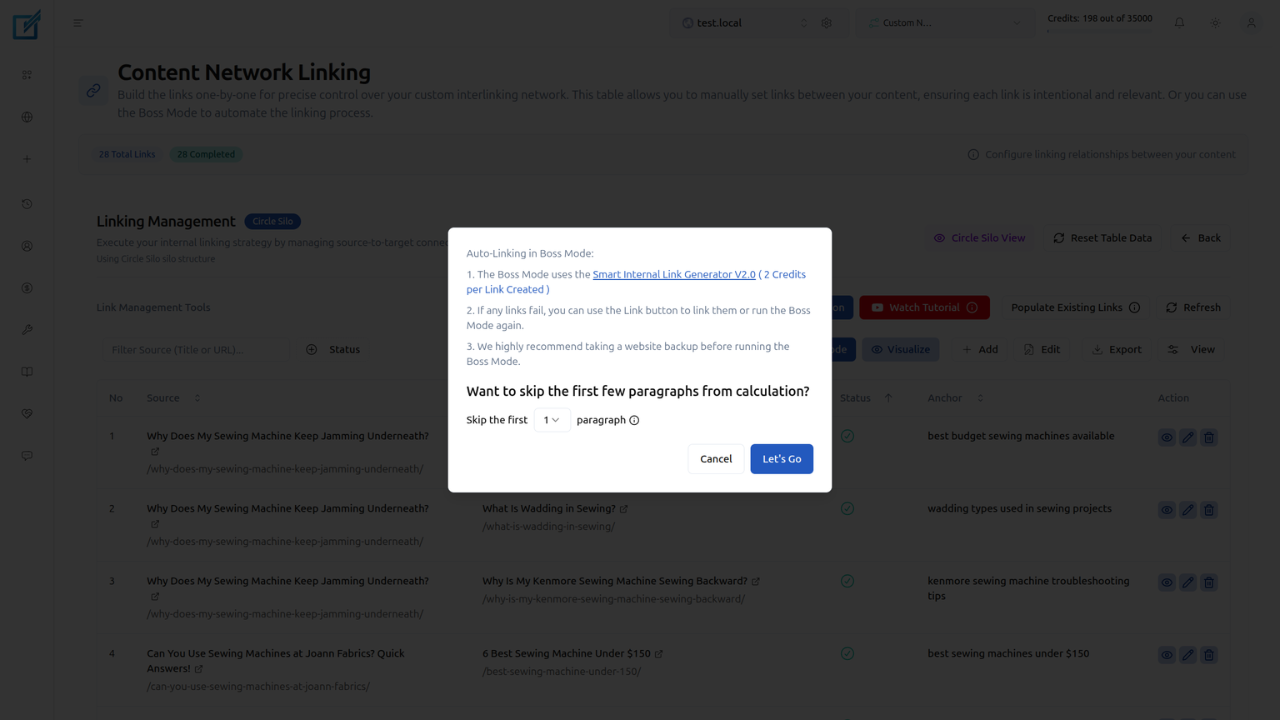
Boss Mode uses the Smart Internal Link Generator V2.0 to insert every link in the priority silo. For each connection from a supporting page to the priority page, the system:
- Finds the most semantically relevant paragraph in the target post based on NLP analysis of content meaning.
- Generates 2–3 new contextual sentences that are appended after that paragraph. These sentences naturally lead into the anchor text rather than forcing a link into existing content.
- Embeds NLP-optimized anchor text within the generated sentences so the link reads as a natural part of the paragraph, not an insertion.
This approach differs from simple link wrapping (the “In-Post Sentences” method), which only inserts a link into an existing sentence. Boss Mode adds fresh context around each link, which produces more natural-sounding content and stronger topical signals for search engines.
The process runs in the background. LinkBoss deploys all links directly to your live site and notifies you on completion. After Boss Mode finishes, you can go back and edit individual links, modify anchor text, or adjust the surrounding context.
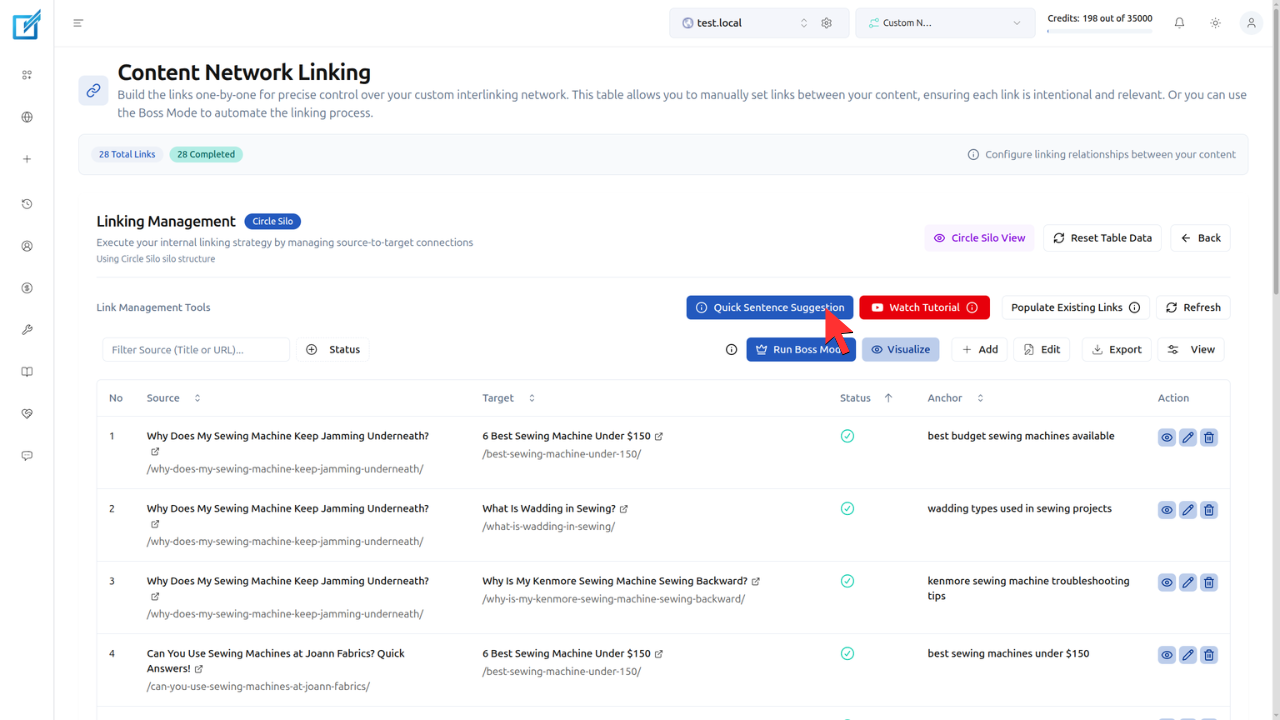
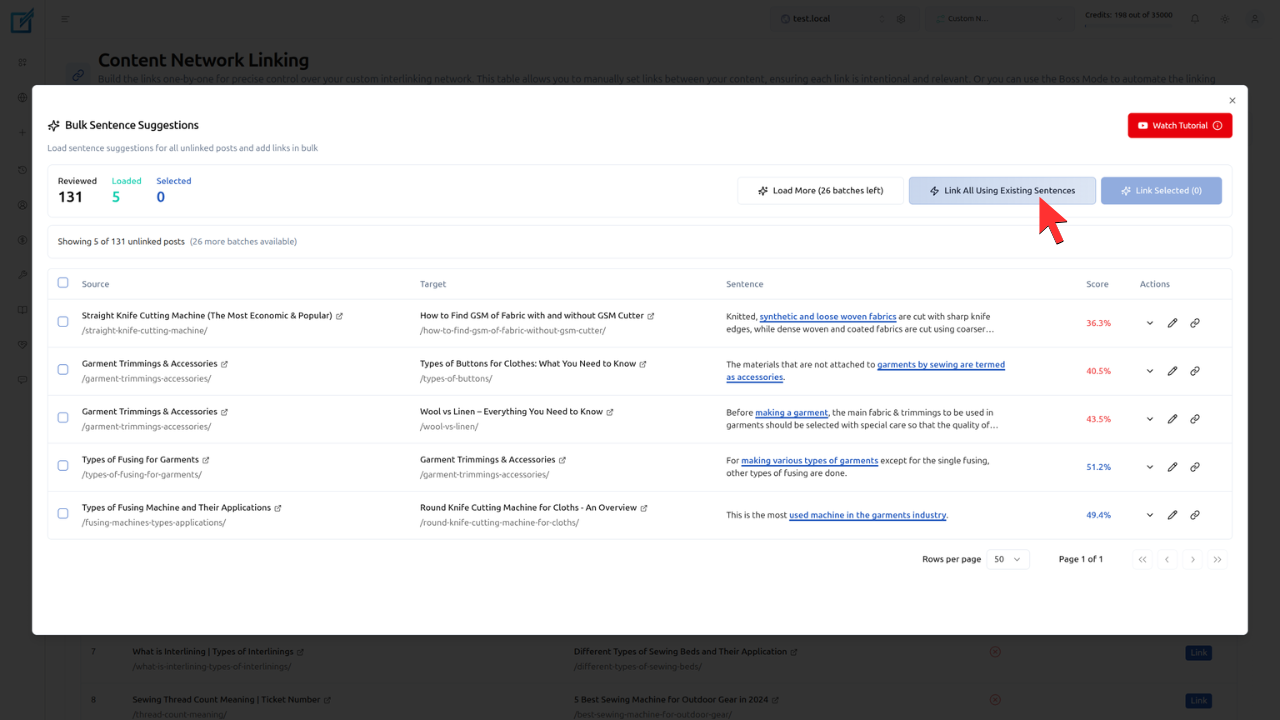
If you prefer not to add new sentences to your posts, use the Quick Sentence Suggestions route instead of Boss Mode. This option inserts links into existing sentences without generating additional content. It costs 1 credit per link instead of 2 credits.
The entire priority silo structure is generated in under 2 minutes, a process that takes 40x longer when performed manually. Links remain permanent even if the LinkBoss plugin is removed from the site. Boss Mode costs 2 credits per link (compared to 1 credit per link for the In-Post Sentences method).
What Types of Websites Benefit Most from a Priority Silo?
The 5 types of websites that benefit most from a priority silo are e-commerce stores, SaaS and B2B companies, affiliate sites, local businesses, and publishers with cornerstone content. Each site type has a clearly identifiable high-value page that benefits from concentrated internal authority.
- E-commerce stores: Product pages and category pages serve as the priority page. Blog content (buying guides, product comparisons, how-to articles) links to the product page, funnelling authority from informational content to the conversion point.
- SaaS and B2B companies: Pricing pages, feature pages, or demo request pages serve as the priority page. Educational cluster content (case studies, tutorials, industry guides) passes topical authority to the commercial page.
- Affiliate sites: The “best [product]” roundup page serves as the priority page. Individual product reviews, comparison posts, and informational guides all link to the roundup, concentrating authority on the highest-revenue URL.
- Local businesses: Service booking pages or location pages serve as the priority page. Blog content about services, case studies, and local guides link to the booking page, funnelling authority toward the conversion URL.
- Publishers with cornerstone content: Full pillar guides serve as the priority page. Narrower articles covering specific subtopics link to the pillar guide, establishing it as the definitive resource on the subject.
How Does a Priority Silo Compare to Other Silo Structures?
A priority silo differs from other silo structures in its asymmetric many-to-one equity concentration, single-page targeting, and suitability for revenue-focused ranking goals. The 4 common silo structures serve distinct strategic purposes based on content organization and ranking objectives.
| Structure | Link Pattern | Equity Flow | Best Use Case |
|---|---|---|---|
| Priority Silo | Asymmetric (all to 1) | Concentrated on priority page | Revenue pages, conversion pages |
| Reverse Silo | Bottom-up (support to target) | Concentrated on 1 page | Low-DR sites, commercial page support |
| Serial Silo | Linear chain (A to B to C to D) | Sequential, diminishing | Tutorials, ordered guides |
| Circle Silo | Circular closed loop | Distributed evenly with pillar concentration | Blog clusters, entity SEO |
The priority silo and reverse silo share a similarity: both concentrate equity on a single page. The difference lies in the linking mechanism. A reverse silo uses a bottom-up pattern where supporting posts form a layer that systematically links upward. A priority silo uses a direct many-to-one pattern where all pages link straight to the priority page regardless of their position in a hierarchy.
Matt Diggity recommends the priority silo for advanced SEOs who have identified specific revenue pages that need disproportionate ranking power. He notes: “The only downside is more management involved,” as the priority silo requires regular monitoring to avoid over-optimizing the priority page.
What Internal Linking Best Practices Apply to a Priority Silo?
The 4 internal linking best practices for a priority silo are using varied anchor text across all supporting pages, maintaining topical coherence between supporting and priority pages, restricting outbound links on the priority page, and monitoring anchor text distribution. These practices maximize the ranking impact on the priority page while avoiding Google’s over-optimization thresholds.
- Vary anchor text across supporting page links: Each supporting page uses a different but topically relevant anchor text when linking to the priority page. Using identical anchor text across many pages linking to the same URL is a known risk that can trigger over-optimization penalties. LinkBoss generates varied anchors automatically using NLP analysis.
- Maintain strict topical coherence: Every supporting page covers a subtopic directly related to the priority page’s subject. Pages that link to the priority page from unrelated contexts dilute the topical signal and risk being flagged as manipulative linking.
- Restrict outbound links on the priority page: The priority page should link to a maximum of 2 to 3 supporting pages. Each additional outbound link dilutes the equity the page has accumulated. The priority page’s primary function is to receive links, not to distribute them.
- Monitor anchor text distribution: Use LinkBoss’s anchor text analysis tool to track the distribution of anchor texts pointing to the priority page. Make sure no single anchor text variation exceeds 15 to 20% of total internal links to that page. Over-concentration of a single anchor text triggers algorithmic scrutiny.
Frequently Asked Questions About Priority Silo Structures
What Is the Difference Between a Priority Silo and a Reverse Silo?
A priority silo uses a direct many-to-one linking pattern where all supporting pages link straight to the priority page. A reverse silo uses a bottom-up layering pattern where supporting posts form a structured tier that funnels authority upward through adjacent connections. Both concentrate equity on a single page, but the priority silo is more aggressive in its concentration while the reverse silo creates a more natural link progression.
How Many Supporting Pages Does a Priority Silo Require?
A priority silo requires a minimum of 5 supporting pages to establish meaningful equity concentration. Practical implementations range from 8 to 20 supporting pages depending on the competitiveness of the priority page’s target keyword. Each additional supporting page adds one more internal link pointing to the priority page, incrementally increasing its accumulated PageRank.
Does the Priority Page Need to Link Back to Supporting Pages?
No. The priority page benefits most from restricting outbound links. Linking back to supporting pages distributes the accumulated equity outward, reducing the concentration effect. If the priority page links to any supporting pages, limit the outbound links to 2 or 3 and choose the most topically relevant supporting pages.
Can Multiple Priority Silos Target Different Pages on the Same Site?
Yes. Multiple priority silos can operate on the same site, each targeting a different high-value page. Keep the supporting page clusters for each priority silo separate. Each supporting page should belong to only one priority silo to avoid conflicting equity distribution. LinkBoss manages separate silo networks independently through its Custom Network tool.
How Does LinkBoss Prevent Anchor Text Over-Optimization in a Priority Silo?
LinkBoss uses NLP-based semantic analysis to generate varied anchor text for each link pointing to the priority page. The algorithm selects contextually relevant phrases from the source page’s content that match the target page’s topic without repeating identical anchor text across multiple links. The anchor text analysis tool provides a visual distribution report to verify balanced anchor text usage.
References
- Google SEO Office-Hours. John Mueller on Internal Linking. youtube.com
- Ahrefs. “Internal Links for SEO: An Actionable Guide.” ahrefs.com
- Bruce Clay. “SEO Silos: How to Build a Website SEO Silo.” bruceclay.com
- Yoast. “The Ultimate Guide to Internal Linking for SEO and GEO.” yoast.com
- Gotch SEO. “Internal Linking 101.” gotchseo.com
- Matt Diggity. “SEO Silos: How to Rank for More Keywords Without Building Links.” YouTube
- Moz. “Internal Links SEO Best Practices.” moz.com