
Trusted by 7,000+ SEO professionals worldwide
The WordPress Automatic Internal Linking Plugin That Builds 1,000 Semantic Links in One Click
LinkBoss is an NLP-powered internal linking SaaS that analyzes your WordPress content semantically, finds relevant link opportunities across your posts and pages, and builds contextual internal links automatically. Stop manual linking. Start ranking.
Why WordPress Site Owners Choose LinkBoss Over Other Automatic Internal Linking Plugins
Three ways LinkBoss solves the internal linking problems that other WordPress plugins can’t.
Semantic AI, Not Keyword Matching
LinkBoss understands meaning. It links your “best running shoes” article to “marathon training guide” because they’re topically related, even without exact keyword overlap. Basic WordPress interlinking plugins can’t do this.
1,000 Links Built in One Click
Manual WordPress linking means editing each post individually. LinkBoss does up to 1,000 operations in a single bulk click, with semantic quality control that basic plugins lack.
Topic Silos That Rank
LinkBoss builds Reverse, Priority, Serial, and Circle silos with one click. Posts cluster under pillar pages, building topical authority Google rewards with higher rankings.
How to Build Semantic Internal Links on WordPress at Scale
Watch how LinkBoss builds semantic silos, bulk-interlinks 1,000 links, manages anchor text, and visualizes your WordPress site’s link architecture.
Video walkthrough: bulk linking, semantic silo building, anchor manager, site visualizer, and link health monitoring for WordPress sites using LinkBoss.
Basic WordPress Automatic Internal Linking Plugins Miss the Point
Most WordPress internal linking tools match keywords. They don’t understand meaning. Here’s why that matters for your Google rankings.
The WordPress Automatic Internal Linking Plugin Built on Semantic AI
Every LinkBoss feature targets a specific WordPress internal linking problem at scale.
LinkBoss Uses NLP Semantic AI to Find Contextually Relevant Links on WordPress
LinkBoss’s NLP semantic interlinking tool uses vector embeddings to understand your posts, pages, and custom post types as related entities, not keyword strings. It finds link opportunities that basic WordPress plugins miss — even when no keywords overlap.
- Understands entity context across WordPress posts, pages, and custom post types
- Relevancy scores for every proposed link. See confidence before inserting
- Anchor text suggestions that read naturally inside your content
- Smart link generator creates contextually appropriate sentences when needed
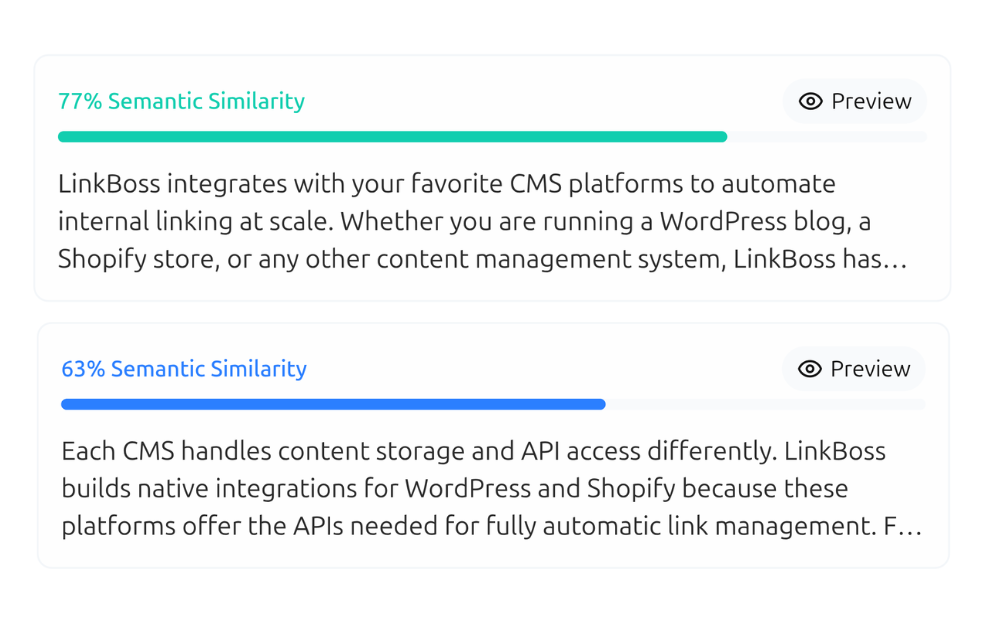
Bulk 2.0 Builds 1,000 WordPress Internal Links in a Single Operation
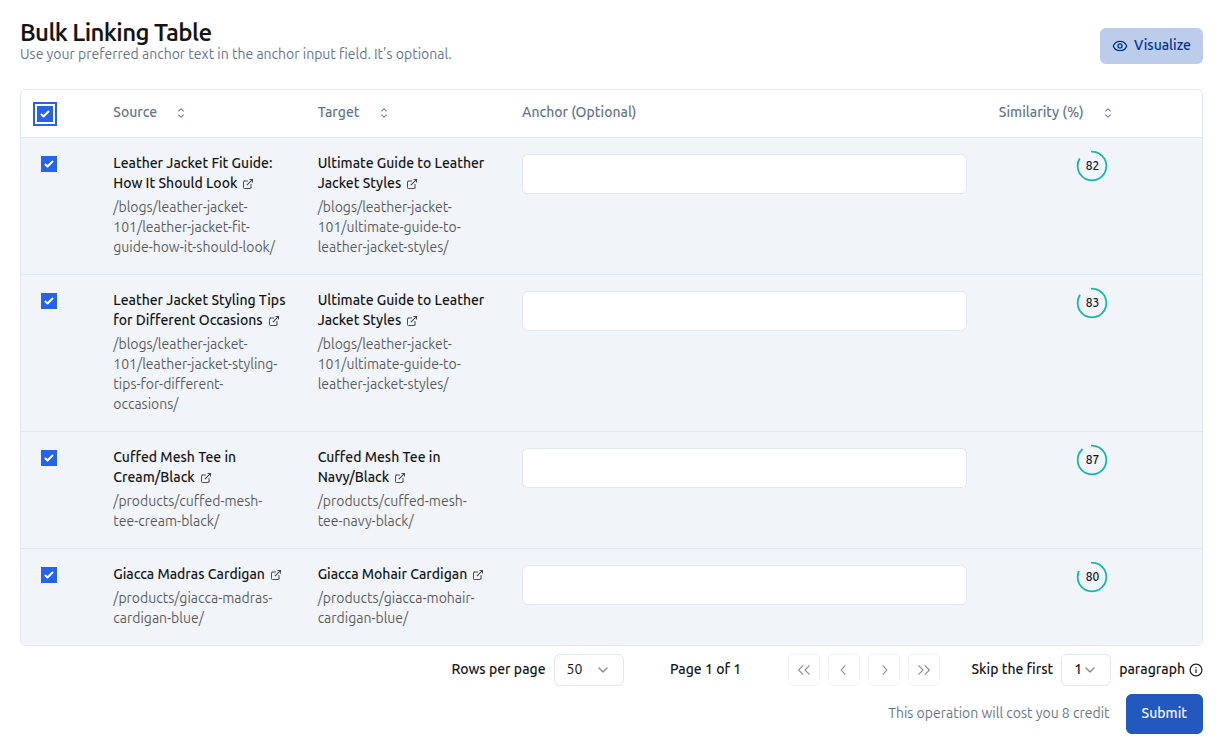
LinkBoss’s bulk WordPress interlinking tool creates up to 1,000 contextual links across 200 pages in one operation. Select orphan pages or your full WordPress site, set the semantic threshold, and LinkBoss generates contextual anchor text automatically. Import from any WordPress category, tag, or custom URL list.
- Create up to 1,000 contextual internal links in one bulk operation on WordPress
- Filter by WordPress category, tag, post type, or custom URL lists
- Customize anchor text preferences and semantic quality thresholds
- Visualize your entire WordPress link network before deploying
- Skip introduction paragraphs for clean, natural link placement
Semantic Silo Builder Creates Topic Clusters That Rank on WordPress
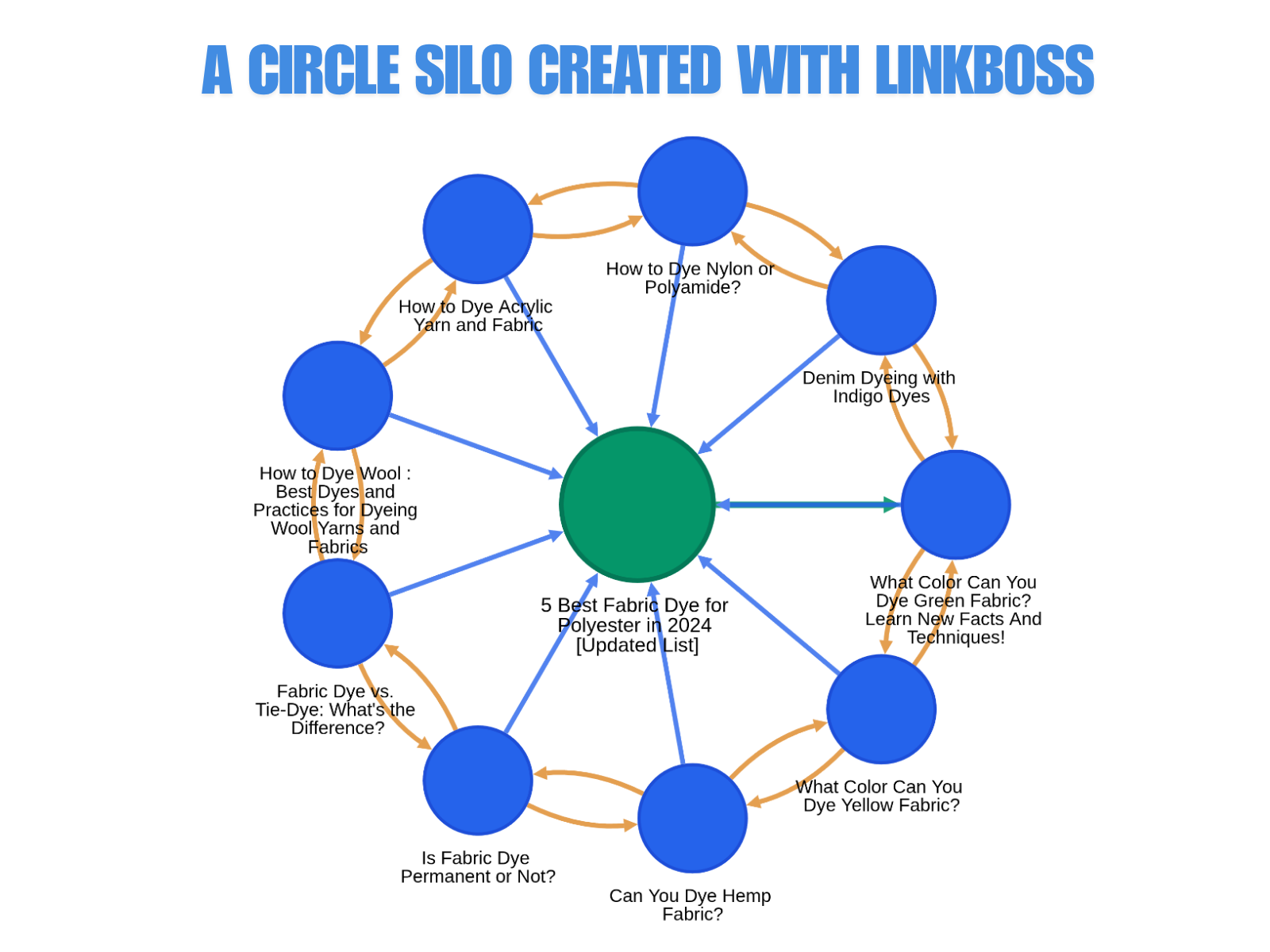
LinkBoss’s WordPress semantic silo builder lets you build Reverse, Priority, Serial, and Circle silos with one click. Set your pillar page, add support content from WordPress posts or categories, and LinkBoss generates the internal linking structure automatically. Test multiple silo strategies instantly — no specialist required.
- Reverse Silo: push authority up from support content to your WordPress pillar page
- Priority Silo: concentrate links on your most important WordPress pages
- Serial Silo: chain pages in a topical sequence for logical authority flow
- Circle Silo: pillar to support, support to pillar, support to support for maximum coverage
- Visual silo map shows your WordPress architecture before you apply it
- Boss Mode applies all links from the generated table in one operation
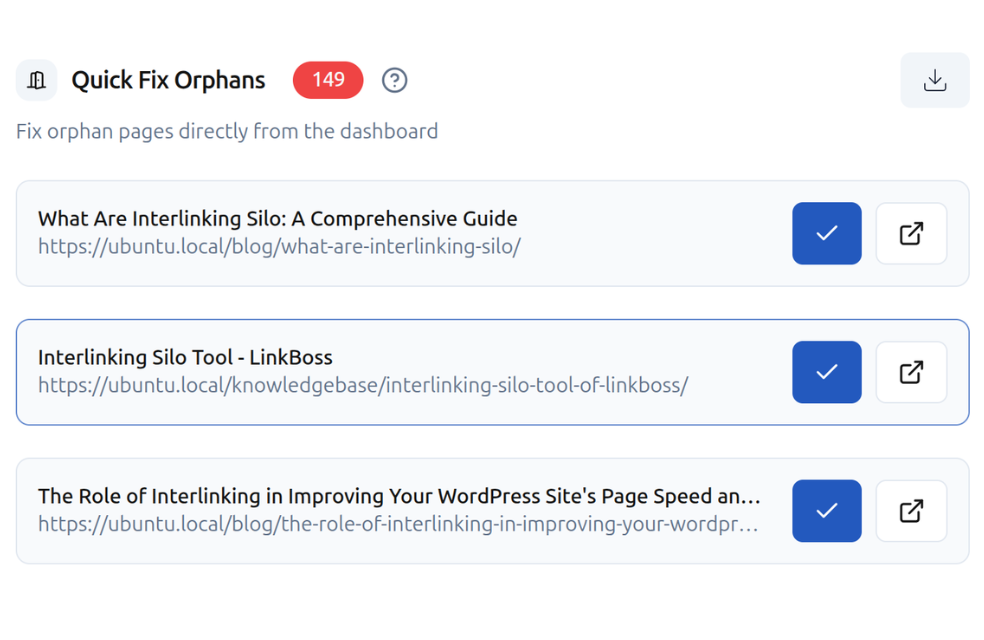
Link Health Monitor Finds Every Orphan Page on Your WordPress Site
LinkBoss’s WordPress link health monitor gives you a site health score for your WordPress internal linking. Detect orphan posts, dead-end pages, link duplication, and anchor cannibalization. All free.
- Full site health score with detailed breakdown for your WordPress site
- Orphan page detection: WordPress posts with zero incoming links
- Dead-end page detection: pages with no outbound internal links
- Link flow score shows how authority distributes across your WordPress site
- Duplicate link filter finds accidental duplicate links
- HTTP/HTTPS audit and outbound domain tracking
Two More LinkBoss Tools Every WordPress Site Needs
Anchor text management and site visualization complete the WordPress internal linking solution.
Fix it directly in the dashboard: click edit or delete on any problematic anchor. See a relevancy score and anchor category before saving.
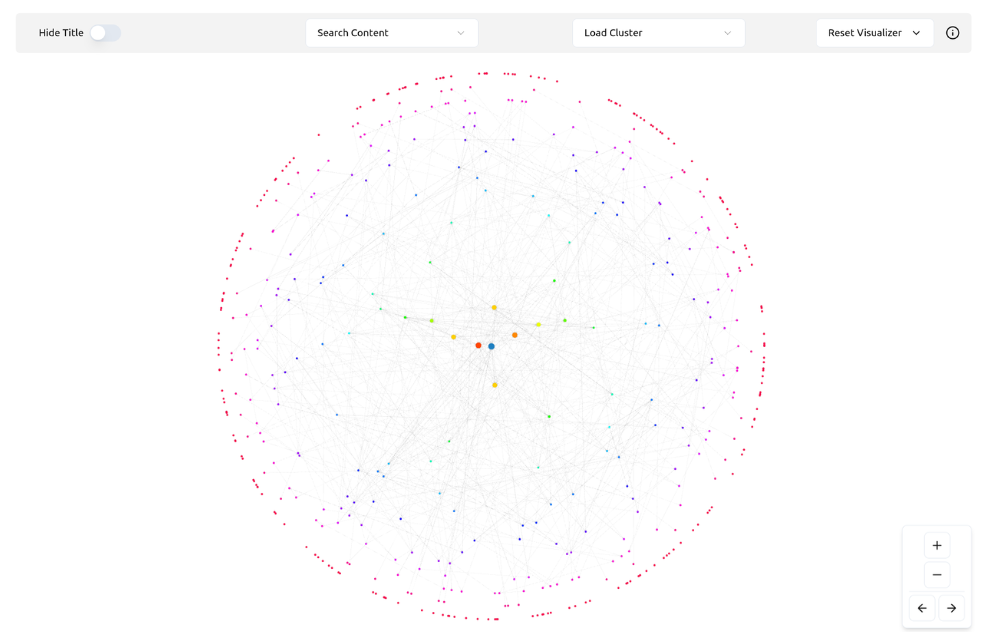
Spot your strongest pages, find isolated clusters, and understand how content flows to your pillar pages.
What You Get for $0 on LinkBoss for WordPress
Most LinkBoss features are completely free. Audit, analytics, and silo planning tools require no credits and no payment.
Site Health & Audit
- Full site health score and dashboard for WordPress
- Orphan post and page detection
- Dead-end page finder
- Link duplication audit
- HTTP/HTTPS link audit
- Outbound domain tracking
- Link flow score per page
GSC Analytics
- Top performing keywords (impressions, clicks, position, CTR)
- Week-over-week ranking movement tracking
- New keyword discovery from the past week
- Downtrending page alerts
- Keyword cannibalization checker
- Anchor text suggestions from high-impression queries
Silo Builder & Visualizer
- All 4 silo preset types (Reverse, Priority, Serial, Circle)
- Custom Network silo builder with visual map
- Full WordPress site structure visualization
- Boss Mode for one-click link insertion
Credits are only consumed when automatically inserting links into your WordPress content. You get 50 free credits on signup. No credit card required. All audit, analytics, and silo tools are always free.
Up and Running in Under 5 Minutes
Connect LinkBoss to your WordPress site and start building links. Follow the step-by-step setup guide — the process takes about 5 minutes with no coding required.
Install the LinkBoss Plugin
Search for “LinkBoss” in your WordPress plugin directory, install it, and activate from your WordPress admin dashboard.
Create Your LinkBoss Account
Sign up for a free account at app.linkboss.io. No credit card required for the 7-day free trial.
Connect Your WordPress Site
Copy your site URL, create your site in the LinkBoss dashboard, grab your API key, and paste it into the plugin settings.
Build Links and Silos
Run a free site audit, then bulk create up to 1,000 links or build a complete WordPress topic silo.
Simple, Scalable WordPress Internal Linking Plugin Pricing
Most features are free. Credits only apply when automatically inserting links into your WordPress content.
- Full site health audit and dashboard
- Orphan and dead-end page detection for WordPress
- GSC-powered keyword analytics
- All silo builder tools and presets
- Site visualizer for WordPress
- 2,400 credits per year
- Renews yearly
No credit card required
- Everything in Launch
- 3 WordPress sites from one dashboard
- Bulk interlinking (up to 1,000 links per operation)
- Silo builder with Boss Mode
- Smart anchor text optimization
- Custom network silo builder
- Links stay permanent
- 3 site swaps per month
No credit card required
- Everything in Scale
- 10 WordPress sites from one dashboard
- Priority support
- Custom API integrations
- White-label reporting
- 30,000 credits per year
- Unlimited site swaps
- Dedicated account manager
No credit card required
Frequently Asked Questions
How is LinkBoss different from other WordPress automatic internal linking plugins?
Does LinkBoss slow down my WordPress site?
Is automatic internal linking safe for Google SEO?
Do I need to keep the WordPress plugin active?
Can I use LinkBoss with other WordPress SEO plugins like Yoast or Rank Math?
Is LinkBoss free to start for WordPress?
Your WordPress Posts May Be Harder to Find Without Structured Internal Links
7,000+ SEO professionals use LinkBoss to build internal link architecture that Google can follow. Start free. No credit card required.