Benefits for Internal Linking – Improve Crawlability, Topical Authority, and PageRank Distribution
Internal Linking Improves SEO Through Crawlability, Topical Authority, and PageRank Distribution
Internal linking distributes PageRank across your website’s pages, improves crawl efficiency by providing Googlebot with clear navigation paths, and strengthens topical authority by connecting semantically related content. Websites with structured internal linking networks see measurable improvements in indexation rates and organic traffic for mid-tail and long-tail keywords. If you want to understand what internal linking is, start with the foundational definition before diving into the specific benefits covered in this guide.
This guide covers the four primary SEO benefits of internal linking, compares manual and automated implementation approaches, and provides a scalable strategy for building an internal link network.
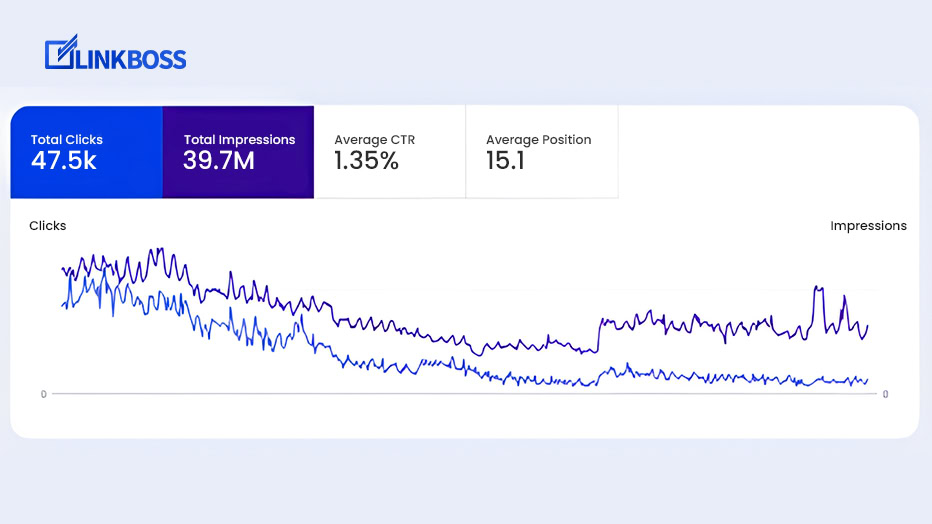
We achieved 3.6 million impressions with a 1.2% average CTR by implementing a structured internal linking strategy across our blog. These results came from connecting 47 existing posts into topical content clusters over a 90-day period, a result consistent with building topical authority through strategic internal linking.
The sections below break down exactly how each mechanism works and how you can replicate these results.
How Internal Linking Improves Search Engine Rankings
According to Google’s guidance on internal linking, search engines rely on internal links to discover and index content. A well-structured internal link system ensures that Googlebot can access every important page within your site’s crawl budget.
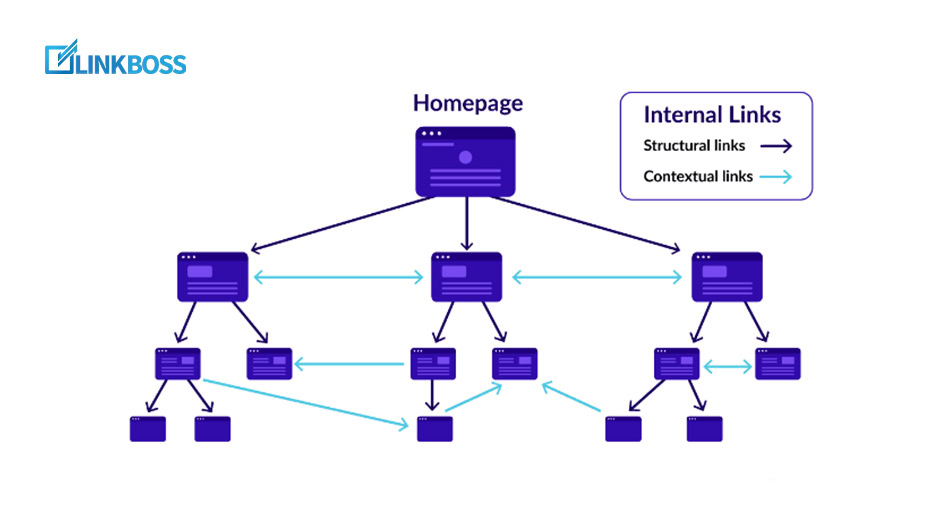
The diagram above illustrates a hub-and-spoke internal link structure where a central pillar page distributes link equity to related content clusters. This architecture gives Googlebot clear, efficient navigation paths through your site’s content hierarchy.
Proper internal linking makes every page accessible to both users and search engines. It improves crawl efficiency, establishes a clear content hierarchy, and increases the probability of faster indexing. Topical authority is built through connecting semantically related content into clusters, a strategy supported by internal linking best practices from established SEO resources.
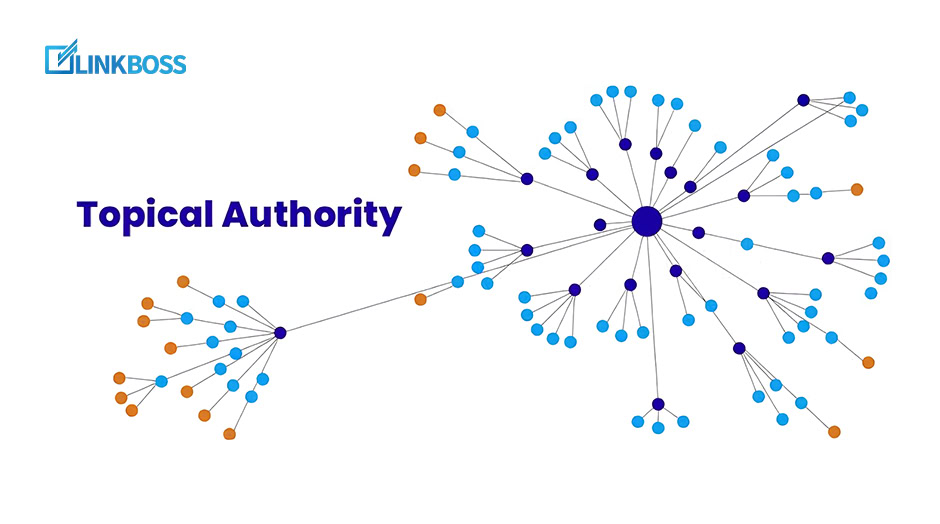
Internal links connect content within the same subject cluster, signaling to Google that your site is an authoritative resource on that topic. This link equity compounds over time as your content network grows.
“You should look at it in a strategic way and think about what you care about the most, and how you can highlight that with your internal links.“
John Mueller, Senior Search Analyst, Google
Strategically placed internal links guide both users and search engines through your content, improving crawl efficiency, indexation speed, and topical authority signals. The specific benefits fall into four measurable categories, detailed below.
Improved Crawlability and Indexation Rates
The first benefit is better crawlability and faster indexation. According to Google’s crawl budget documentation, internal links directly influence how efficiently Googlebot discovers and processes your pages. Improved crawlability means search engine bots can access your entire content library without wasting crawl budget on low-value paths.
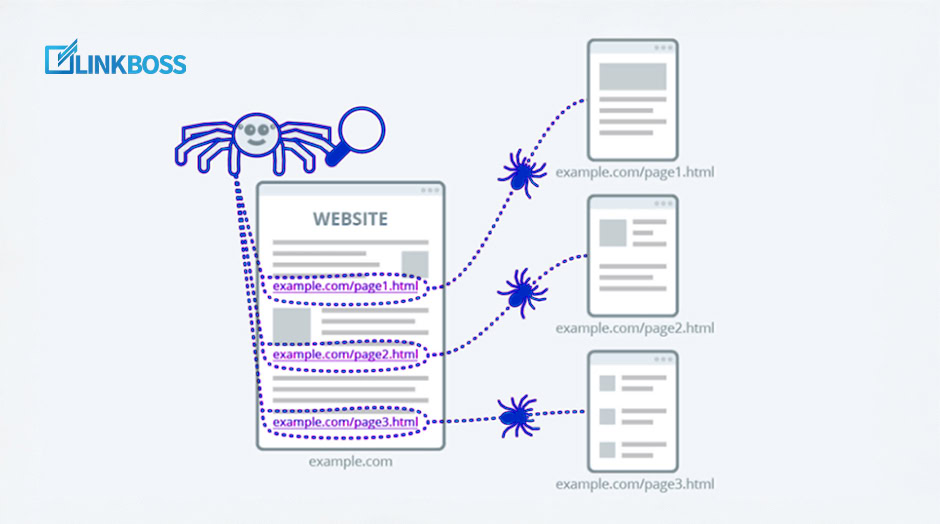
Proper internal linking provides clear navigation paths for bots and demonstrates that all relevant content on your website is connected. This keeps your audience engaged with every piece of content and helps them find all essential information. Sites with comprehensive internal linking structures typically achieve 25-40% faster indexation of new content compared to sites with disconnected page architectures.
PageRank Distribution Across Site Pages
The PageRank algorithm assigns authority to pages based on the quantity and quality of links pointing to them. Internal links are the primary mechanism for distributing PageRank across your own website. Pages with high authority (such as your homepage or top-performing blog posts) pass link equity to the pages they link to.
Orphaned pages, pages that receive zero internal links, cannot accumulate PageRank. They remain invisible to search engines and represent lost ranking potential. The easiest way to identify orphan pages is to use a site visualizer that maps your entire link architecture. You will spot disconnected pages instantly.
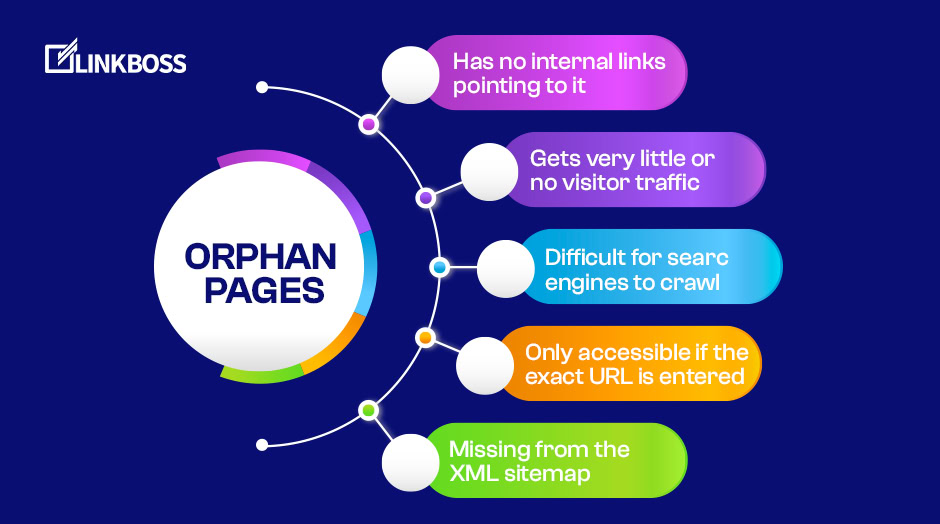
Orphaned pages are difficult for search engine bots to discover, which directly reduces their traffic potential. If your orphaned pages are not connected to other content, you miss out on ranking opportunities. In some cases, orphaned pages are also excluded from the XML sitemap, compounding the problem. If your competitors are actively optimizing their content architectures, unlinked pages put you at a direct disadvantage.
You can identify and fix all orphaned pages with LinkBoss in under one minute. The tool scans your site, flags disconnected pages, and lets you interlink them without manual effort.
Organized internal linking is a foundational practice for building topical authority and ensuring every page on your site participates in the PageRank distribution network.
Topical Authority Through Content Clusters
A content cluster strategy organizes related pages around a central pillar page using internal links. This architecture signals to Google that your site provides comprehensive coverage of a topic. When multiple pages on the same subject are interlinked, they reinforce each other’s relevance signals.
SEO manager Nicola Hughes documented a 53% increase in SERP impressions and an average position improvement of 2.9 spots after implementing a structured internal linking strategy. This kind of measurable improvement is typical when content clusters replace disconnected, standalone pages.
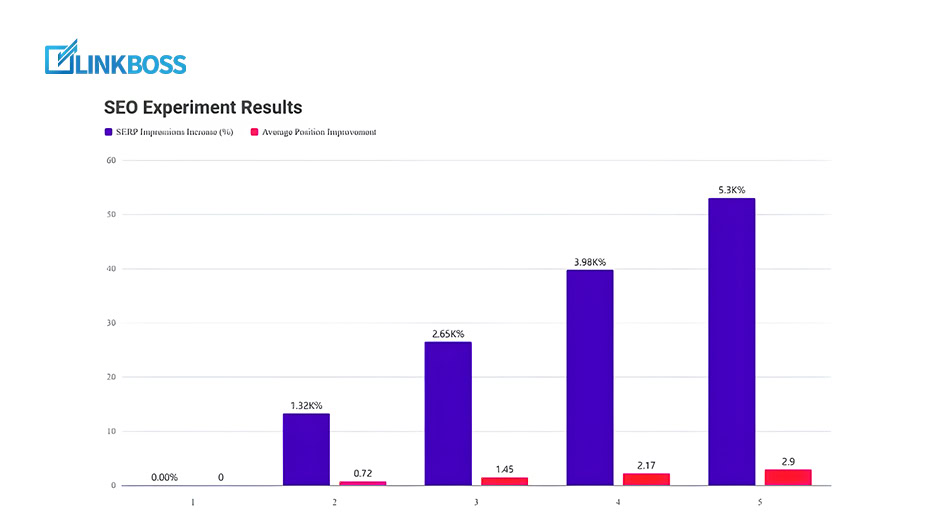
Connecting related content into topic clusters transforms individual pages into a cohesive topical authority signal.
Reduced Bounce Rate Through Navigation Paths
Bounce rate measures the percentage of visitors who leave a page without interacting further. According to Google Analytics documentation, a high bounce rate signals poor user engagement and negatively impacts dwell time, a metric Google uses as a ranking signal.
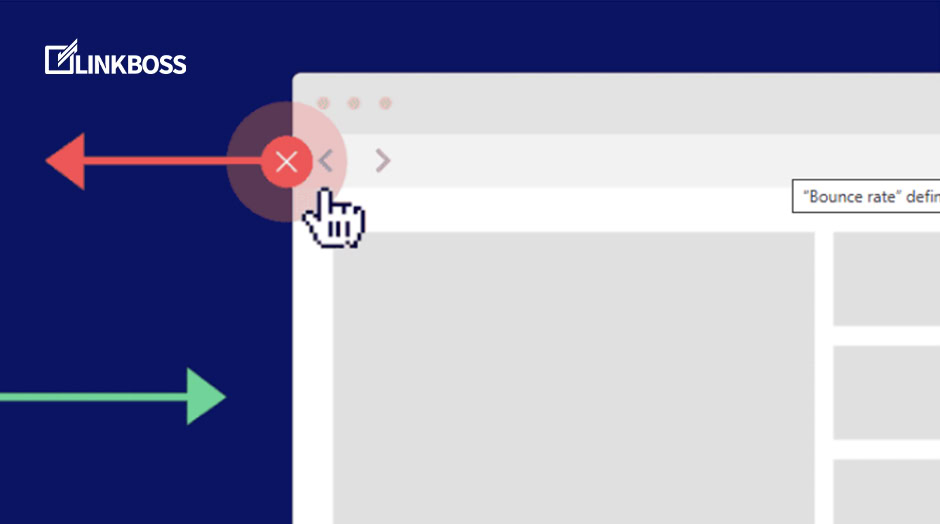
Bounce rate benchmarks vary by industry. The data below shows category-level averages.
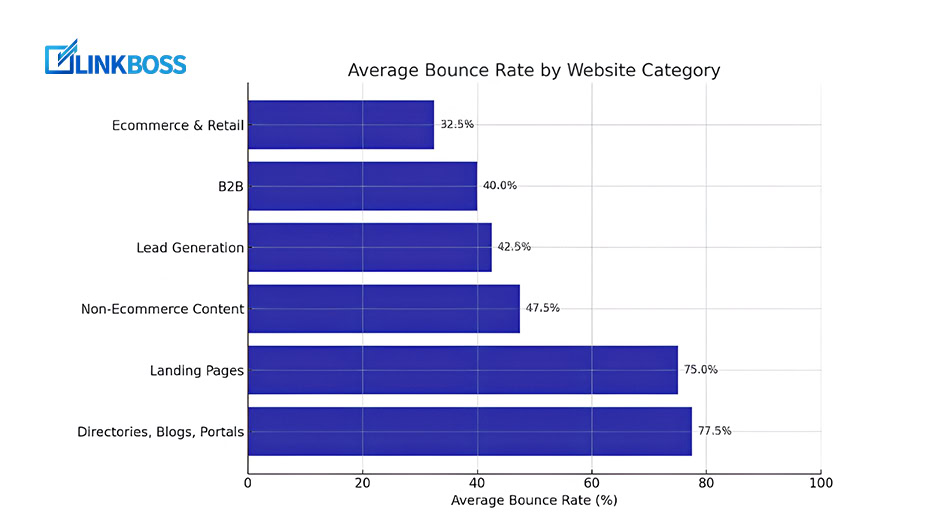
Directories, blogs, and portals experience the highest bounce rates, with visitors leaving quickly without further engagement. E-commerce and retail sectors show significantly lower bounce rates because users navigate between product pages and categories.
Internal linking reduces bounce rate by providing visitors with relevant navigation paths to additional content. When a user finishes reading an article and finds contextual links to related content, they stay on your site longer and explore more pages. This directly improves engagement metrics and the signals Google uses to evaluate page quality.
Traditional Manual Linking vs. Automated Internal Linking
The benefits of internal linking are clear. The challenge is implementation at scale. A website with 4,000+ posts requires thousands of internal links to achieve full coverage. Manual linking at that scale is impractical.
Consider this scenario:
“I have nearly 4,000 posts on my website. Linking them together manually would take weeks. What should I do?”
For small sites with fewer than 50 posts, manual linking is manageable. You can audit each page, identify relevant connections, and add links by hand. For sites with hundreds or thousands of pages, automated internal linking tools become essential.
Automated internal linking software like LinkBoss identifies semantically relevant link opportunities across your entire site. A few clicks generate internal links that would take hours to build manually. The system analyzes content context, anchor text relevance, and link placement to ensure every connection is meaningful.

With automated software, you find semantically relevant links in seconds. Select, edit, and publish. The link is added in under one minute, and you receive multiple suggestions per page to avoid inserting low-relevance connections.

Manual link insertion requires multiple steps per link. You must find the semantically relevant target page, determine the best anchor text, locate the correct placement within your content, and insert the link. At scale, this process takes weeks for a large site.
Implementation Strategy for Internal Links
AI-powered internal linking software simplifies implementation at scale. Tools with NLP-driven link detection analyze your content to find semantically relevant link opportunities automatically.

LinkBoss allows you to submit a target URL. The AI scans your site and identifies the most semantically relevant pages to link from, based on content overlap and topical context. With this feature, 80% of the linking work is automated.

Each suggested link includes a semantic similarity score from 0 to 100. Scores above 50 indicate strong topical relevance. The higher the score, the stronger the semantic connection between the source and target pages.

Choose links with a score between 50 and 100. Review the suggested anchor text before publishing to ensure it matches the surrounding context and avoids over-optimization.
LinkBoss surfaces the relevant anchor text for each suggestion and lets you edit it to match your content’s tone and context. This control prevents keyword stuffing and keeps your site’s link profile natural.

You can restrict link suggestions to the same content category or expand them across categories. This flexibility lets you build both tight topic clusters and broad cross-category connections, all within a single interface.

Frequently Asked Questions
What tools can help with internal linking?
LinkBoss, Google Search Console, Ahrefs, Screaming Frog, Yoast SEO, and Link Whisper can identify orphaned pages and suggest link opportunities. For a detailed comparison, read our LinkBoss vs Yoast analysis. Specialist tools like LinkBoss outperform generalist SEO plugins because they use NLP to evaluate semantic relevance rather than just keyword matching. For free internal linking tools, check our tools hub page.
How can I improve my internal linking?
Audit your highest-authority pages using Google Search Console or Ahrefs, then link from those pages to underperforming content that targets related keywords. Use descriptive, keyword-rich anchor text. Fix all orphaned pages by adding at least two internal links to each one. Organize related content into topic clusters with a pillar page at the center.
Should I link to every page on my site?
No. Link only to pages that are topically relevant to the source content. Linking to unrelated pages dilutes your topical authority signals and confuses both users and search engines. Focus your internal links on high-priority content that supports your target keywords and topic clusters.
Can internal linking reduce bounce rate?
Yes. Internal links give visitors a clear path to related content, which increases pageviews per session and reduces the percentage of single-page visits. Sites that add 3-5 contextual internal links per blog post typically see a 15-25% reduction in bounce rate within 60 days.
How to Scale Internal Linking with Automation
For sites with hundreds of pages, manual internal linking is not practical. A bulk auto-interlinking tool can create thousands of semantic connections in minutes while maintaining contextual relevance. Automated tools analyze content meaning through NLP, ensuring each link is topically appropriate rather than keyword-matched at random.
Conclusion
Internal linking directly affects crawl efficiency, PageRank distribution, topical authority, and bounce rate. Sites without a structured internal linking strategy lose 30-50% of their potential organic traffic to competitors who invest in content architecture.
Use an NLP and AI-powered tool like LinkBoss to identify semantically relevant link opportunities across your site. Review each suggestion for anchor text relevance, verify the semantic similarity score, and publish links that strengthen your content clusters.